Compare the 8 best keyword research tools for API access, pricing & automation. Find the right SEO tool for your workflow — only at Ameztrix.

Best Keyword Research Tools Compared by API and Automation (2026 Guide)
Finding the best keyword research tools used to mean one simple routine: open a dashboard, type in a seed keyword, and download a spreadsheet. That’s not really the whole picture anymore.
By 2026, dashboards alone just don’t cut it anymore — not for SEO teams, agencies, publishers, or the growing number of AI-powered workflows out there. What they actually need is programmatic keyword data, something that plugs directly into reporting systems, automation platforms, and AI agents without a person sitting in the middle. That’s precisely why API access has turned into one of the biggest deciding factors when you’re picking from the top-rated keyword research platforms available right now.
So the real questions worth asking are: which platforms actually give you usable API access? Which ones support MCP (Model Context Protocol)? And once you start scaling, how do pricing, credits, and rate limits actually hold up in practice? To answer that, we compared eight platforms — SE Ranking, DataForSEO, Ahrefs, Semrush, Serpstat, Similarweb, Wincher, and Moz Pro — across API access, automation depth, pricing, and real-world use cases, so you can shortlist the best keyword research tools for exactly what your workflow needs.
Quick Answer: Among the leading tools on this list, SE Ranking stands out for bundled API and MCP access, DataForSEO leads for raw API-first data, and Ahrefs and Semrush remain strong all-round research platforms with separately billed API tiers. The right pick depends on whether you need keyword discovery, rank tracking, market intelligence, or AI-agent automation.
Key Takeaways
- SE Ranking is among the best keyword research tools for teams that want API and MCP access bundled directly into their plan.
- DataForSEO runs an API-first, pay-as-you-go model built for developers.
- Ahrefs remains one of these SEO platforms for deep research, though API access is billed separately.
- Semrush offers programmatic access to keyword and backlink data through its evolving API infrastructure.
- Serpstat blends keyword, backlink, and rank data into one affordable package.
- Similarweb leans toward market and audience intelligence rather than pure keyword data.
- Wincher is built primarily for rank tracking, not large-scale keyword discovery.
- Moz Pro pairs Keyword Explorer with Domain Authority, keeping API access behind higher tiers.
- API availability, credits, and rate limits often matter more than dashboard polish when judging the best keyword research tools for automation.
- For AI search visibility, Google’s fundamentals haven’t shifted much — existing SEO guidance still applies to AI Overviews and AI Mode.
What Is a Keyword Research API?
A keyword research API lets software request keyword data directly, instead of a person manually clicking through a dashboard. Depending on the provider, the response can include:
- Search volume
- Keyword difficulty
- Search intent
- CPC (cost per click)
- Competition level
- Keyword suggestions and related terms
- SERP details
- Historical trends
- Ranking data
- Competitor and backlink information
Say you want data for “best AI tools.” Rather than typing that into a search box by hand, your application sends the term to an API and receives structured data back instantly. A basic automated flow looks like this:
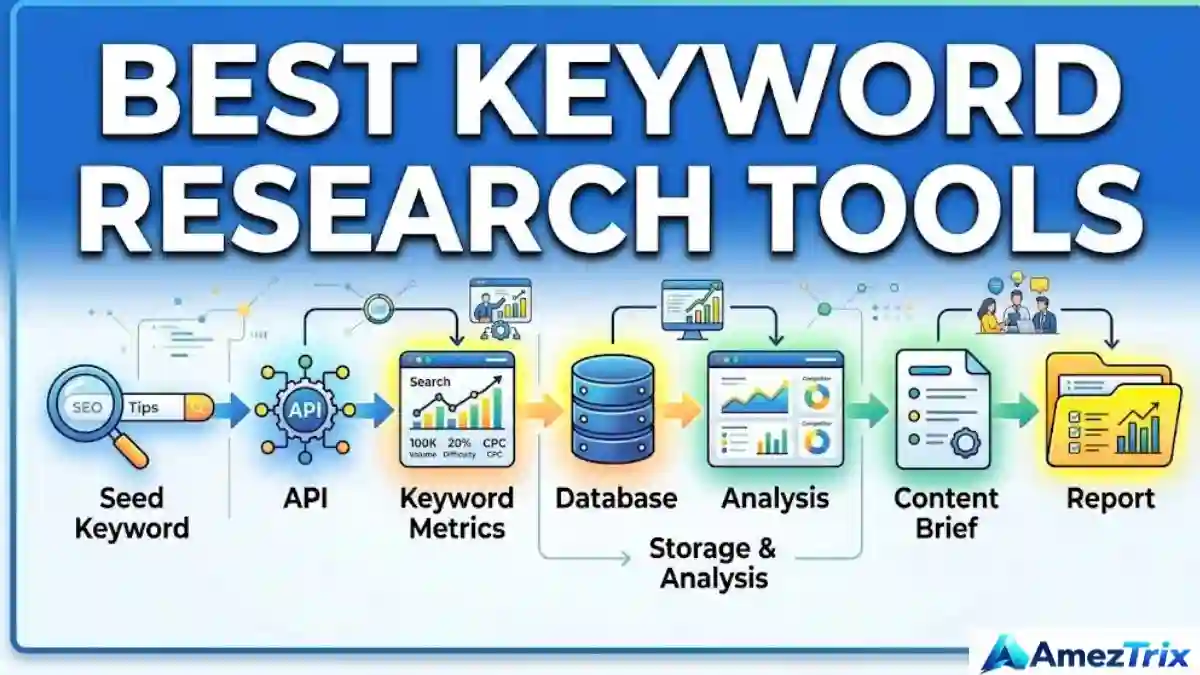
Seed Keyword → API → Keyword Metrics → Database → Analysis → Content Brief → Report
If you’re only researching keywords once in a while, this level of automation probably doesn’t matter much. But once it becomes a weekly or daily task, doing it manually starts to cost real time — which is exactly why so many teams now search for the best keyword research tools with reliable API support.
Why Automation Matters When Choosing SEO Tools
Picture an agency handling keyword research for dozens of client sites every week. The manual process usually looks like this: open the platform, enter keywords, export the data, clean the spreadsheet, remove duplicates, sort by intent, compare search volumes, build a report, and send it to writers. That’s a lot of repetitive clicking for a task that repeats every single week.
An API can take over most of that workload:
Keyword List
     ↓
Keyword Research API
     ↓
Search Volume + Difficulty + Intent
     ↓
Keyword Clustering
     ↓
Content Brief
     ↓
SEO Dashboard
     ↓
Client Report
This kind of automation pays off once the process repeats often enough to justify the setup — which is a big reason automation capability now ranks high on any checklist for the best keyword research tools.
SEO Dashboard vs. API: Two Different Jobs
A dashboard is designed for a person. An API is designed for software. Neither one fully replaces the other.
| Feature | SEO Dashboard | API |
|---|---|---|
| Manual research | Excellent | Requires setup |
| Automation | Limited | Strong |
| Spreadsheet workflows | Manual | Automatable |
| Scheduled research | Usually limited | Strong |
| Custom dashboards | Limited | Strong |
| AI-agent integration | Depends on platform | Possible |
| Large recurring jobs | Can get repetitive | Better suited |
| Requires a developer | Usually no | Often yes |
If you only run keyword research occasionally, a dashboard from any of the best keyword research tools is probably your fastest option. The API becomes valuable once research is repetitive, large-scale, or feeding into another system.
8 Best Keyword Research Tools Compared
Here’s the full comparison of the leading options based on API access, automation, and pricing.
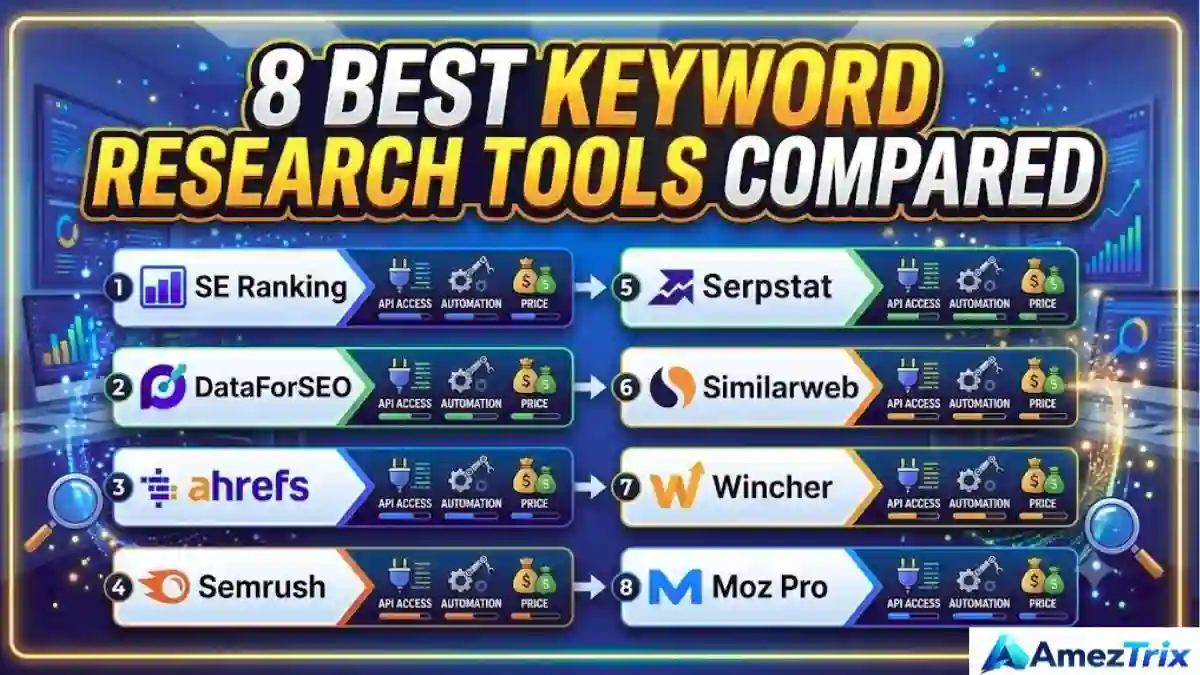
| Rank | Tool | API Access | Rate Limit / Credits | MCP | Starting Price |
|---|---|---|---|---|---|
| 1 | SE Ranking | Included in every plan | 10 req/sec; 25K–100K credits/month | Yes | $129/month |
| 2 | DataForSEO | API-first | Pay per request | No native MCP | Usage-based |
| 3 | Ahrefs | Separate API | Metered units | Limited | $129/month + API |
| 4 | Semrush | Higher-tier/separate API | API units | Limited | $139.95/month |
| 5 | Serpstat | Available at modest tier | Metered credits | No | $50/month |
| 6 | Similarweb | Demand/market API | Enterprise-gated | No | Custom |
| 7 | Wincher | Tracking-focused API | Lighter research volume | No | ~€49/month |
| 8 | Moz Pro | Higher-tier API | Smaller index | No | $99/month |
Important: pricing and API terms shift often. Treat these figures as a snapshot of the top keyword research platforms, not a final word — verify current pricing directly with each provider before purchasing.
1. SE Ranking — Best Keyword Research Tools for Bundled API + MCP Access
SE Ranking is an all-in-one SEO platform where API and MCP access come included across plans rather than sitting behind a separate paywall. Its Data API suite covers:
- Keyword Research
- Backlinks
- Domain data
- Website Audit
- AI Search
- Project Management
It reports a keyword database of roughly 5.5 billion terms spread across 188 regional databases — a solid reason it ranks among the best keyword research tools for agencies running large-scale automation.
| Feature | Data |
|---|---|
| Keyword database | 5.5 billion |
| Regional databases | 188 |
| Default rate limit | 10 requests/sec per key |
| Batch lookup | Up to 100 keywords |
| MCP | Yes |
| Core plan | $129/month |
| Growth plan | $279/month |
| Trial | 14 days |
| Trial API credits | 100,000 |
A standalone Data API is also available from $179/month billed annually, plus pay-as-you-go pricing starting at $50 for 250,000 credits.
Who it’s for: agencies, in-house SEO teams, reporting automation, keyword databases, and AI-agent workflows. The main limitation is a 10 requests/second default rate cap, and its keyword data leans primarily toward Google.
2. DataForSEO — Best Pick Among Keyword Research Tools for Developers
DataForSEO takes a very different approach. Instead of functioning as a traditional dashboard, it’s positioned as an API-first SEO data provider — ideal for teams that want to build their own application on top of raw keyword data.
DataForSEO characteristics:
- API-first architecture
- Usage-based, pay-per-request pricing
- Granular SEO and SERP data
- No traditional dashboard emphasis
- No native MCP support in the current comparison data
If your development team wants to build a custom keyword tool, a SERP monitoring system, or a full data pipeline, DataForSEO is worth serious consideration among the top-tier options for pure API access. The tradeoff is development overhead — storage, UI, clustering, scheduling, and visualization all need to be built separately.
3. Ahrefs — Best Keyword Research Tools for Established SEO Research
Ahrefs is a major SEO research platform covering both keyword and backlink data. API access here is billed as a separate, higher-cost component rather than something bundled into the standard subscription.
| Item | Information |
|---|---|
| Platform | SEO research |
| Keyword research | Yes |
| Backlink research | Yes |
| Keyword Generator | Available |
| Lite plan | $129/month |
| API | Separately billed |
| API units | Metered |
Ahrefs remains one of the well-rounded SEO platforms for teams that already use it for daily manual research and only occasionally need programmatic access. For heavy automation, budget API costs separately from the core subscription.
4. Semrush — Best Keyword Research Tools for Full-Suite Marketing Teams
Semrush is a broad digital marketing platform spanning keyword research, competitive analysis, advertising, backlinks, and content strategy. Its SEO API provides programmatic access to keyword metrics, backlink data, and competitor insights, including:
- Search volume
- Keyword difficulty
- Search intent
- CPC
- Competition
- Trends
- SERP features
Note: Semrush’s v4 keyword API endpoint is currently in Early Access, meaning pricing and response formats may still change before general availability.
- Pro plan: $139.95/month
- Annual equivalent: $117.33/month
- API: Billed separately
Best use case: teams that want a full marketing suite alongside solid keyword and backlink data in a single subscription.
5. Serpstat — Best Keyword Research Tools on a Budget
Serpstat is a value-oriented platform combining keyword research, backlink data, and rank tracking.
- Individual plan: approximately $50/month
- API access available at a relatively modest tier
- Credit-based usage, so larger jobs may hit rate or credit limits
Serpstat suits small agencies, freelancers, and consultants running medium-sized projects — making it one of the best keyword research tools for budget-conscious teams. For larger workloads, monitor credit consumption closely.
6. Similarweb — Best for Market Intelligence, Not Just Keywords
Similarweb differs from the other Google AI tools on this list because its real strength lies in market intelligence rather than keyword-level data.
| Area | Availability |
|---|---|
| Market intelligence | Yes |
| Traffic data | Yes |
| Audience intelligence | Yes |
| Demand data | Yes |
| Traditional keyword database | Not the primary focus |
| API | Enterprise-oriented |
| Free tier | Limited |
Choose Similarweb when your priority is understanding a market or audience rather than pulling raw keyword volume and difficulty scores.
7. Wincher — Best Keyword Research Tools for Rank Tracking
Wincher focuses primarily on rank tracking, and its API reflects that priority with clean, scheduled ranking pulls rather than large-scale keyword discovery.
- Tracking-focused API
- Scheduled ranking pulls
- Lighter keyword research database
- No native MCP
- Basic plan: approximately €49/month for around 500 keywords
- Free trial available
If ranking monitoring is your top priority, Wincher earns a spot among the best keyword research tools for that specific job. For large-scale keyword discovery, look elsewhere.
8. Moz Pro — Best Keyword Research Tools Paired with Domain Authority
Moz Pro combines keyword research with its well-known Domain Authority ecosystem.
| Feature | Data |
|---|---|
| Standard plan | $99/month |
| Annual equivalent | $79/month |
| Keyword Explorer | Yes |
| Domain Authority | Yes |
| API | Higher tiers only |
| Index size | Smaller than the largest competitors |
Moz Pro makes sense for teams already relying on Domain Authority as part of their SEO reporting.
How to Choose the Best Keyword Research Tools for Your Workflow
Before choosing from the best keyword research tools available, don’t judge by price alone. Compare these seven factors instead.
1. API Access
Determine whether API access is included, gated behind higher tiers, sold as an add-on, or contracted separately. A low subscription price can turn expensive once API costs are added.
2. Credits
Credits determine how much data you can pull. One API request doesn’t always equal one credit — some platforms charge per keyword, row, data field, or task. Calculate your expected monthly workload in advance.
3. Rate Limits
Rate limits determine how fast your application can send requests. “10 requests per second” sounds fine until you’re processing thousands of keywords at once. Plan your architecture around this from day one.
4. Keyword Database Size
A larger database offers more discovery opportunities, but size alone doesn’t guarantee relevance. Check country coverage, language support, freshness, and whether historical or intent data is included.
5. MCP Support
MCP (Model Context Protocol) provides a standardized way for AI systems to interact with tools and data sources. Support varies significantly across the best keyword research tools, so confirm this before building any AI-driven workflow.
6. AI-Agent Compatibility
A traditional workflow (SEO → Tool → Export → Spreadsheet → Writer) can evolve into: AI Agent → Keyword API → Data Analysis → Clustering → Content Brief → Human Review. Confirm the platform supports this kind of integration if AI automation is on your roadmap.
7. Total Cost of Ownership
Don’t compare subscription prices alone. Add up subscription cost, API credits, infrastructure, automation, development, and maintenance for a realistic total.
Best Keyword Research Tools for AI Agents and Automated Workflows
AI agents are reshaping how keyword research actually gets done. A traditional process might look like:
SEO → Keyword Tool → Export → Spreadsheet → Writer
An automated AI-driven workflow using the best keyword research tools could instead look like:
AI Agent → Keyword API → Data Analysis → Keyword Clustering → Content Brief → Human Review
Step 1: Enter a topic, such as “AI SEO tools.”
Step 2: The API retrieves search volume, difficulty, intent, CPC, and related keywords.
Step 3: The AI groups keywords by intent:
- Informational: “What is AI SEO?”, “How does AI SEO work?”
- Commercial: “Best AI SEO tools”, “AI SEO software
- Transactional: “Buy AI SEO software”, “AI SEO platform pricing”
Step 4: The system generates a content brief with a primary keyword, secondary keywords, suggested headings, and FAQ topics.
Step 5: A human reviews the output for accuracy, originality, experience, usefulness, and brand voice. Google’s own guidance keeps emphasizing people-first content over content built purely to manipulate rankings.
SEO, AEO, GEO, LLMO, AIO, GXO, and SXO: How They Work Together
Modern search optimization now stretches well beyond traditional keyword placement, and choosing among the best keyword research tools should factor in all of these angles.
SEO (Search Engine Optimization): Helps search engines discover, understand, index, and rank content — covering technical SEO, on-page structure, internal links, search intent, and structured data.
AEO (Answer Engine Optimization): Focuses on direct-answer experiences — clear questions, concise answers, definitions, and FAQs.
GEO (Generative Engine Optimization): Improves visibility in generative search experiences. Google’s guidance states that existing SEO fundamentals remain relevant to AI Overviews and AI Mode, with no special “AI hacks” required.
LLMO (Large Language Model Optimization): Makes information easier for language models to understand and represent — through clear factual statements, strong topical organization, and consistent terminology.
AIO (AI Optimization): A broader approach to optimizing content and workflows for AI-powered search and discovery generally.
GXO (Generative Experience Optimization): Considers the full discovery journey — search, AI answers, conversational interfaces, and content discovery together.
SXO (Search Experience Optimization): Combines search visibility with actual usability. A page can generate impressions but still underperform if visitors can’t quickly find their answer — fast loading, mobile usability, clear headings, and scannable content all matter here.
Making Keyword Research Content AI-Search Friendly
Google’s documentation confirms that pages eligible for AI Overviews and AI Mode must meet normal technical and indexing requirements — no special AI markup is required. Build around this structure instead of chasing shortcuts:
H1
↓
Quick Answer
↓
Key Takeaways
↓
Comparison Table
↓
Detailed Tool Sections
↓
Use Cases
↓
How-To Workflow
↓
FAQ
↓
Conclusion
This layout helps both human readers and automated systems understand the page clearly — a key requirement for ranking any content about the best keyword research tools.
How to Automate Keyword Research: A 6-Stage Workflow
Stage 1: Collect seed keywords — from Google Search Console, existing articles, customer questions, competitor pages, keyword APIs, and search suggestions.
Stage 2: Retrieve API data — search volume, difficulty, CPC, intent, SERP data, and related terms.
Stage 3: Clean the dataset — remove duplicates, irrelevant queries, and unrelated search intent.
Stage 4: Cluster keywords — group by topic, intent, search journey, or entity.
Stage 5: Create content briefs — turn each cluster into an article, landing page, FAQ, comparison, or tutorial.
Stage 6: Monitor performance — track impressions, clicks, CTR, rankings, conversions, and AI-search visibility where available.
Keyword API Pricing: What to Actually Calculate
Suppose your workflow requires 100,000 keyword requests per month. Don’t just compare subscription prices — calculate the real total:
Total monthly cost = Subscription + API credits + Infrastructure + Automation + Development + Maintenance
For an API-first platform, also factor in development, hosting, database, and monitoring costs. For a traditional keyword research platform, the formula is simpler: subscription + API access + API usage.
When Should You Automate Keyword Research?
Automate when:
- You perform keyword research every week.
- You manage multiple websites.
- You generate recurring SEO reports.
- You operate a large content team.
- You maintain an SEO dashboard.
- You’re building an SEO application.
- You need AI-agent workflows.
Manual research may be enough when:
- You research only a few keywords.
- You publish occasionally.
- You manage one small website.
- You don’t need recurring reports.
Automation isn’t automatically better — its value depends on how often the workflow repeats and how much manual effort it removes.
Common Mistakes When Choosing Keyword Research Tools
Mistake 1: Choosing based only on price. A $50 plan isn’t cheap if it can’t handle your required data volume.
Mistake 2: Ignoring API credits. Always calculate expected monthly consumption before subscribing.
Mistake 3: Ignoring rate limits. Large projects slow down significantly without proper throttling and batching.
Mistake 4: Confusing keyword research with rank tracking. A rank tracker is not a comprehensive keyword discovery platform.
Mistake 5: Ignoring data coverage. Check country, language, search engine coverage, and historical data availability.
Mistake 6: Building automation too early. If you research keywords only once a month, a complex automated system may create more maintenance than value.
Mistake 7: Publishing AI-generated content without added value. Google explicitly emphasizes unique, useful, people-first content and warns against producing large volumes of content primarily to manipulate rankings.
Best keyword research tools for AI agents: Quick Comparison Summary
| Tool | Primary Strength | API Model | MCP | Best-Fit Workflow |
|---|---|---|---|---|
| SE Ranking | SEO + automation | Included | Yes | Automated SEO workflows |
| DataForSEO | Raw SEO data | Usage-based | No native | Custom SEO software |
| Ahrefs | SEO research | Separate API | Limited | Advanced research |
| Semrush | Marketing + SEO | API/subscription-based | Limited | Enterprise marketing workflows |
| Serpstat | Affordable SEO research | Credit-based | No | Small/medium workflows |
| Similarweb | Market intelligence | Enterprise-oriented | No | Market research |
| Wincher | Rank tracking | API | No | Automated rank reports |
| Moz Pro | Keyword + DA | Higher-tier API | No | DA-focused SEO workflows |
Data note: The tool-specific pricing and capability figures above reflect the comparison data supplied for this piece, cross-checked against current Google AI-search guidance and Semrush’s API documentation. Tool pricing, API limits, and features can change — verify provider documentation before publishing time-sensitive pricing claims.
Frequently Asked Questions
Which best keyword research tools have APIs?
The tools covered here — SE Ranking, DataForSEO, Ahrefs, Semrush, Serpstat, Similarweb, Wincher, and Moz Pro — all offer some form of API access, ranging from fully included to enterprise-gated models.
What is a keyword research API?
It allows software to retrieve keyword and SEO data programmatically instead of requiring manual searches through a dashboard.
What data can a keyword API provide?
Depending on the provider, data may include search volume, keyword difficulty, CPC, intent, trends, SERP information, related keywords, competitor data, backlinks, and rankings.
What is MCP in SEO?
MCP, or Model Context Protocol, lets compatible AI systems interact with external tools and data. An MCP-enabled tool can allow an AI agent to query keyword or SEO data directly.
Is API automation useful for small websites?
It depends on frequency. If keyword research is occasional, manual tools are usually sufficient. If the process repeats regularly, automation reduces repetitive work significantly.
Which is more important: API or keyword database size?
Neither is universally more important. Database size matters for discovery, while API quality matters for automation. The right balance depends on your specific workflow.
Can AI automate keyword research?
Yes. An AI workflow can use an SEO API to retrieve keyword metrics, organize results by intent, cluster related queries, and create content briefs. Human review remains essential for accuracy, relevance, and originality.
Does Google require special AI SEO markup?
No. Google’s documentation states there are no additional technical requirements or special schema needed specifically for AI Overviews or AI Mode beyond normal Search eligibility and SEO fundamentals.
Is SEO still important for AI search?
Yes. Google states its generative AI search features are rooted in core Search systems, and existing SEO best practices remain relevant.
Final Verdict
Keyword research is shifting from a purely manual SEO activity toward a programmable, automation-friendly workflow. The eight platforms compared here take very different approaches to keyword discovery and automation:
- SE Ranking — all-in-one SEO platform with bundled API and automation
- DataForSEO — API-first SEO data for developers
- Ahrefs — large-scale SEO research with separate API access
- Semrush — broad marketing platform with programmatic SEO data
- Serpstat — affordable SEO research with API access
- Similarweb — market and audience intelligence
- Wincher — rank-tracking automation
- Moz Pro — keyword research paired with Domain Authority
The real question isn’t simply “which tool has the most features?” It’s about defining your workflow first: Do you need manual keyword research? Recurring reports? A developer-friendly API? Rank tracking? Market intelligence? Or a way to connect SEO data with AI agents? Once those requirements are clear, comparing the best keyword research tools on API access, credits, rate limits, data coverage, MCP availability, and total cost becomes far easier.
For modern search visibility, keyword data is only one part of the equation. Google continues to emphasize technical accessibility, useful content, clear organization, original information, and people-first value across both traditional and generative search experiences. Automate the repetitive work — but keep human expertise where it adds the most value.
About Author
Rajendra Parmar is the Founder and Editor of AmezTrix, where he covers Artificial Intelligence, Technology, WordPress, Web Hosting, Digital Marketing, Gadgets, and Software. His mission is to simplify complex technology through practical tutorials, honest reviews, and well-researched guides that help readers make smarter digital decisions.