AmezTrix breaks down how to build an AI SaaS startup — from MVP to monetization — stack, pricing models, security, and a launch checklist.

How to Build an AI SaaS Startup: A Practical, Step-by-Step Guide
Quick answer: If you’re wondering how to build an AI SaaS startup, it comes down to combining an AI API (like OpenAI) with a real software product — authentication, a database, subscriptions, payments, and a usable interface — not just wrapping a chatbot in a landing page. Below is the full process, the tech stack that actually gets used, what it costs, and where most founders go wrong.
AI SaaS development has quietly become one of the smartest ways to turn an AI idea into an actual business. Think about it — writing assistants, support bots, document analyzers, marketing tools, niche industry apps. You don’t need to build your own model anymore. You just need to wrap a solid API in a product people actually want to use.
But here’s the catch nobody tells you upfront: having a good AI idea is the easy part. Most guides on how to build an AI SaaS startup skip straight to the fun part — the AI — and gloss over everything else it actually takes to turn that into a business.
A real AI SaaS product needs a working frontend, a backend that doesn’t fall over under load, a database, proper authentication, payment processing, some way to control API costs, analytics, infrastructure that scales, and — this gets skipped a lot — a genuinely decent user experience. That’s a lot more than “connect to an API and ship it.” This guide walks through exactly how to build an AI SaaS startup step by step — the stack, the real costs, the traps people fall into, and what to do before you launch.
What Is an AI SaaS Product? (Quick Definition)
AI SaaS (Artificial Intelligence Software as a Service) is software delivered over the internet that uses AI to automate a task, and customers pay for it monthly, per use, or through some other recurring model. No downloads, no installs.
You’ve probably used a few without labeling them this way:
- AI content generation
- AI document analysis
- AI customer support
- AI image generation
- AI meeting summarization
- AI coding assistance
- AI SEO tools
- AI marketing automation
- AI data extraction
- AI workflow automation
- AI-powered search
- AI productivity assistants
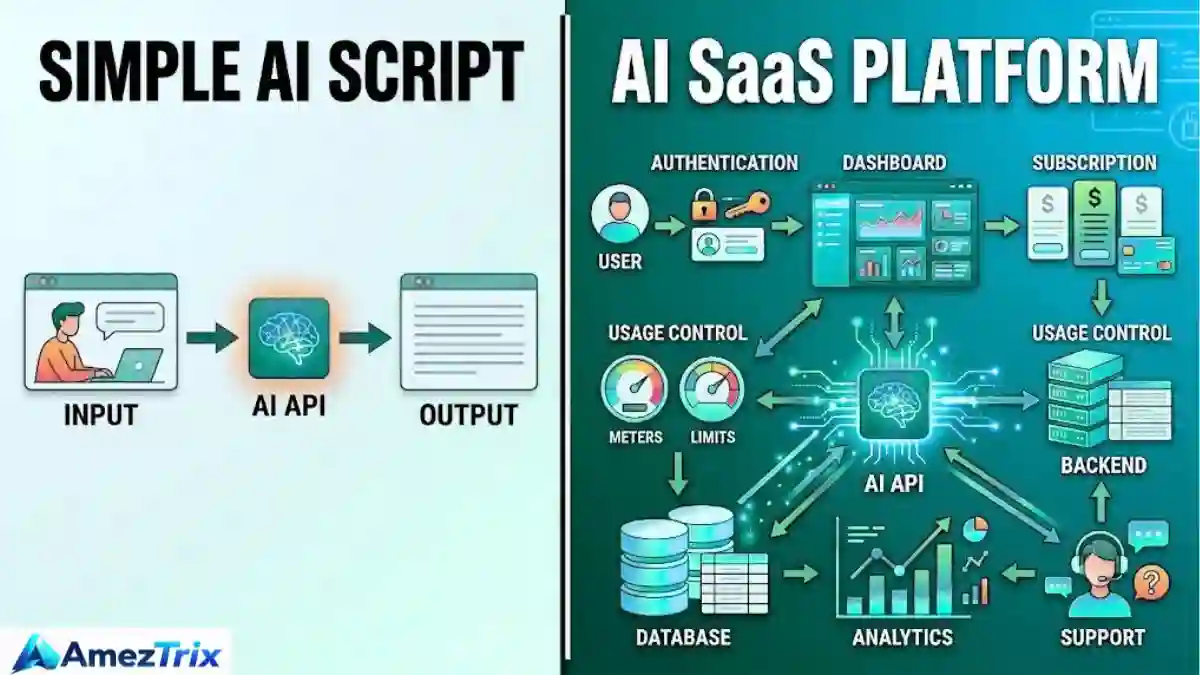
Here’s the important part: an API call is not a business. A real SaaS product wraps the AI in an experience — registration, login, a dashboard, usage tracking, subscriptions, payments, security, support, and analytics. The AI is one piece of the puzzle, not the whole product.
A commercial AI SaaS product typically needs:
| # | Component | Why It Matters |
|---|---|---|
| 1 | User registration | Lets people create accounts |
| 2 | Authentication | Controls who can access what |
| 3 | Dashboard | Where users actually use the product |
| 4 | AI functionality | The core value delivered |
| 5 | Database | Stores users, content, and history |
| 6 | Usage tracking | Enforces plan limits |
| 7 | Subscription management | Handles plan changes |
| 8 | Payment processing | Collects revenue |
| 9 | Security controls | Protects data and credentials |
| 10 | Customer support | Keeps churn down |
| 11 | Analytics | Shows what’s working |
| 12 | Scalable infrastructure | Handles growth without breaking |
Why AI SaaS Startups Are Growing So Fast

Generative AI dropped the technical barrier to the floor. A few years back, adding AI to a product meant hiring ML engineers, gathering training data, and renting serious compute. Now you call an API.
That shift means small teams can go after specific, narrow problems instead of trying to out-build the big AI labs. And narrow works in your favor — it’s easier to market, price, and explain to a customer in one sentence.
Example: instead of building “yet another chatbot,” build an assistant that only writes property listings, ads, and emails — for real estate agents. Nothing else. That focus is exactly what makes it sellable and easy to rank for in search (think “AI tool for real estate agents” rather than “AI chatbot”).
AI SaaS Tech Stack: What Founders Actually Use
There’s no single “correct” stack — it depends on your product — but here’s what shows up again and again:
| Technology | Typical Purpose |
|---|---|
| Next.js | Frontend and full-stack web app |
| React | Interactive UI |
| Tailwind CSS | Styling |
| OpenAI API | AI-powered functionality |
| PostgreSQL | Relational database |
| Supabase | Database, auth, and backend in one |
| Stripe | Subscription and payment processing |
| Vercel | Deployment and hosting |
| Node.js | Server-side logic |
| Redis | Caching |
| Cloud storage | Files and media |
| GitHub | Version control |
Don’t pick tools because they’re trendy on X or Reddit. Pick what fits what you’re actually building.
Why Next.js Is the Default Choice for AI SaaS
Next.js lets you build the landing page, login screens, dashboard, and backend API routes inside one project. That’s genuinely useful — you’re not stitching together three separate systems just to get a working app.
A typical flow for an AI content tool:
Frontend — user types a topic, picks a content type, hits Generate.
Backend — checks login, checks usage limits, calls the AI, processes the reply, saves what matters.
Output — the result appears in the user’s dashboard.
Simple on paper. A bit more work in practice, especially the “what happens when the AI call fails” part — which most tutorials conveniently skip.
How the AI API Actually Powers the Product
Your app sends structured input to the model and gets a response back, which is then formatted and displayed. Say a user types:
“Write a product description for a wireless keyboard.”
What happens behind the scenes:
- Request comes in
- Backend checks authentication
- Backend checks subscription and usage limits
- Request goes to the AI model
- AI generates a response
- App processes the result
- Usage gets logged
- Result is shown to the user
Remember this distinction: the AI model provides the intelligence, but your product is what people are actually paying for. The workflow, the polish, the ease of use — that’s your job, not the model’s.
AI SaaS Monetization: How These Businesses Make Money
| Model | How It Works | Best For |
|---|---|---|
| Subscription | Monthly/annual flat fee | Predictable, familiar SaaS revenue |
| Usage-based | Pay per generation/request | Heavy or irregular usage patterns |
| Credit-based | Buy credits, spend as needed | Flexible, prepaid feel |
| Freemium | Free tier + paid upgrades | Fast user acquisition |
| Enterprise licensing | Custom pricing and features | Larger orgs with specific needs |
A typical subscription ladder:
| Plan | Example Customer | Possible Features |
|---|---|---|
| Free | New users | Limited AI generations |
| Starter | Individuals | Higher usage limits |
| Pro | Professionals | Advanced features |
| Business | Teams | Collaboration + higher limits |
| Enterprise | Organizations | Custom requirements |
Base pricing on your actual costs, customer value, and competitor pricing — not a number that felt right at 2 a.m.
Most successful AI SaaS products blend two or three of these models rather than picking just one.
Security: The Part Founders Underestimate
The most common (and most avoidable) mistake: putting an API key directly in frontend JavaScript. Anyone can open dev tools and grab it.
Keep credentials server-side. Beyond that, cover:
- Authentication and authorization
- Database security
- Input validation
- Rate limiting
- Secure cookies
- Verified payment webhooks
- Environment variables kept out of your repo
- HTTPS everywhere
- Proper error handling and logging
- Abuse detection
AI products carry an extra risk: every wasted or abusive request costs real money. Rate limiting here isn’t just a security control — it’s a budget control too.
What Breaks When You Actually Get Users
A prototype that works fine for five test users can fall apart completely at five thousand. This tends to catch founders off guard right after their first real spike in traffic.
Common breaking points:
- API rate limits
- Database bottlenecks
- Rising server costs
- Slow page loading
- Concurrent request handling
- Queue backups
- File storage limits
- Payment-processing complexity
- Increased abuse
- Climbing AI inference costs
You don’t need enterprise-grade architecture on day one. The rough path forward is: caching → queues → background workers → database optimization → CDN → load balancing → monitoring. Build toward it as demand grows, not all at once.
How to build an AI SaaS startup: Step-by-Step Process
Step 1: Find a Real, Specific Problem
Skip “how to build an AI SaaS startup.” Ask instead: what’s slow, expensive, or annoying for a specific group of people that AI could genuinely fix?
Good hunting grounds: marketing, education, healthcare admin, real estate, e-commerce, customer support, finance operations, recruitment, legal workflows, content creation, SEO, sales.
Narrower is almost always better — easier to build, easier to sell, easier to rank for in search.
Step 2: Validate the Idea Before You Build
Talk to people before writing code. Run customer interviews, surveys, competitor research, a landing page, a waitlist, or small paid experiments.
The real question isn’t “does this sound interesting” — it’s whether the target customer actually pays to solve this problem. Interest is cheap. Money on the table is real evidence.
Step 3: Define the MVP (Minimum Viable Product)
The MVP should solve the core problem with the smallest practical feature set.
Needed for an AI writing SaaS MVP: registration, login, dashboard, input form, AI generation, history, usage limits, subscription, basic account settings.
Not needed yet: mobile app, 30 templates, team collaboration, a dozen integrations, multiple payment providers. Add those once people are actually using the core workflow.
Step 4: Design the User Experience, Not Just a Text Box
A text box plus an AI response isn’t a product — it’s a demo. Users need to understand what the tool does, what input is required, what output they’ll get, and what happens when generation fails.
Good UX includes: clear onboarding, suggested prompts, progress indicators, copy buttons, export options, history, regeneration controls, and error messages that actually explain what went wrong.
Step 5: Build the Backend
This is where the critical logic lives — user accounts, subscription status, AI requests, usage limits, API credentials, database operations, payment webhooks, permissions, and logging.
Get this layer right and everything downstream gets easier. Rush it, and you’ll be firefighting security and cost issues for months.
Step 6: Add Authentication and Authorization
Give users a few sane ways in: email/password, magic links, Google or GitHub login, enterprise SSO later if needed.
Enforce usage limits on the backend, not the frontend — a Free user capped at 20 generations should actually be capped at 20, not just told they are.
Step 7: Add Payments
Once the product clearly delivers value, integrate billing. A common flow: pricing page → checkout → payment confirmation → webhook → account update → premium access.
Never trust anything the browser reports about a payment — verify webhooks server-side, every time.
Step 8: Test Everything, Not Just the AI Response
Test: registration, login, password recovery, AI requests, API failures, usage limits, subscription upgrades and cancellations, payment webhooks, database errors, mobile layouts, slow connections, invalid inputs, and security vulnerabilities. Load testing catches bottlenecks before real traffic does.
How Much Does AI SaaS Development Cost?
There’s no universal price, and anyone quoting one without asking questions is guessing. Cost depends on:
| Factor | Impact |
|---|---|
| Product complexity | Higher complexity = more development effort |
| Number of features | More features = more build time |
| AI model usage | Higher usage = higher operating costs |
| Integrations | Each third-party service adds engineering work |
| Design | Custom UX takes additional effort |
| Authentication | Adds implementation and testing time |
| Billing | Requires payment integration and webhook handling |
| Database | Complexity affects architecture |
| Security | Sensitive apps need extra controls |
| Scaling | Higher traffic needs more infrastructure |
A simple MVP is nowhere close to the cost of an enterprise-grade platform. Ask for a feature-based estimate rather than a vague hourly quote.
Controlling AI API Costs (So You Don’t Lose Margin)
A product can grow in users and still lose money if nobody’s watching AI spend.
- Set usage limits per plan, and actually enforce them
- Monitor consumption per account, not just in aggregate
- Cache repeated requests where results don’t need to be regenerated
- Optimize prompts — avoid unnecessarily large inputs and outputs
- Match the model to the task — not everything needs your most expensive option
- Detect abuse with rate limits and anomaly checks
Before finalizing pricing, work out roughly: revenue per customer − infrastructure costs − AI costs − payment fees − operational costs. If that number’s negative, fix it before scaling, not after.
SEO, AEO, GEO, LLMO, AIO, GXO, SXO — What They Mean for AI SaaS
Search behavior has fragmented — people search on Google, but also ask Google AI tools directly. Here’s how each optimization approach applies to an AI SaaS website:
| Optimization | Primary Focus | Practical Approach for AI SaaS |
|---|---|---|
| SEO | Search engines | Product pages, use-case pages, comparisons, tutorials |
| AEO (Answer Engine Optimization) | Direct question answering | FAQ sections, question-based headings, concise definitions |
| GEO (Generative Engine Optimization) | AI-generated answers | Clear, factual, structured info about product, pricing, use cases |
| LLMO (Large Language Model Optimization) | Model understanding of your brand | Consistent terminology, documentation, transparent pricing |
| AIO (AI Optimization) | Visibility in AI-powered discovery | Accurate, explicit, structured, easily discoverable pages |
| GXO (Generative Experience Optimization) | Full AI-assisted user journeys | Content that maps problem → tool → workflow → result |
| SXO (Search Experience Optimization) | Search + usability combined | Fast loading, clear CTAs, mobile-first, trust signals |
These overlap heavily in practice. You don’t need seven separate content strategies — you need one: clear, structured, genuinely useful content that works for both human readers and AI systems parsing it.
What Does an AI SaaS Website Need for AEO?
Answer common questions directly, using question-style headings:
- What is AI SaaS?
- How does AI SaaS work?
- How much does AI SaaS development cost?
- How do I build an AI SaaS product?
- Can I integrate an AI API into my SaaS?
- How do AI SaaS businesses make money?
Answer the question first, in one or two sentences, then add supporting detail underneath.
Recommended AI SaaS Website Structure
| Section | Includes |
|---|---|
| Homepage | Value proposition, core features, how it works, use cases, social proof, pricing, FAQ, CTA |
| Product pages | Feature description, benefits, real examples, honest limitations, CTA |
| Resources | Guides, tutorials, comparisons, case studies, documentation |
| Trust pages | About, Contact, Privacy Policy, Terms, Security |
Don’t skip the trust pages — visitors check them more often than you’d expect, especially before entering a card number.
AI SaaS Launch Checklist
| Area | Checklist Item |
|---|---|
| Product | Core problem clearly defined |
| MVP | Essential features completed |
| UX | Mobile and desktop tested |
| AI | API integration tested under load |
| Security | Credentials protected server-side |
| Database | Backup and recovery in place |
| Payments | Checkout tested end-to-end |
| Webhooks | Payment events verified |
| SEO | Titles and descriptions optimized |
| AEO | FAQs implemented |
| GEO | Clear entity and product information |
| Analytics | Conversion tracking configured |
| Performance | Core pages load fast |
| Legal | Privacy Policy and Terms published |
| Support | Customer contact method available |
| Monitoring | Errors and uptime monitored |
Common AI SaaS Development Mistakes to Avoid
- Building too many features early — a long feature list doesn’t make a better product; it makes a slower launch
- Ignoring AI costs — revenue growth means little if margins shrink underneath it
- Exposing API keys in frontend code — still common, still entirely avoidable
- Weak mobile experience — a huge share of SaaS traffic is mobile; test there first
- No usage limits — unlimited AI access creates unpredictable infrastructure costs
- Weak onboarding — users who don’t understand the product in the first minute tend to leave
- Skipping analytics — without data, you’re guessing where users drop off
- Trusting AI output blindly — depending on the use case, output often needs human review before reaching a customer
What to Ask an AI SaaS Developer Before Hiring
Technical questions:
- What tech stack will you use?
- How will API keys be secured?
- How will authentication and rate limiting work?
- How will the application scale?
Business questions:
- What’s included in the MVP, and what’s excluded?
- How are additional features priced?
- Who owns the source code?
- What happens after launch — is maintenance included?
Deployment questions:
- Where will the app be hosted, and who controls that account?
- What’s the plan if the application goes down?
Asking these upfront prevents expensive misunderstandings later.
How Long Does It Take to Build an AI SaaS?
Development time depends heavily on scope. A simple MVP takes considerably less time than a platform with multiple AI workflows, team management, billing tiers, and enterprise security.
Typical sequence: idea → validation → product specification → UI/UX design → MVP development → testing → deployment → feedback → iteration.
The goal isn’t launching fast for its own sake — it’s launching something usable enough to generate real feedback quickly.
Should You Build It Yourself or Hire a Developer?
| Approach | Trade-off |
|---|---|
| Build it yourself | More control, but requires technical skill and time |
| Hire a developer | Faster access to expertise, but requires budget and careful vetting |
A technical founder often prefers building in-house. A non-technical founder usually needs a development partner. If hiring, review actual portfolio work and ask how they handle security, deployment, and ongoing maintenance.
What Makes an AI SaaS Product Different From a Simple AI Script?
A simple AI script: input → AI API → output.
A SaaS platform: user → authentication → dashboard → subscription → usage control → backend → AI API → database → analytics → support.
That extra layer is what turns an AI experiment into an actual software business — and it’s usually where most of the engineering effort actually goes.
Frequently Asked Questions
What is AI SaaS development?
AI SaaS development is the process of building cloud-based software that uses artificial intelligence to deliver automated or intelligent features to paying customers.
How to build an AI SaaS startup?
Identify a specific customer problem, validate the idea, define an MVP, choose a tech stack, build the application, integrate the AI API, add authentication and payments, test thoroughly, and launch.
Can I build an AI SaaS without training my own AI model?
Yes. Most AI SaaS products integrate an existing AI API instead of training a model from scratch.
How much does AI SaaS development cost?
There’s no fixed price — it depends on features, complexity, design, integrations, security needs, AI usage volume, and infrastructure requirements.
How does an AI SaaS make money online?
Common models include subscriptions, usage-based pricing, credit systems, freemium plans, one-time purchases, and enterprise licensing.
Is Next.js suitable for AI SaaS?
Yes, for most AI SaaS applications, since it supports both a modern React-based interface and server-side backend logic in one project.
How do I protect an AI API key?
Store it server-side. Never expose it in frontend or client-side code.
Does an AI SaaS need Stripe specifically?
No. Stripe is one option among several payment providers — the right choice depends on your market, geography, and pricing model.
Final Verdict
How to build an AI SaaS Startup no longer requires training your own AI model — that barrier is essentially gone. What it does require is treating the AI as one component of a real product, not the entire product.
Before picking a tech stack, get clear on: target customer → problem → core workflow → MVP features → AI requirements → pricing model → security approach → launch strategy → growth plan. That roadmap gives you a far clearer starting point than trying to build every feature at once.
About Author
Rajendra Parmar is the Founder and Editor of AmezTrix, where he covers Artificial Intelligence, Technology, WordPress, Web Hosting, Digital Marketing, Gadgets, and Software. His mission is to simplify complex technology through practical tutorials, honest reviews, and well-researched guides that help readers make smarter digital decisions.