Discover the best AI tools for work, study, business, content creation, research, coding and productivity. Compare AI tools and find the right one.

Best AI Tools in 2026: Choose the Right AI for Work, Study, and Business
Artificial intelligence has quietly become one of the most useful things you can add to your daily workflow — whether you’re finishing a college assignment, running a small business, writing content, or shipping code. There’s an AI tool for almost every task you can think of: chatbots that answer questions instantly, generators that turn a sentence into an image, assistants that summarize a 50-page PDF in seconds, and platforms that write, debug, and explain code on demand.
The problem isn’t a shortage of options. It’s the opposite. With thousands of AI products competing for your attention, the real question isn’t “what tools are out there?” — it’s “which ones are actually worth installing?”
That answer changes depending on who’s asking. A student prepping for exams needs something completely different from a content creator managing writing, graphics, video, and audio in the same week. A business owner usually gets more value from automation and AI agents, while a developer wants a coding-first assistant that fits into their existing setup.
This guide walks through the best AI tools by category, explains what each one is actually good at, and helps you build a toolkit that fits your workflow — without wasting money on subscriptions you’ll open twice and forget about.
Quick Answer: What Are the Best AI Tools Right Now?
There’s no single “best” AI tool for everyone — but a few platforms consistently rise to the top because of how much ground they cover:
| Category | Top Pick |
|---|---|
| Best overall AI assistant | ChatGPT |
| Best for Google ecosystem users | Google Gemini |
| Best for long-form writing & analysis | Claude |
| Best for AI-powered research | Perplexity |
| Best for studying your own documents | NotebookLM |
| Best for AI image generation | Midjourney and similar specialized tools |
| Best for content creation | ChatGPT, Claude, Canva, plus niche tools |
| Best for business automation | AI agents and workflow platforms |
| Best for coding | GitHub Copilot, Cursor, and similar assistants |
Your final decision should hinge on your workflow, your budget, how much you care about data privacy, and the kind of output you actually need.
What Are AI Tools, Really?
AI tools are applications built to handle tasks that once needed a human sitting down and doing them by hand. Depending on what they’re designed for, they can write text, answer questions, summarize long documents, generate images from a prompt, analyze spreadsheets, produce working code, create audio or video, automate repetitive tasks, or help you think through a decision.
Most run on large language models, generative AI systems, computer vision, or speech recognition — often blending several of these under the hood.
A general-purpose assistant can brainstorm with you, break down a dense report, explain a tricky concept, draft an email, or write a script — all in one chat window. More specialized tools zero in on a single job: generating visuals, editing video, running SEO audits, building slide decks, or supporting academic research.
The real value isn’t automation for its own sake — it’s speed. Google AI tools strip out the repetitive grunt work so you can move from a rough idea to a usable result much faster.
Best AI Chatbots and General-Purpose Assistants
For most people, a general-purpose assistant is the natural entry point into AI.
1. ChatGPT
ChatGPT remains one of the most versatile assistants available, capable of writing, brainstorming, coding, research, studying, planning, file analysis, and image work — frequently within a single conversation.
Best for: general-purpose help, writing and editing, brainstorming, coding, learning, research, analyzing files and images, and content production.
If you only want to commit to one tool for now, ChatGPT is a safe first pick simply because it covers so much ground.
2. Google Gemini
Gemini performs best for people already living inside Google’s ecosystem who want AI stitched directly into tools they already use daily.
Best for: general assistance, research and information discovery, Google Workspace tasks, writing and brainstorming, learning, and multimodal work.
Gemini’s real strength isn’t beating every rival outright — it’s that its usefulness compounds the more Google apps you already depend on.
3. Claude
Claude, built by Anthropic, has earned a strong reputation for writing, analysis, coding, and working through large volumes of information without losing track of context.
Best for: long-form writing, document analysis, complex explanations, coding, structured thinking, and editing or rewriting.
If your main need is working through lengthy material or producing well-organized written output, Claude is worth testing.
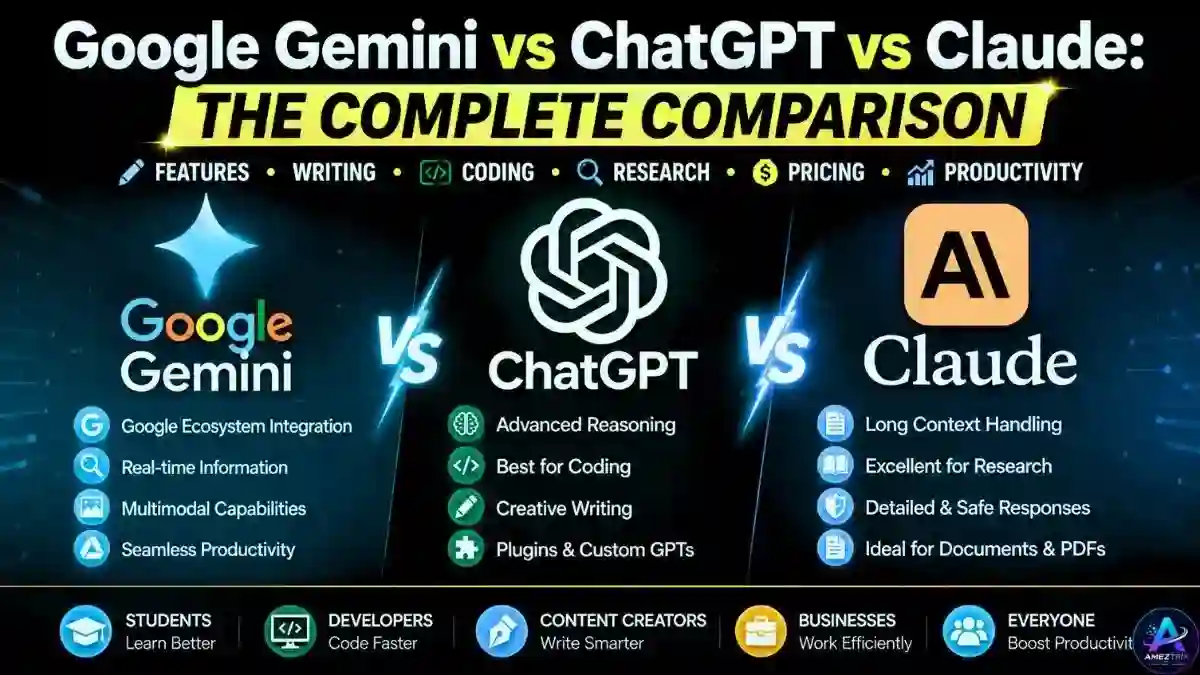
ChatGPT vs Gemini vs Claude
| Tool | Best Use Case |
|---|---|
| ChatGPT | Broad, general-purpose workflows |
| Gemini | Google ecosystem integration and multimodal tasks |
| Claude | Long-form writing, analysis, and coding |
Instead of chasing a universal “winner,” match the tool to the task in front of you.
Best AI Tools for Students
Students can lean on AI for learning, brainstorming, research, summarizing, and general productivity — but it works best as a study partner, not a shortcut around actual thinking. Many institutions also have their own AI-use policies, so it’s worth checking those before relying on any tool for graded work.
Popular picks include ChatGPT, Google Gemini, Claude, NotebookLM, Perplexity, Grammarly, Canva, and Notion AI, alongside subject-specific research and math tools.
Ways to use AI responsibly as a student:
- Get concepts you’re stuck on explained differently
- Generate practice questions
- Build a realistic study schedule
- Summarize your own class notes
- Spot mistakes in a draft before submitting
- Brainstorm research angles
- Compare competing ideas or theories
- Prepare revision material
Specific, well-structured prompts consistently outperform vague “just do it for me” requests — how you ask genuinely changes what you get back.
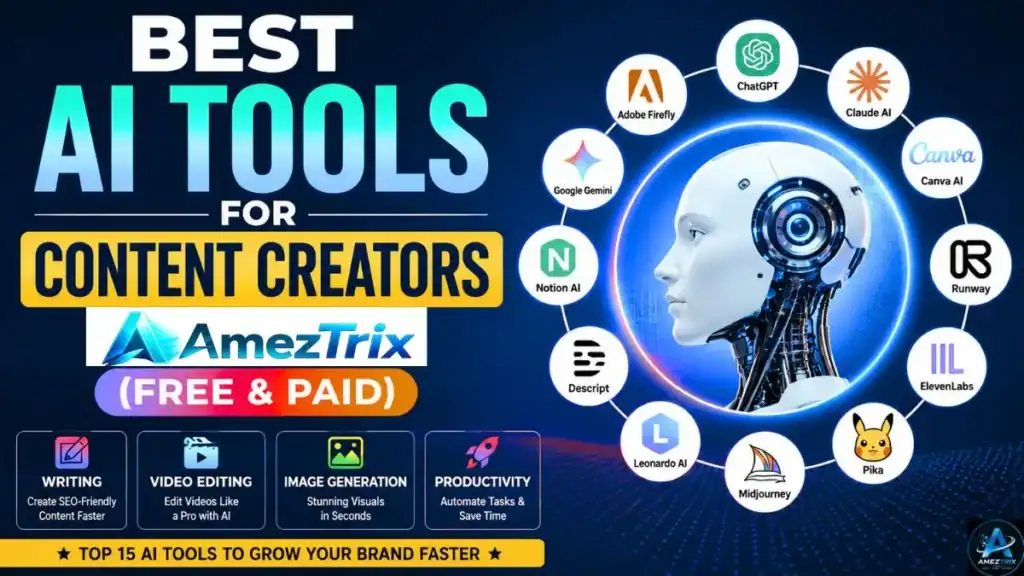
Best AI Tools for Content Creators
Content creators rarely get by with just one tool, because a full production pipeline almost never fits inside a single app.
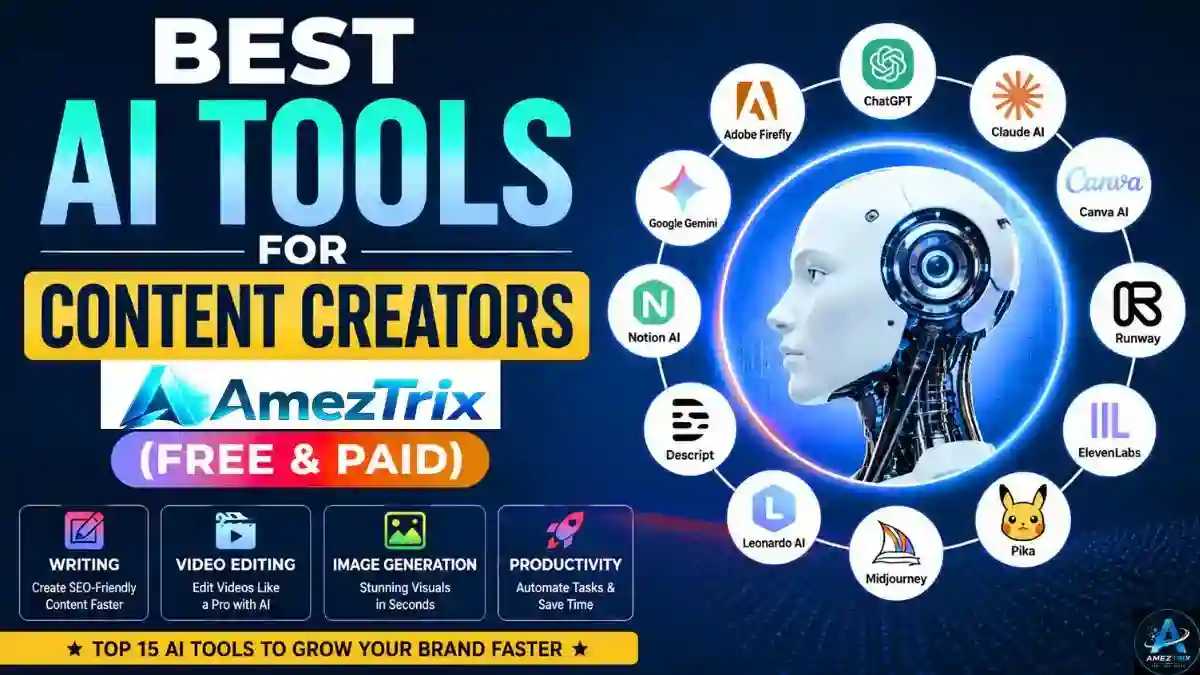
A typical workflow looks like: Research → Writing → Images → Video → Audio → Editing → Distribution.
No single platform excels at every stage. A practical stack might include ChatGPT for brainstorming and drafts, Claude for long-form writing and editing, Canva AI for graphics and slides, Midjourney for visuals, an AI video generator for production, a voice-cloning tool for narration, Grammarly for polish, and Notion AI to stay organized.
A practical content workflow:
- Research the topic
- Generate and organize ideas
- Build an outline
- Write the first draft
- Fact-check the key claims
- Create supporting visuals
- Produce or edit video and audio
- Optimize for your target audience
- Add your own insight and editing
- Publish and track performance
The goal is boosting output speed without sacrificing originality, accuracy, or your own editorial judgment.
Best AI Image Generators
AI image generators turn a text prompt into a finished visual — a genuine time-saver for designers, bloggers, marketers, and social media managers.

Popular options include Midjourney, Adobe Firefly, ChatGPT’s built-in image tools, and Leonardo — each with its own tradeoffs on pricing, interface, and usage rights.
Before picking one, compare: image quality, prompt interpretation, editing tools, character consistency, commercial usage rights, resolution, ease of use, and price.
Best AI Tools for Research
AI research tools speed up how fast you find information — but they don’t remove the need to verify what you find.
- Perplexity — strong for source-backed, AI-assisted web research
- NotebookLM — built for digging through your own uploaded documents
- ChatGPT — useful for brainstorming, summarizing, and general research support
- Google Gemini — solid for research and multimodal information gathering
A reliable research workflow:
- Define your question clearly
- Track down primary or authoritative sources
- Let AI summarize and organize the material
- Open and verify the important sources yourself
- Compare conflicting information
- Add your own analysis
- Cite sources properly
Never treat an AI-generated answer as automatically correct — these systems can misread context, make errors, or serve outdated information.
Best AI Tools for Writing
AI writing tools are handy for outlines, first drafts, headlines, product descriptions, emails, social posts, grammar cleanup, summaries, and rewrites.
- ChatGPT — strong all-rounder for brainstorming, drafting, and rewriting
- Claude — well suited to long-form writing, editing, and structured documents
- Grammarly — reliable for grammar, clarity, and general polish
- Jasper — commonly used by marketing teams for campaign copy
The smart move is never publishing raw AI output as-is. Use it to speed up the first draft, then add your own facts, examples, experience, and editorial judgment.
Best AI Tools for Business
Businesses use AI across customer support, content, sales, research, data analysis, internal knowledge management, coding, marketing, and automation.
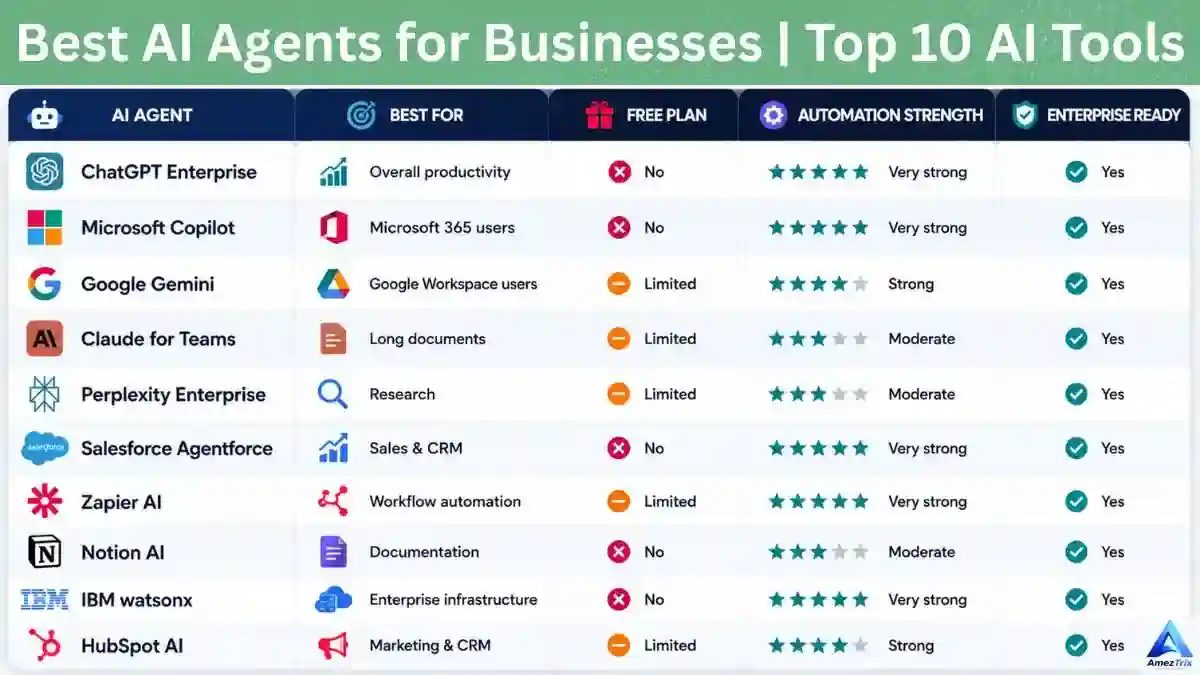
- Customer Support: AI assistants handle common questions and escalate complex ones to a human.
- Marketing: AI supports content ideas, campaign planning, copywriting, audience research, and email marketing.
- Data Analysis: AI can scan spreadsheets, spot patterns, summarize reports, and surface insights.
- Internal Knowledge: Companies use AI to search and summarize internal docs and knowledge bases.
- Workflow Automation: AI connects to business apps to automate repetitive processes.
- AI Agents: Agents go a step further, pursuing a goal, choosing actions, using tools, and checking their own results.
AI Agents vs. AI Chatbots
These terms get used interchangeably, but they aren’t the same thing.
| Chatbot | AI Agent | |
|---|---|---|
| Flow | User → Question → AI → Answer | Goal → Planning → Tool Selection → Action → Result → Verification → Next Action |
| Best for | Single-turn questions | Complex, multi-step workflows |
How to build a simple AI agent:
- Define the goal
- Choose an AI model
- Design clear instructions
- Give the agent the right tools
- Connect any external data it needs
- Map out the workflow
- Add memory or context where relevant
- Test it thoroughly
- Monitor its outputs
- Refine based on real results
Start with a simple workflow — don’t try to launch a fully autonomous system on day one.
Best AI Tools for Coding
AI coding assistants help developers write, explain, debug, refactor, and understand code faster.

Popular options include GitHub Copilot, Cursor, ChatGPT, Claude, and Replit’s AI-powered dev tools. They’re useful for code completion, debugging, explaining unfamiliar code, refactoring, writing documentation, generating tests, learning to code, and prototyping.
Always review AI-generated code carefully — it can carry security holes, faulty assumptions, inefficient logic, or compatibility issues.
Best AI Tools for Presentations and Design
AI has changed how presentations, graphics, and visual content come together. Tools like Canva AI, Gamma, Adobe Firefly, and Figma AI help with outlines, slide design, social graphics, branding concepts, and layout ideas.
The best results come from letting AI handle the repetitive design work while you stay in control of messaging, branding, and final quality.
Best AI Tools for Video Creation
AI video tools speed up production with text-to-video generation, AI avatars, automatic captions, background removal, voiceovers, script generation, and short-form editing.
Compare platforms on output quality, editing controls, licensing terms, export resolution, watermark restrictions, and price — this category moves fast, so today’s favorite can change quickly.
Best AI Tools for Audio and Voice
AI audio tools handle voiceovers, transcription, podcast editing, noise reduction, voice effects, narration, and audio summaries. Popular categories include AI voice generators, podcast editing platforms, speech-to-text tools, and music generation systems.
Always check a platform’s licensing terms before using AI-generated voices or music commercially.
Best AI Tools for Productivity
AI productivity tools cut repetitive work and keep information organized—meeting summaries, note organization, task management, email drafting, document summarization, calendar planning, and workflow automation.
Notion AI, Otter, ChatGPT, Gemini, and Microsoft Copilot are common picks here, often paired with automation platforms that connect AI to other business apps.
The best productivity setup isn’t the one with the most tools — it’s the one that removes the most repetitive work from your day.
Best Free AI Tools
Plenty of AI platforms offer free access, though free tiers usually come with limits. They’re a solid fit for students, beginners, bloggers, freelancers, small businesses, and anyone just testing the waters.
Before committing to a free tool, check: daily usage limits, model restrictions, export limitations, watermarks, file upload caps, commercial usage rights, and data privacy policies.
Free vs. Paid AI Tools
| Factor | Free AI Tools | Paid AI Tools |
|---|---|---|
| Cost | Usually free | Monthly or annual fee |
| Usage | Often limited | Usually higher limits |
| Advanced models | May be restricted | More options available |
| Features | Basic to moderate | More advanced |
| Priority access | Limited | Typically better |
| Best for | Beginners and casual users | Professionals and businesses |
Don’t subscribe to every tool you come across. Start free, test the workflow, and upgrade only when the extra features genuinely pay off.
How to Choose the Right AI Tool
Choosing gets much easier once you start with the problem instead of the brand name.
- What do I actually want to accomplish? Writing, image generation, research, learning, document analysis, video, code, or automation.
- How often will I actually use it? If it’s once a month, a premium plan probably isn’t worth it.
- Does it fit my existing workflow? A tool that plugs into what you already use often saves more time than a “more powerful” tool that needs manual workarounds.
- How accurate is the output? Always test important workflows before relying on the results.
- What are the privacy implications? Check how the provider handles your files, conversations, and personal or business data.
- Can I use the output commercially? Especially important for images, music, voice, and video — read the licensing terms first.
- Is the price actually justified? Calculate the time it saves you. If it frees up hours that matter, the subscription earns its keep.
How to Get More Out of Any AI Tool
Having access to AI doesn’t guarantee good results — your prompting matters just as much as the tool itself.
- Use clear prompts. Instead of “Write an article about AI,” try: “Create a beginner-friendly outline for an article about AI tools for small businesses, including practical examples, benefits, limitations, and a comparison section.”
- Provide context. Tell the AI who the audience is, the goal, the format, the tone, what must be included, and any constraints.
- Review everything. Never publish or rely on important AI-generated information without checking it.
- Add your own expertise. AI can produce a draft — your experience, examples, opinions, and editorial judgment make it genuinely useful.
Are AI Tools Actually Worth Using?
For most people, yes — but only when solving a real problem. AI tools save time on repetitive tasks, brainstorming, research, content production, coding, and automation.
The flip side: using too many tools creates a different problem. You can end up spending more time switching between apps than actually getting work done.
A focused starter toolkit might look like:
| Need | Suggested Tool |
|---|---|
| General assistant | ChatGPT or Gemini |
| Long-form analysis | Claude |
| Research | Perplexity |
| Document study | NotebookLM |
| Design | Canva or a specialized tool |
| Coding | GitHub Copilot, Cursor, or similar |
Choose based on your workflow, not on hype.
Common Mistakes When Using AI Tools
- Using too many tools — more apps don’t automatically mean more productivity
- Trusting AI without verification — it can and does generate inaccurate information
- Publishing raw AI content — unedited output can read as generic or simply wrong
- Ignoring privacy — never upload sensitive information without understanding a platform’s data policy
- Chasing hype — a viral tool doesn’t necessarily solve your specific problem
- Paying for tools you barely use — test the free plan before you buy
Can AI Tools Help You Make Money?
AI tools can support legitimate income-generating work by boosting productivity — freelancing, content creation, graphic design, video editing, web development, digital marketing, SEO services, automation, consulting, online education, and product development are all areas where AI speeds things up.
But AI doesn’t guarantee income on its own. The real skill is combining AI with an actual service, audience, business problem, or professional skill you already have.
AI Tools for SEO and Digital Marketing
AI also plugs into SEO and marketing workflows: keyword brainstorming, content outlines, search-intent analysis, meta titles and descriptions, content editing, competitor research, content repurposing, social ideas, and email marketing.
Even so, AI should support your SEO strategy, not replace it. A strong approach still needs genuine search-intent analysis, helpful original content, technical SEO, internal linking, solid site structure, good user experience, credible information, and regular updates. AI speeds all of that up — it can’t guarantee rankings.
AI Tools and the Future of Work
AI is increasingly becoming a built-in layer inside everyday software rather than a separate destination you visit for every task. Instead of opening a standalone AI website for each job, people are finding AI directly inside productivity suites, creative apps, development environments, search tools, and business software.
That means the most valuable skill going forward probably isn’t memorizing hundreds of AI tools — it’s learning to spot which problems AI can actually improve.
A productive AI workflow generally looks like: Problem → AI Tool → Human Review → Improvement → Final Result. The human stays responsible for deciding whether the output is accurate, useful, appropriate, and ready to publish.
Frequently Asked Questions About AI Tools
What are the best AI tools for beginners?
ChatGPT, Gemini, and Claude are solid starting points since they handle a wide range of tasks. Start with one general-purpose assistant, then add specialized platforms.
What’s the single best AI tool overall?
There isn’t a universal winner. ChatGPT is a strong general-purpose choice, while Gemini, Claude, Perplexity, NotebookLM, and specialized tools may fit particular workflows better.
Are there free AI tools?
Yes — many platforms offer free plans or free access with usage limits. Features and limits change often, so check current pricing before deciding.
Which AI tool is best for students?
ChatGPT, Gemini, Claude, NotebookLM, Perplexity, and specialized learning tools all work well. The best fit depends on whether you need explanation, research, note analysis, writing help, or exam prep.
Which AI tools work best for content creators?
Creators typically combine general assistants like ChatGPT and Claude with specialized tools for images, video, audio, editing, and design.
Can AI tools replace human workers?
AI can automate or speed up certain tasks, but full job replacement depends on the role, workflow, and organization. In most cases, AI changes how people work rather than eliminating the human role entirely.
Are AI-generated results always accurate?
No. AI systems can produce incorrect or outdated information, so important facts should always be checked against reliable sources.
Should I use multiple AI tools?
Only when each one solves a genuinely different problem. A small toolkit of complementary tools usually beats maintaining a dozen overlapping subscriptions.
Are AI tools safe to use?
Safety depends on the tool, the information you share, and how you use the output. Review privacy policies and avoid submitting sensitive information unless you’re clear on how it will be handled.
Final Verdict: Which AI Tools Should You Actually Use?
The best AI tools aren’t the ones stuffed with the most features — they’re the ones that solve your specific problem efficiently.
For most people, a practical toolkit starts with one general-purpose assistant — ChatGPT, Gemini, or Claude — followed by specialized tools for research, design, coding, content creation, or automation as the need arises.
A simple rule of thumb: start with one, learn it well, build a workflow, then add specialized tools only when you actually need them.
Students should focus on learning and research tools. Content creators can build out AI-assisted writing, image, video, and audio workflows. Businesses can explore agents and automation. Developers can lean on AI coding assistants. Marketers can pair AI with SEO and content strategy.
The AI landscape will keep shifting fast — so instead of chasing every new release, focus on the tools that consistently improve your productivity, creativity, research, or business results.
About Author
Rajendra Parmar is the Founder and Editor of AmezTrix, where he covers Artificial Intelligence, Technology, WordPress, Web Hosting, Digital Marketing, Gadgets, and Software. His mission is to simplify complex technology through practical tutorials, honest reviews, and well-researched guides that help readers make smarter digital decisions.

Rajendra Parmar
Founder & Editor • AmezTrix
Rajendra Parmar is the Founder and Editor of AmezTrix, a platform covering Artificial Intelligence, Technology, WordPress, Web Hosting, Digital Marketing, Gadgets, Software Reviews, and emerging innovations. His mission is to simplify complex technology through practical tutorials, honest reviews, and well-researched guides that help readers make smarter digital decisions.