AI Agents Foundation is a beginner-level approach to building a team of specialised AI agents, such as content, data, automation, and builder agents, using no-code tools like ChatGPT, Claude, and n8n. Each agent handles one job, and a human reviews the results before anything is published or sent.
AI Agents Foundation: How to Build an AI Team Without Code
If you have only used AI as a chatbot, the idea of an AI team can sound abstract. This guide makes it concrete. You will learn what AI agents are, how a multi-agent workflow fits together, which tools beginners can start with, and what to check before you spend money on AI agent training. We also look at the LEAD “AI Agents Foundation” programme, a two-day course advertised for Kuala Lumpur, and give you an honest view of what such a course can and cannot do.
Key takeaways: Start with one repetitive task. Give each agent one clear role. Keep a human approval step for anything public, financial, or irreversible. Measure net time saved, not the number of agents.
What Are AI Agents?
An AI agent is software that uses an AI model to understand an instruction, work toward a goal, and take steps with the tools it has been given. Those AI tools might include a web search, a spreadsheet, an email account, or an API connection to another app.
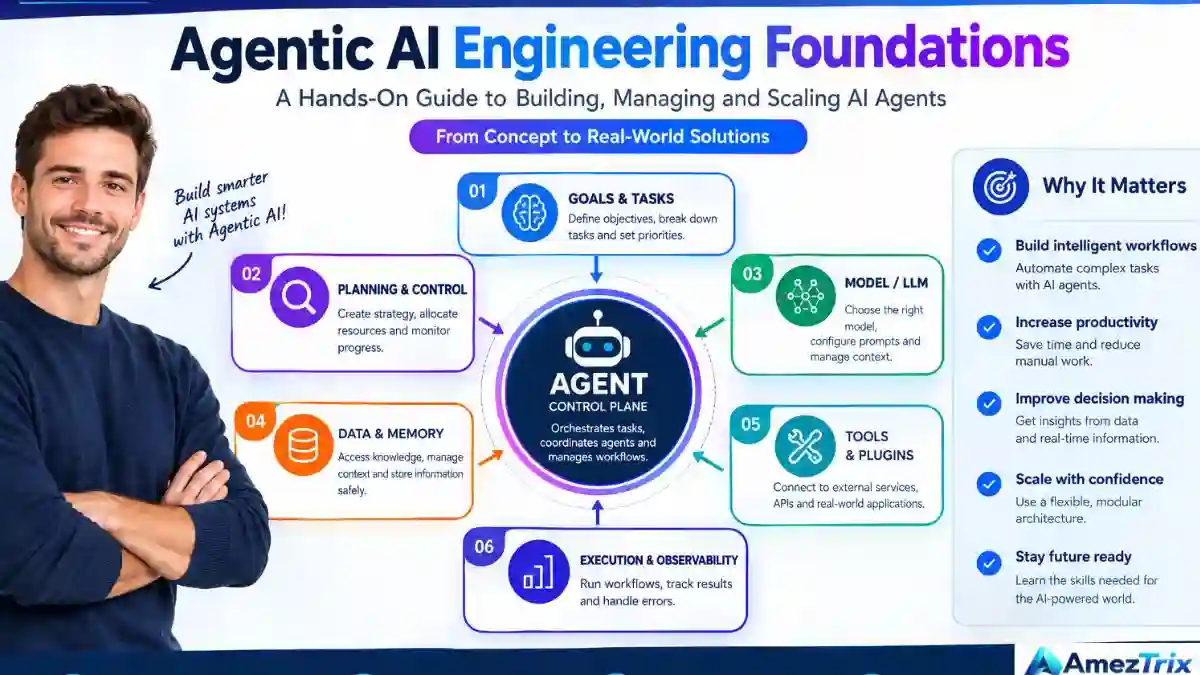
A chatbot waits for your prompt and replies. An agent-based workflow can go further and complete several connected steps. It is still not magic. How well an agent performs depends on its model, its instructions, the tools and data it can reach, the permissions you grant, and the checks you build around it.
AI Chatbot vs AI Agent vs Multi-Agent System
| Feature | AI chatbot | AI agent | Multi-agent system |
|---|---|---|---|
| Main purpose | Answer questions | Complete a defined task | Coordinate several specialised tasks |
| Workflow | Mostly conversational | Can use tools across multiple steps | Splits work between agents |
| Tool access | Depends on the product | Configured integrations | Different tools per agent |
| Human oversight | Recommended | Important | Essential for consequential actions |
| Example | Draft an email | Analyse a spreadsheet | Research, analyse, draft, and route a report |
Not every job needs a team. A single well-configured agent is often enough. Multi-agent AI systems make sense when a process has several distinct responsibilities, for example writing, data analysis, and publishing. For a deeper look at the automation side, read our guide to AI agent automation.
Why Build an AI Team at All?
Most small teams lose hours to repetitive digital work: formatting reports, copying data between apps, sorting enquiries, and producing first drafts. Combining language models with workflow software can reduce that load. The realistic benefits are:

- Time: less manual effort on routine steps.
- Consistency: tested instructions and templates get reused.
- Capacity: more routine work without more manual effort.
- Coordination: fewer jumps between apps.
- Focus: more time for strategy, creative decisions, and quality control.
These gains are not automatic. AI handles a clean spreadsheet well but can stumble on ambiguous data, missing context, or inconsistent records. Judge automation by time saved, accuracy, cost, and business outcome.
The Four Agents in a Starter AI Team
The LEAD programme poster groups agents into four categories. It is a handy model for any beginner team, whether or not you take the course.
| Agent | Responsibility | Example output |
|---|---|---|
| Content Agent | Drafts and organises written material | Article draft, content brief, newsletter |
| Data Agent | Analyses approved datasets | Summaries, calculations, chart ideas |
| Automation Agent | Connects tools and runs workflows | Task status and execution log |
| Builder Agent | Helps create pages and prototypes | Draft landing page or simple app |
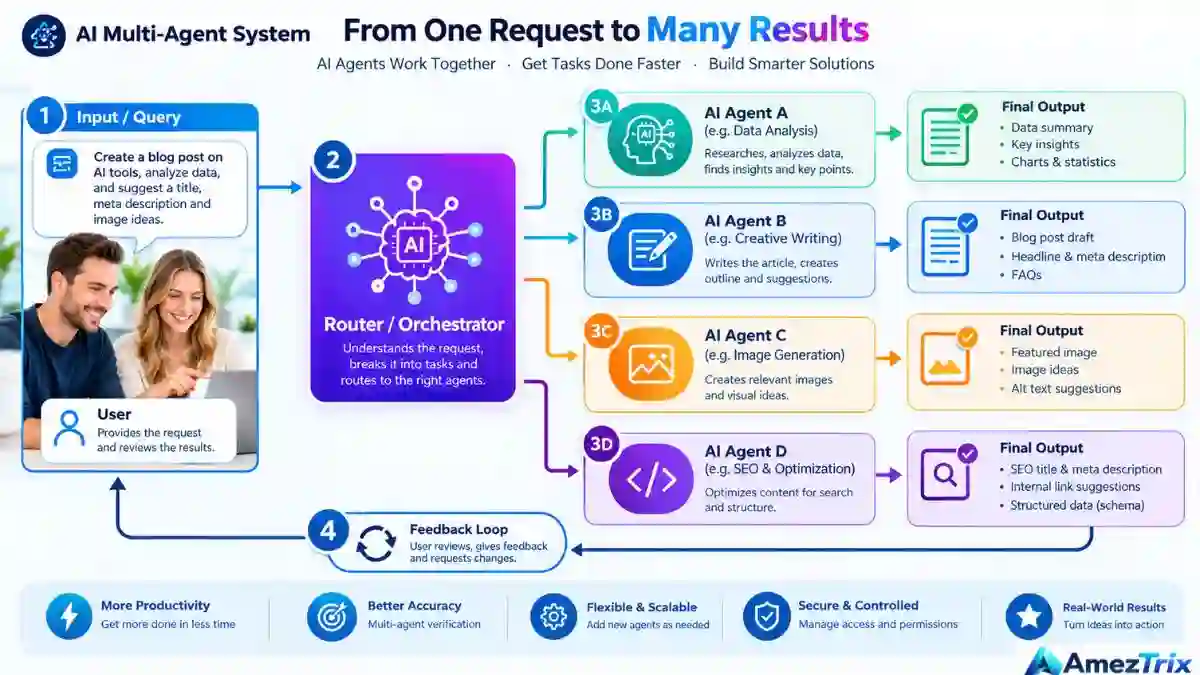
These agents do not independently chat and plan like coworkers. They coordinate through a workflow orchestrator or other integrations you set up. A good design gives each agent a clear role, limits its tool access, defines how information passes between agents, and says exactly when the process must pause for a human.
AI Agents Foundation Programme: What Is Advertised
The LEAD AI Agents Foundation programme is promoted as a two-day, in-person, hands-on course. The details below come from the promotional poster and organiser material, not from independent testing.
| Detail | As advertised |
|---|---|
| Dates | 27–28 October 2026 |
| Venue | AI365 Hub, Oval Damansara, TTDI, Kuala Lumpur, Malaysia |
| Format | Two days, in person, hands-on |
| Featured tools | ChatGPT, Claude, n8n, Netlify, Grok Bot, and more |
| Coding | Marketed as no coding required |
| Agent categories | Content, Data, Automation, Builder |
| Follow-up | Three months of implementation support |
| Funding | Advertised as HRDC-claimable, subject to eligibility and terms |
Confirm current availability, pricing, and terms on the official AI Agents Foundation page. The poster also cites one student saving 40 hours a month. Treat that as a promotional example. It is not a typical result or a guarantee.
Day 1: Create and Build Your AI Team
1. Pick the Right AI Tool for Each Job
A common beginner mistake is assuming one platform is best at everything. Models and apps differ in strengths, limits, cost, and integrations. Test each against a real task from your own work.
| Tool | Possible use | What to verify |
|---|---|---|
| ChatGPT | Drafting, brainstorming, file analysis | Current tools and plan limits |
| Claude | Writing, document analysis, coding help | Context limits and integrations |
| Gemini | Research and Google-connected workflows | Data permissions and availability |
| Grok | Conversational help and research | Source quality and access |
| n8n | Connecting apps, automating workflows | Credentials, hosting, maintenance |
| Netlify | Deploying simple sites and prototypes | Build requirements and security setup |
This table describes potential uses. It is not a performance ranking, and features change often.
2. Prompt Like a Professional
A strong prompt defines six things: the role, the task, the context, the constraints, the output format, and how the AI should verify its work. Compare these two:
- Weak: “Write a blog post about AI agents.”
- Stronger: “Act as a technology editor. Write a guide to AI agents for small businesses in plain English. Compare relevant tools, separate verified facts from estimates, cite reliable sources, and list any claims I should check. Do not invent prices, features, or statistics.”
A detailed prompt does not guarantee a correct answer, but it gives you something specific to evaluate.
3. Use the Ask–Check–Fix–Use Method
- Ask: give a clear task and enough context.
- Check: review facts, calculations, citations, and whether the answer fits the question.
- Fix: correct errors and request specific revisions.
- Use: apply the result only once it meets your quality and safety bar.
4. Build a Live Web Page Without Traditional Coding
AI-assisted builders can turn a plain-English description into a first-draft page. You might request a landing page with a headline, service blocks, a contact form, and FAQs. Then treat the output as a starting point:
- Define the purpose and audience.
- Describe the sections you need.
- Generate the first version.
- Check mobile layout and accessibility.
- Test every link, form, and button.
- Review privacy, security, and speed.
- Publish only after testing.
Generated pages can contain broken links, inaccurate claims, and insecure code. A page that looks finished is not proof that it is production-ready.
5. Turn One Brief Into a Content Package
A content agent can turn a single approved brief into a blog draft, a title and meta description, social captions, image alt text, a short video script, and a newsletter. The rule is to keep one verified set of facts across every format. A human editor should still check originality, quotes, links, image rights, and product details.
Day 2: Analyse Data and Automate Workflows
6. Analyse Spreadsheets With AI
A data agent can summarise trends, flag unusual entries, and suggest follow-up questions. For a monthly sales sheet, that might mean rising and declining products, month-to-month differences, and categories driving revenue. Always check findings against the raw data, because an apparent trend can come from missing rows, duplicate transactions, or inconsistent dates. Ask the AI to show its method and point to the rows behind each conclusion. Do not upload confidential customer or financial data to a service your organisation has not approved.
7. Turn Numbers Into a Decision-Ready Slide
A useful summary slide has the main finding, one chart or metric, a baseline comparison, the business implication, a recommended next step, and any limitations. The AI should never invent missing numbers, distort chart scales, or treat correlation as causation.
8. Automate Routine Tasks With n8n
n8n AI automation works by linking apps into a workflow. The basic pattern is: trigger, collect, process with AI, validate, act, log. For example, a workflow can detect a new form submission, classify it, draft a reply, and send it to a teammate for approval. You can explore its features in the n8n documentation.
| Workflow | Possible automation | Safeguard |
|---|---|---|
| Email management | Categorise incoming messages | Human approval for sensitive replies |
| Content planning | Organise approved topic ideas | Editor approves topics and claims |
| Reporting | Summarise spreadsheet data | Reconcile with source records |
| Lead routing | Send enquiries to the right team | Restrict access to personal data |
| Document processing | Extract fields from approved files | Validate critical fields |
| Website publishing | Save a CMS draft | Require editorial approval to publish |
Not every task needs AI. For fixed rules, such as moving a file or sending a notification, traditional automation is often more predictable. Use AI where interpretation, classification, or language adds real value.
9. Connect Multiple Agents Into One System
Once single tasks work, you can chain them. A content agent hands a draft to a checking step, a data agent supplies verified numbers, and an automation agent saves the result and logs what happened. Keep the chain short at first. Every extra handoff is another place for an error to travel.
10. Always Verify AI Output
Automation can multiply mistakes when one wrong result flows into the next step. A sound verification setup includes:
- Source checks for factual claims.
- Validation rules for structured data.
- Tests with realistic inputs and failure cases.
- Error handling and retry limits.
- Logs showing which actions ran.
- Permission controls on every connected app.
- Human approval for high-impact or irreversible actions.
- A recovery plan for accidental changes.
An agent may prepare an invoice, but it should not approve the payment. It may prepare a WordPress post, but it should not necessarily publish it.
Practical Example: An AI Team for a WordPress Blog
Picture a site that publishes technology guides. A structured editorial workflow could look like this:
- Discover topics: use Search Console data, audience questions, and industry news. Do not pick a topic only because a tool calls it trending.
- Research and verify: gather reliable sources and dates. Separate confirmed facts from rumours and forecasts, and flag gaps instead of filling them.
- Draft: the content agent prepares an outline, article, comparison table, FAQs, and metadata.
- Add internal links: link only to relevant pages that exist, with descriptive anchor text.
- Prepare images: use licensed assets or an image brief, with descriptive alt text.
- Save as a draft: the workflow creates an unpublished draft. An editor then checks accuracy, originality, links, and search intent before publishing.
| Stage | Tool or system | Output |
|---|---|---|
| Topic discovery | Search Console and research tools | Topic shortlist |
| Research | AI assistant plus trusted sources | Verified notes |
| Writing | Content agent | Article draft |
| Coordination | n8n or similar platform | Connected process |
| Storage | WordPress | Unpublished draft |
| Quality assurance | Human editor | Approved article |
This approach can improve consistency and cut repetitive work. It does not guarantee search rankings, which still depend on research quality, editorial review, site authority, and competition.
AI Automation Tools for beginners
You do not need every tool. Choose the smallest set that solves a real problem.
| Tool | Best starting use | Limitation |
|---|---|---|
| ChatGPT | Drafting, reasoning, file analysis | Output needs verification |
| Claude | Writing and document work | Features vary by plan |
| Gemini | Google-connected assistance | Access and features vary |
| n8n | Multi-step app automation | Needs testing and upkeep |
| Netlify | Deploying simple sites | Not a fit for every hosting need |
| WordPress | Content and editorial drafts | Plugins and permissions need setup |
| Google Search Console | Impressions, clicks, queries | Not a full competitor database |
Before committing, check current pricing, usage limits, data retention terms, and supported integrations.
How Much Time Can AI Agents Save?
There is no universal figure. The result depends on the existing process, task complexity, error rate, setup effort, usage charges, and maintenance. Use this formula instead:
Net time saved = manual time − (review time + maintenance time + setup time spread over the period)
Hypothetical example: a team spends 60 hours a month on a repetitive process. After automation, review and maintenance take 20 hours. The net saving is 60 − 20 = 40 hours per month. This is an illustration only, not a forecast for any participant or business.
| Metric | What to measure |
|---|---|
| Baseline task time | Minutes needed before automation |
| Automated task time | Human time needed afterwards |
| Setup time | Design, integration, testing |
| Error rate | Incorrect or incomplete outputs |
| Running costs | Subscriptions, API usage, hosting |
| Rework | Time spent fixing outputs |
A workflow that saves time but creates costly errors is not a win. Measure quality and risk next to speed.
Pros and Cons of AI Agent Training
Pros
- Beginner-friendly: a no-code route lets you learn agent workflows without becoming a developer.
- Practical: content, spreadsheets, web pages, and automation are concrete tasks you can test.
- Clear structure: separating work by agent makes complex processes easier to organise.
- Reusable: tested templates adapt to similar tasks.
- Support: the advertised three months of implementation help may suit people who need guidance after the course, subject to the organiser’s terms.
Cons and Limitations
- Two days is a foundation, not mastery. Reliable workflows take continued practice.
- No-code is not no-effort. APIs, authentication, data formats, and permissions can get complicated.
- Tools change. Interfaces, pricing, and features can shift after training.
- Automations fail. Bad inputs, outages, and broken integrations interrupt workflows.
- Costs add up. Subscriptions, API usage, and maintenance can erode the savings.
- Privacy risk. Connected apps can expose sensitive data if access is loose.
- Results vary with background, workload, and how soon you apply what you learn.
Is the AI Agents Foundation Programme Worth It?
| Audience | Potential value | Consider |
|---|---|---|
| Small-business owners | Automating repetitive admin | Pick workflows with measurable value |
| Digital marketers | Reporting and campaign support | Verify data and claims |
| Bloggers and publishers | Content preparation | Keep originality and human review |
| Freelancers and agencies | Repeatable client workflows | Plan for maintenance and client permissions |
| Students | Practical AI skills | Build projects that show real ability |
| Developers | Quick prototyping | No-code training may be too basic |
| Large organisations | Team productivity | Governance, security, compliance |
Questions to ask the organiser before you register: What is the detailed curriculum? What are the prerequisites? Which tool accounts do I need, and what do they cost? What exactly does the three-month support include? What is the refund policy? What extra costs apply?
If you plan to use an employer training grant, confirm eligibility and approval rules with both your employer and the organiser. An HRDC-claimable label in an advertisement does not by itself mean every participant or employer qualifies.
Best Practices for a Reliable AI Team
- Start with one repetitive task that has clear inputs, clear outputs, and is easy to verify, such as a weekly report.
- Define success first. Record current time, error rate, and the quality you need.
- Give each agent one role, with defined access and outputs.
- Use least privilege. Separate read and write access, and avoid publishing, payment, or deletion rights without safeguards.
- Test realistic cases, including missing data, odd inputs, and failures.
- Keep a human approval step for anything published, sent, paid, or committed.
- Review performance regularly and update prompts when evidence says so.
- Document everything: tools, data sources, permissions, failure handling, and recovery steps.
Common Mistakes
- Automating a broken process instead of fixing it first.
- Building five agents when one would do.
- Letting an agent publish or pay without approval.
- Trusting numbers without checking the source data.
- Ignoring ongoing subscription and API costs.
Red Flags When Choosing AI Training
- Guaranteed income, rankings, or savings.
- No curriculum or tool list available before payment.
- Vague refund or support terms.
- Pressure to buy extra paid tools without explanation.
- Claims that AI needs no human checking.
Publishing This Topic Well: SEO, AEO, GEO and LLMO
If you write about AI agents yourself, clarity beats tricks. Use a descriptive title and one H1, answer the main question early, define terms plainly, support facts with reliable sources, keep tool names consistent, and separate facts from estimates and opinion. Structured data and clean headings help machines interpret a page, but no technique guarantees a ranking or an AI citation. Google advises making helpful, reliable, people-first content, and does not set a preferred word count. See Google’s guidance on helpful content.
Frequently Asked Questions
1. What is AI Agents Foundation?
It is a beginner-oriented way to learn how AI agents handle content, data analysis, website building, and workflow automation. The LEAD programme discussed here is advertised as a two-day, hands-on course.
2. Do I need coding skills to build AI agents?
Not to start. Visual automation platforms and no-code tools can cover many beginner workflows. Advanced integrations, custom apps, and troubleshooting may still need technical knowledge.
3. What is the difference between ChatGPT and an AI agent?
ChatGPT is an AI assistant that responds to instructions and, depending on enabled tools, can do more. An AI agent is set up to pursue a defined task using a model, instructions, and tools. The two overlap, and capabilities depend on configuration.
4. Can AI agents work together as a team?
Yes. A multi-agent workflow assigns separate responsibilities and coordinates their outputs. It needs clear task boundaries, data handoffs, permissions, and error handling.
5. Can n8n connect AI agents to other apps?
Yes. n8n can link supported apps, pass data between them, call AI services, apply conditions, and route results. Exact capabilities depend on your version and the integrations available.
6. Is AI agent automation free?
Not always. Some tools offer free tiers or self-hosting, but model usage, premium features, hosting, and maintenance can cost money. Estimate the full running cost before adopting a workflow.
7. Is AI agent automation safe for business data?
It can be, if you choose approved tools, restrict permissions, protect sensitive data, and monitor important actions. Avoid sharing confidential information with unapproved services.
8. Is the LEAD AI Agents Foundation programme HRDC-claimable?
The promotional material advertises it as claimable. Confirm current eligibility, approval steps, and terms with the organiser and your employer before you rely on it.
Final Verdict: Is Building an AI Team Worth It?
Yes, for the right task. Building an AI team is worth it when it solves a genuine, repetitive problem and when you measure the result honestly. The value comes from a reliable process, not from the number of agents.
The LEAD AI Agents Foundation programme looks like a practical, hands-on starting point for beginners interested in content, data, automation, and web building. Its claims are promotional, so verify the curriculum, costs, eligibility, and support terms before you commit. If a course is not an option, you can start alone: pick one repetitive task, build a small workflow, test it with realistic data, measure it, and expand only when it proves reliable.
The bottom line: AI can help you work faster, but people still set direction, verify important outputs, protect data, and own the decisions.
TL;DR
- AI agents complete multi-step tasks with tools. Chatbots mainly answer prompts.
- A starter team has four roles: content, data, automation, builder.
- Use ChatGPT or Claude for thinking and drafting, and n8n to connect apps.
- Verify every output and keep human approval on consequential actions.
- Measure net time saved, including setup, review, and running costs.
- Treat course claims, such as 40 hours saved, as promotional until verified.
This guide is an educational overview. Programme details come from promotional material and the organiser’s page. Tool features, prices, and eligibility rules change, so verify them with the providers before deciding.
About the Author
Rajendra Parmar is the Founder and Editor of AmezTrix, where he covers Artificial Intelligence, Technology, WordPress, Web Hosting, Digital Marketing, Gadgets, and Software. His mission is to simplify complex technology through practical tutorials, honest reviews, and well-researched guides that help readers make smarter digital decisions. You can also explore more new Google AI tools on the site.

Rajendra Parmar
Founder & Editor • AmezTrix
Rajendra Parmar is the Founder and Editor of AmezTrix, a platform covering Artificial Intelligence, Technology, WordPress, Web Hosting, Digital Marketing, Gadgets, Software Reviews, and emerging innovations. His mission is to simplify complex technology through practical tutorials, honest reviews, and well-researched guides that help readers make smarter digital decisions.