Learn what AI agent automation is, how it beats normal automation and RPA, plus real use cases, costs, risks, and a simple 7-step plan to start.
AI Agent Automation: What It Is & How to Start
Quick answer: AI agent automation means using AI agents to plan, run, and check multi-step business tasks with very little human input. Unlike normal automation, which follows fixed rules, an agent takes a goal, picks its own steps, uses connected tools, and escalates to a human when it should. The smartest way to start is with one low-risk, high-volume workflow, tight permissions, and human approval for anything sensitive.
Table of Contents
- What Is AI Agent Automation?
- How Does It Work?
- AI Agent vs Automation vs Chatbot
- AI Agents vs RPA
- Why It Matters in 2026
- What Can AI Agents Automate?
- Small Business Use Cases
- AI Agent Automation in India
- How to Choose a Platform
- How to Build Your First Workflow
- Human-in-the-Loop
- Multi-Agent Systems
- Benefits
- Risks and Safety
- Cost and ROI
- Agents for SEO and Marketing
- Common Mistakes
- Where This Is Heading
- FAQ
- Final Verdict
What Is AI Agent Automation?
AI agent automation means using AI agents to plan, run, and check multi-step tasks with very little human input.
Normal automation follows a script. If A happens, do B. An AI agent works differently. You give it a goal, and it figures out the steps, uses the tools it has been connected to, looks at the result, and keeps going until the job is done or it needs a person to sign off.
Traditional automation follows instructions. An AI agent works toward a goal.
Here’s a simple example. A customer fills out a form on your website. Old-style automation sends a “thanks, we got your message” email. Done.
An AI agent goes a lot further. It reads the request, checks who the customer is, looks up their company, decides how serious the lead is, updates your CRM, writes a personal reply, books a follow-up, and pings your sales team if the lead looks big. Same trigger, completely different result.
Google Cloud describes this as the shift from chatbots to agents that handle complex workflows. IBM uses the term “agentic enterprise” for companies where AI agents plan and carry out multi-step work next to human employees.
Agent automation fits best when work is repetitive but not perfectly predictable, spread across several apps, heavy on text or data, or full of exceptions that fixed rules can’t handle.
How Does AI Agent Automation Work?
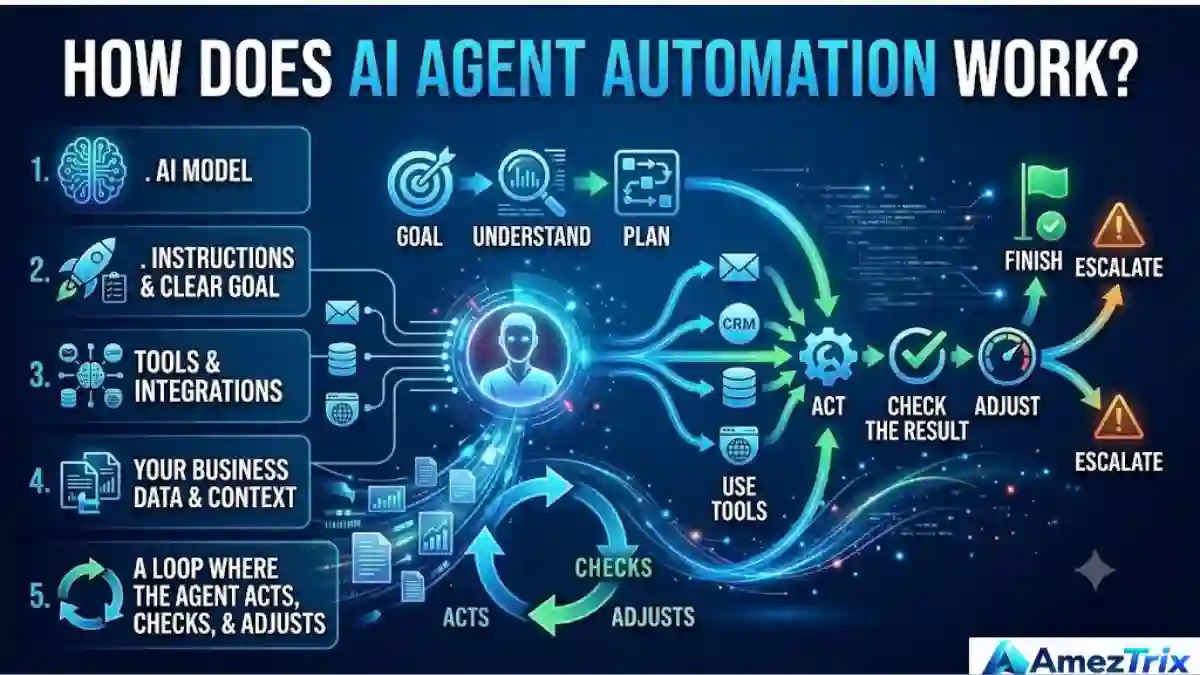
Every agent setup has five parts:
- An AI model (the “brain”)
- Instructions and a clear goal
- Tools and integrations, such as email, CRM, databases, and browsers
- Your business data and context
- A loop where the agent acts, checks, and adjusts
The flow looks like this: goal → understand → plan → use tools → act → check the result → adjust → finish or escalate.
Let’s walk through a sales example. The goal is “follow up with every new lead.” The agent receives a lead, reads it, spots what the customer needs, checks the CRM, researches the company, sets a priority, writes the email, sends it, schedules a follow-up, and updates the record. High-value leads go straight to a salesperson.
A chatbot would have stopped at “here’s a draft email.” That’s the gap.
One thing worth saying early: good agent systems aren’t built around unlimited freedom. They’re built around controlled tools, clear permissions, approval steps, and the ability to see what happened afterward.
AI Agent vs Traditional Automation vs Chatbot

People mix these up all the time, so here’s a side-by-side look.
| Feature | Traditional Automation | Chatbot | AI Agent |
|---|---|---|---|
| Follows fixed rules | Yes | Sometimes | Not necessarily |
| Understands natural language | Limited | Yes | Yes |
| Makes decisions from context | Limited | Limited | Yes |
| Uses external tools | Yes | Sometimes | Yes |
| Handles multi-step tasks | Limited | Usually not | Yes |
| Copes with unexpected situations | Poorly | Limited | Better |
| Plans its own steps | No | Limited | Yes |
| Works toward a goal | Limited | No | Yes |
An easy way to remember it:
- Automation: “Do these steps.”
- Chatbot: “Answer this question.”
- AI agent: “Get this done.”
AI Agents vs RPA
Robotic Process Automation (RPA) is great at rigid, predictable computer tasks. Open a spreadsheet, copy a value, paste it into a website, hit submit. Same every time.
The trouble starts when a process has any ambiguity. Say a customer emails a messy complaint. Someone has to understand it, check the customer’s history, pick a response, update the support system, and flag anything strange. RPA can’t read between the lines. An agent can.
So will agents replace RPA? Probably not. Most teams end up with a mix: agents for the thinking, RPA and APIs for the clicking, databases for the facts, and humans for the approvals.
Why AI Agent Automation Matters in 2026
For a few years, AI was mostly about producing content. Now businesses want it to do actual work.
Gartner argues that the best returns come from specialized agents built around one business process, not from a single “do everything” agent. That matches what most people find once they try it. Narrow agents are easier to test, easier to trust, and easier to fix.
The path usually goes: chatbot → assistant → copilot → agent → multiple agents working together. The mindset shift is simple. “AI helps me do the work” becomes “AI does part of the work for me.”
What Can AI Agents Automate?
Customer support
An agent can read a question, sort the issue, search the knowledge base, pull the customer’s account, answer, open a ticket, update its status, and escalate the tricky ones. It doesn’t just reply. It finishes the workflow around the reply.
Sales
Lead qualification, prospect research, CRM updates, personalized emails, follow-up scheduling, meeting prep, pipeline monitoring. Sales teams lose a surprising amount of time on admin, and this is where agents give it back.
Marketing
Keyword and competitor research, content briefs, SEO checks, social drafts, email campaigns, reporting. One long article can become a LinkedIn post, an X post, a newsletter, and a short FAQ. A person still reviews before anything goes live.
Finance and accounting
Invoice processing, expense sorting, reconciliation, payment reminders, anomaly detection. Money tasks need tighter control than content tasks. A sensible setup: the agent spots a mismatch, prepares a recommendation, a human approves, then the agent acts.
HR
Screening candidates, scheduling interviews, onboarding, answering policy questions, collecting documents. Hiring and firing decisions should stay with people.
Here’s a quick view of where agents tend to fit well:
| Business Function | Example AI Agent Task |
|---|---|
| Sales | Lead qualification |
| Marketing | Content research |
| Customer support | Ticket classification |
| Finance | Invoice processing |
| HR | Interview scheduling |
| IT | Incident triage |
| Operations | Status monitoring |
| E-commerce | Order support |
| SEO | Content analysis |
| Software | Code review |
| Procurement | Vendor comparison |
| Management | Report generation |
The best candidates share four traits: they happen often, follow a pattern, have results you can measure, and carry low risk if something goes wrong.
AI Agent Automation for Small Businesses
You don’t need a huge company or a big budget. Small teams often get the quickest wins because their processes are simpler.
- Leads: website form → AI qualifies → CRM → personal reply → follow-up
- Support: WhatsApp or email → understand → look up info → answer → open a ticket if needed
- Appointments: request → check availability → book → confirm → remind
- Content: topic → research → outline → draft → SEO check → human approval → publish
- Online stores: order → status check → customer message → spot problems → escalate
Here’s my honest advice for small businesses: don’t try to automate everything. Pick the one task that eats the most time and repeats the most, and start there.
AI Agent Automation in India
India is a big market for this. It has a huge tech workforce, strong digital infrastructure, a large IT-services industry, and lots of startups.
SAP India reported in 2026 that Indian enterprises are moving from AI experiments to real execution, with standard processes, connected data, and governance becoming the base for autonomous operations. Microsoft’s 2026 Work Trend Index found that 32% of the Indian workforce it studied qualified as “Frontier Professionals,” meaning people who are actively redesigning how they work around AI agents. NVIDIA has also reported working with Indian tech companies on agentic AI for call centers, healthcare, telecom, and software development.
The use cases span IT services, banking, healthcare admin, manufacturing, logistics, e-commerce, education, real estate, digital marketing, and telecom.
A quick MSME example
Picture a local distributor. A customer messages: “Need 100 units. Please share today’s price and delivery time.”
An agent can understand the request, find the product, check stock, pull today’s price, check delivery timing, draft the quotation, send it, log the inquiry, and set a follow-up reminder.
Nobody loses a job here. The staff just stop spending their day on copy-paste work and spend it on selling and solving problems.
How to Choose an AI Agent Automation Platform
There’s no single best tool. The right one depends on your workflow, your software, your team’s skills, your security needs, and your budget.
| Platform Type | Best For |
|---|---|
| No-code platforms | Teams that want to build workflows without programming |
| Developer frameworks | Custom builds with tool calling, memory, and orchestration |
| Enterprise AI platforms | Governance, permissions, and audit trails |
| Business platforms | Agents built into CRM, ERP, or support software |
2026 comparisons of business agent tools often feature n8n, Relevance AI, and ServiceNow AI Agents, each aimed at a different type of buyer. Want a wider list? See our guide to the best AI automation tools.
So skip “what’s the best tool?” and ask this instead: which platform fits my workflow, my data, my apps, my budget, and my risk level?
Before you pick, check five things:
- Integrations. Does it connect to your CRM, email, Google Workspace or Microsoft 365, databases, Slack, WhatsApp, accounting software, and your website?
- Permissions. Can you control exactly what the agent can read, create, edit, delete, send, publish, or buy?
- Human approval. Can you require sign-off for payments, refunds, account changes, publishing, legal documents, and sensitive data?
- Monitoring. Can you see what the agent did, which tools it used, and where it failed?
- Security. Access controls, authentication, encryption, audit logs, and data isolation.
How to Build Your First AI Agent Workflow Automation
Start small. Seriously. If you want a deeper technical walkthrough, read our guide on how to build an AI agent.
Step 1: Pick one workflow. Not “automate the company.” Something like “automate lead qualification.”
Step 2: Define the outcome in measurable terms. “Make sales easier” is too vague. “Every new website lead gets classified, added to the CRM, and answered with a personal reply within five minutes” is something you can test.
Step 3: Map the current process. Write down the trigger, input, decision, action, output, and exceptions. This shows you where the agent actually has to think.
Step 4: Connect only what’s needed. CRM, email, and a knowledge base, for example. Not every system in the company.
Step 5: Set guardrails. What can it do? What can’t it do? When must it ask? When must it hand off? What data can it touch?
Step 6: Test with messy examples. Normal cases are easy. Try incomplete, wrong, and contradictory inputs too. Agents often look great in demos and then stumble on real-world mess.
Step 7: Turn on triggers last. Only after it works reliably should you add schedules, incoming emails, form submissions, or CRM events. Run it manually first.
Human-in-the-Loop AI Agent Automation
Full autonomy sounds exciting. For most business work, it isn’t what you want yet.
| Risk Level | Recommended Model |
|---|---|
| Low | AI acts, a human monitors |
| Medium | AI proposes, a human reviews, AI executes |
| High | AI analyzes, a human decides, AI executes |
For example, an agent can prepare a ₹50,000 purchase order. A manager approves it before it goes out.
What the architecture looks like
In plain terms: a trigger starts the agent. The agent reasons and plans, pulls business context, picks a tool, and calls an API, CRM, database, or browser. It checks the result, asks for human approval if required, takes the final action, and logs everything.
The key idea is separating intelligence from permission. An agent might be smart enough to decide something without being allowed to do it. That gap is a feature, not a flaw.
Multi-Agent Systems: Do You Need Them?
Sometimes one agent isn’t the best fit. Complex jobs can be split among specialists: a research agent finds information, an analyst agent studies it, a writer agent drafts the report, a reviewer agent checks quality, and a publishing agent posts it after approval.
It sounds impressive, and it can work well. But more agents don’t automatically mean better results. Every extra agent adds cost, delay, debugging pain, and security risk.
If one agent can handle the job reliably, stop there. For most businesses, one specialized agent inside a structured workflow is the smarter starting point.
Benefits of AI Agent Automation
- Saves time. Agents handle repetitive work around the clock.
- Cuts manual work. Less copying data between apps.
- Faster responses. Requests get handled straight away.
- Works across tools. One agent can coordinate several systems.
- Handles messy input. Emails, documents, and plain-language requests are fair game.
- Scales. A workflow that works can process far more volume without a matching increase in manual effort.
- Helps people. Staff can focus on judgment and relationships.
Risks of AI Agent Automation and How to Stay Safe
| Risk | What It Means |
|---|---|
| Hallucinations | AI models can state wrong things confidently |
| Wrong actions | A bad decision hurts a lot more once the agent can change real systems |
| Privacy | Agents may touch customer, financial, or employee data |
| Prompt injection | Malicious text hidden in an email or web page can try to hijack the agent’s instructions |
| Too many permissions | Extra access is extra risk |
| Weak context | An agent can make a logical decision from outdated or incomplete information |
Industry analysis keeps coming back to the same point: autonomous agents need monitoring, good context, governance, and tight permissions.
A simple safety ladder
Give agents the minimum authority they need. Think in five levels:
- Read-only: can look things up
- Draft: can prepare actions but not run them
- Approved actions: can run set low-risk actions
- Conditional autonomy: can act alone inside clear limits
- High autonomy: only for well-tested processes with strong monitoring and a way to roll back
Move up one level at a time. Don’t start at the top.
How Much Does AI Agent Automation Cost?
There’s no fixed price. The bill depends on model usage, number of agents, how often workflows run, external API fees, the platform, databases, development time, hosting, monitoring, security, and ongoing maintenance.
A simple workflow on an existing no-code platform can be cheap. An enterprise rollout can need serious engineering and governance spending.
A better question than “how much is an AI agent?” is “what does it cost per completed workflow?” That number tells you far more.
Calculating ROI
ROI = (Savings + Extra Revenue − Automation Cost) ÷ Automation Cost × 100
Say an automation saves 100 employee hours a month, brings in ₹50,000 of extra monthly revenue, and costs ₹30,000 a month. Compare the total value created with the full cost of running it.
Don’t stop at time saved. Track processing time, error rate, conversion rate, customer satisfaction, cost per transaction, and how often the agent escalates to a human.
AI Agents for SEO and Digital Marketing
This one matters if you run a publication, agency, or website.
An SEO workflow might run like this: keyword research → search results analysis → competitor review → content brief → internal link suggestions → SEO review → update recommendations → performance tracking.
For a tech publication, you could split the work among a research agent for keyword opportunities, a content agent for first drafts, a fact-checking agent for claims and sources, an SEO agent for titles, headings, and search intent, a distribution agent for social and newsletter copy, and an analytics agent for traffic reviews.
A human editor should still own the final call on facts and editorial decisions. In my view, this is non-negotiable if you care about trust.
Writing for AEO and GEO
Answer Engine Optimization (AEO) and Generative Engine Optimization (GEO) are about making your content easy for AI search tools to understand and quote.
That means clear definitions, direct answers near the top of sections, logical headings, tables, real examples, and honest sources. Don’t just repeat your keyword. Cover the whole topic: agents, agentic AI, workflow automation, tools, RPA, APIs, human oversight, governance, and ROI.
Common Mistakes to Avoid
- Automating a broken process. AI won’t fix a bad workflow. It’ll just make the mess faster.
- Handing out too many permissions. Start tight.
- Automating high-risk decisions too early. Keep approvals in place.
- Ignoring data quality. Bad data, bad decisions.
- Measuring only time saved. Quality, revenue, customer experience, and risk count too.
- Building a do-everything agent first. Narrow agents are easier to test and control.
Where AI Agent Automation Is Heading
The next stage is less about single chatbots and more about digital teams. Picture specialized agents for sales, support, marketing, finance, HR, IT, procurement, research, and software development, passing work to each other through controlled workflows. A sales agent hands off to finance, then operations, then customer support.
People shift from doing the work to managing it: reviewing, setting direction, and making the calls that matter.
There’s a reality check, though. Forrester reported in 2026 that plenty of organizations are chasing agentic AI, but relatively few have reached meaningful, scaled production use. So the winners probably won’t be the companies with the most agents. They’ll be the ones with the best processes, clean data, solid integrations, good governance, and honest measurement.
AI Agent Automation FAQ
What is AI agent automation?
It’s the use of AI agents to plan and carry out multi-step tasks using business data, software tools, APIs, and workflows, with limited human involvement.
How is it different from normal automation?
Normal automation follows preset rules. Agent automation interprets a goal, makes decisions from context, picks tools, handles exceptions, and adjusts based on results.
Is ChatGPT an AI agent?
Not by itself. A chat model becomes an agent when it’s paired with instructions, tools, permissions, context, and a way to carry out tasks.
Which AI agents for business can use it?
Any business with repetitive, multi-step digital work: e-commerce, finance, healthcare admin, education, marketing, software, logistics, customer service, and professional services.
Can AI agents replace employees?
They can automate parts of jobs, mostly repetitive ones. Judgment, accountability, creativity, and relationships still need people. For now, human plus AI is the realistic model.
Is it expensive?
It ranges from cheap no-code workflows to large enterprise projects with heavy engineering, security, and governance costs.
What are the best AI agent automation tools?
There isn’t one. It depends on your workflow, software, security needs, budget, and how much autonomy you want.
Is it safe?
It can be, with restricted permissions, human approvals, monitoring, testing, audit logs, secure integrations, and clear limits.
Can small businesses use AI agents?
Yes. Good starting points are lead qualification, customer support, scheduling, invoice processing, content creation, and follow-ups.
What is agentic AI?
It’s AI designed to pursue goals through planning, decisions, tool use, and multi-step action, instead of producing a single reply.
What is an AI agent workflow?
A sequence where an agent and other tools work together on a defined process, with triggers, decisions, actions, conditions, approvals, and outputs.
Will agents become more autonomous?
Probably, but only as fast as security, governance, monitoring, and evaluation improve. Being able to act only helps when you can control and verify what the agent does.
Final Verdict: Is AI Agent Automation Worth It?
Yes, if you apply it to the right workflow.
The real value isn’t getting AI to write more content. It’s letting AI do connected work across your tools, with you in control.
The formula is simple: clear goal + good data + an AI agent + the right tools + guardrails + human oversight + measurement.
Start with one workflow. Test it. Watch it. Add permissions slowly. Measure the result. Then scale.
The future probably isn’t humans versus AI. It’s people directing capable agents to get work done faster, more consistently, and at a bigger scale.
About the author: Rajendra Parmar is the Founder and Editor of AmezTrix, where he writes about AI, technology, WordPress, web hosting, digital marketing, gadgets and software. His goal is to turn complex tech into practical tutorials, honest reviews and well-researched guides.