Compare the best AI hosting for apps, agents & models. See GPU vs standard plans, real costs, red flags & which provider fits your project in 2026.
Quick answer: If your app calls an AI API such as OpenAI or Anthropic, you do not need a GPU. Vercel, Railway, DigitalOcean and Cloudflare are strong, simple choices. If you run your own model, look at RunPod, Modal, CoreWeave, AWS, Google Cloud or Azure.
Best AI Hosting in 2026: Top Providers and Honest Picks

TL;DR: Best AI Hosting at a Glance
- Calling an AI API? Skip the GPU. Start with Vercel, Railway, DigitalOcean or Cloudflare.
- Running your own model? You need GPU hosting. Compare RunPod, Modal, CoreWeave and the big three clouds.
- Total cost beats sticker price. GPU hours, idle time, storage, bandwidth and API fees all count.
- Prices change fast. We avoid exact figures here. Check each provider’s live pricing page before you pay.
Last reviewed: October 2026.
Best AI Hosting – Our Top Picks by Need
Short on time? Here is the fast version. Details follow below.
| If you want… | Our pick | Why | Link |
|---|---|---|---|
| Simple cloud servers for an AI app | DigitalOcean | Real servers without the big-cloud maze | Check DigitalOcean |
| Fast “push and go” deployment | Railway | Quick setup for prototypes and agents | Check Railway |
| Affordable GPU rental | RunPod | Wide range of GPU types by the hour | Check RunPod |
| AI-powered WordPress site | Hostinger or Cloudways | Fast WordPress hosting, no GPU needed | Check Hostinger | Check Cloudways |
What Is AI Hosting?
Picture a kitchen. Regular web hosting is a small kitchen that makes sandwiches all day. It is fast, cheap and great at serving the same simple thing to lots of people.
AI hosting is the kitchen that can also cook a complicated dish on request. It may need a bigger stove (a GPU), more counter space (RAM and storage) and a quicker delivery route (networking).
In plain words, best AI hosting means server or cloud infrastructure built to run AI-powered software: chatbots, agents, APIs and machine learning models.
What AI hosting can include
- CPUs and GPUs
- Large RAM and fast NVMe storage
- Containers and serverless functions
- Model-serving tools
- Fast networking and a CDN
- Monitoring, backups and security controls
Most projects use only a small slice of that list, which is good news for your budget.
Why People Search for the Best AI Hosting
Most searchers fall into one of three groups. Find yours and skip the rest.
| Who you are | What you actually need | Search intent |
|---|---|---|
| Website or WordPress owner using AI plugins | Proof that normal hosting is enough | Informational |
| Developer or startup shipping an AI app | An affordable, fast place to deploy | Commercial |
| ML engineer or AI team | GPU access, hourly rates, scaling | Commercial and transactional |
This guide covers all three. Many “top 10” lists quietly serve only one.
Do You Really Need GPU Hosting?
Usually not, at least at the start. This one question decides most of your hosting budget.
If your app sends a prompt to an external model API and shows the reply, the heavy computing happens on the API provider’s machines. Your server only runs the site, the database and the API calls. Ordinary CPU hosting handles that well.
You need your own GPU when you run the model yourself. That means training, fine-tuning, self-hosted open models, or heavy image and video generation.
| What you are building | GPU needed? | Hosting that fits |
|---|---|---|
| WordPress site with an AI plugin | No | Good WordPress or cloud hosting |
| Chatbot using an external API | No | Vercel, Railway, DigitalOcean |
| AI agent with background jobs | No, if it uses an API | Railway, DigitalOcean, Modal, Cloudflare |
| RAG app with a vector database | Usually no | Cloud VM or managed platform |
| Self-hosted open-source LLM | Yes | RunPod, Modal, CoreWeave, hyperscalers |
| Fine-tuning or training | Yes | GPU cloud or hyperscaler |
| Image or video generation at scale | Yes | GPU cloud |
Key Points
- “AI” in your product pitch does not mean “GPU” on your invoice.
- API-based apps run happily on ordinary hosting.
- For self-hosted models, VRAM (GPU memory) matters as much as GPU speed.
The 4 Types of AI Hosting
1. Developer platforms
You push code and they run it. Vercel, Railway and Cloudflare live here. Setup is quick and server work is minimal, which suits API-based apps.
2. Simple cloud servers
DigitalOcean is the classic example. You get virtual machines and managed databases with more control than a platform and a gentler learning curve than the big clouds.
3. GPU clouds
RunPod, Modal and CoreWeave focus on GPU access. Some rent GPUs by the hour. Modal runs your code serverlessly, so you pay only while jobs run.
4. Hyperscalers
AWS, Google Cloud and Microsoft Azure offer almost everything: GPUs, managed ML platforms, compliance tools and global regions. They are powerful, and they take time to learn.
Best AI Hosting Providers Compared
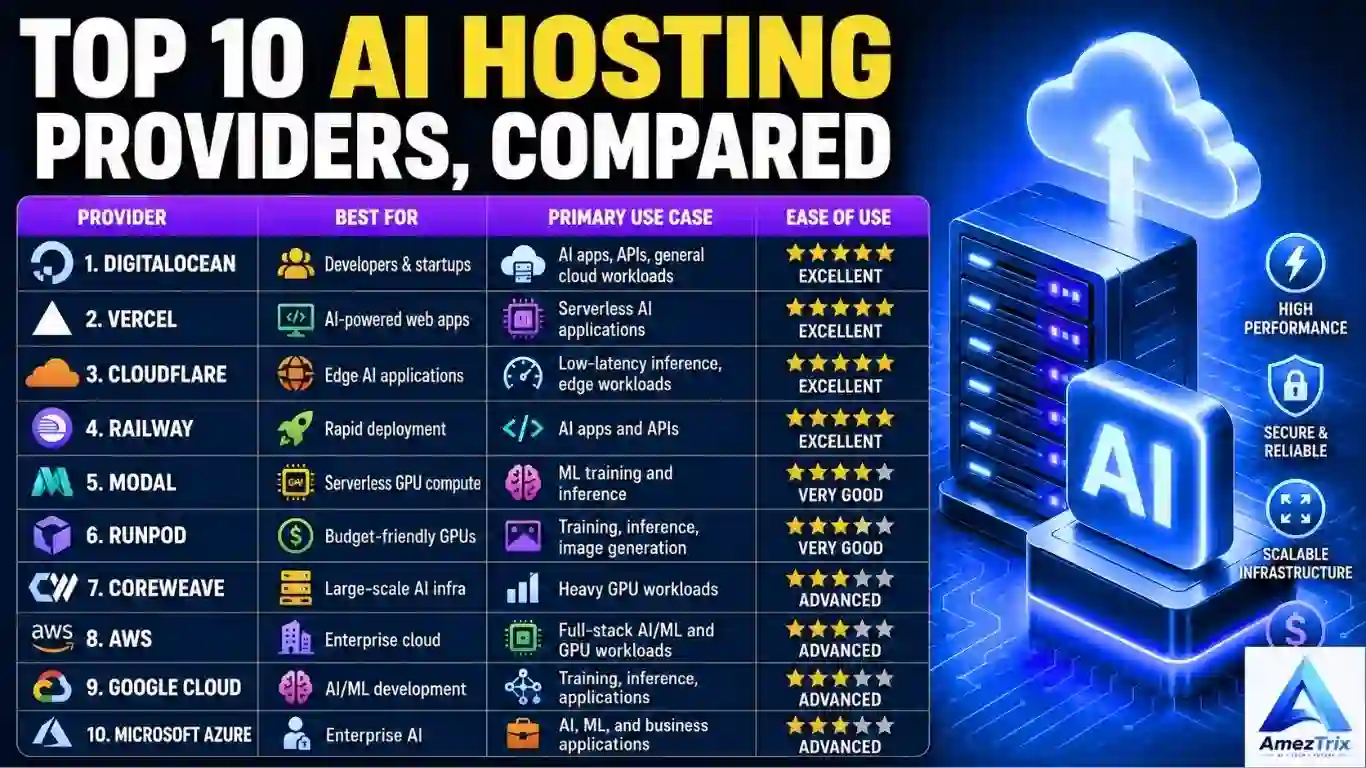
This table shows where each provider fits. It is not a strict ranking, because the right pick changes with your project.
| Provider | Type | Best for | GPU focus | Learning curve |
|---|---|---|---|---|
| Vercel | Serverless platform | AI web apps, Next.js, chat UIs | No | Easy |
| DigitalOcean | Cloud servers | Startups, APIs, SaaS | Limited | Easy |
| Railway | Developer platform | Prototypes, small APIs, agents | No | Easy |
| Cloudflare | Edge platform | Low-latency, global apps | Edge inference | Easy to medium |
| Modal | Serverless GPU | Inference, batch jobs, ML pipelines | Yes | Medium |
| RunPod | GPU cloud | Experiments, fine-tuning, image generation | Yes | Medium |
| CoreWeave | GPU cloud | Large-scale training and inference | Yes | Advanced |
| AWS | Hyperscaler | Enterprise AI, full-stack workloads | Yes | Advanced |
| Google Cloud | Hyperscaler | Data science, ML development | Yes | Advanced |
| Microsoft Azure | Hyperscaler | Enterprises on Microsoft tools | Yes | Advanced |
Best AI Hosting Providers: Honest Reviews
1. Vercel: Best for AI Web Apps
Building a chat interface or content tool with Next.js? Vercel removes most of the deployment work. Connect a Git repo and it ships. It also handles streaming responses well, which matters for chat-style AI.
Good for: AI chat apps, dashboards, frontend-heavy products.
Watch out for: Serverless time limits and usage-based billing can surprise you on long AI jobs. Check current limits for your plan.
2. DigitalOcean: Best for Simple Cloud Control
DigitalOcean gives you real servers without the maze of options on the big clouds. A droplet plus a managed database covers most API-based AI apps.
Good for: indie developers, SaaS products, agents with background workers.
Watch out for: You manage more yourself than on a platform like Vercel.
See current DigitalOcean plans →
3. Railway: Best for Fast Deployment
Railway is built for the “push and go” workflow. Python and Node apps, databases and queues are quick to set up, which makes it a good home for prototypes and small agents.
Good for: prototypes, indie hackers, small AI APIs.
Watch out for: Costs can climb with scale. Compare against a plain VM before committing long term.
Try Railway →
4. Cloudflare: Best for Edge and Global Speed
Cloudflare runs code close to your users, which cuts latency for international audiences. It also offers AI inference for supported models, plus solid security tooling.
Good for: global apps, lightweight inference, security-focused teams.
Watch out for: The platform has its own way of doing things, and model choice is limited to what it supports.
5. Modal: Best for On-Demand GPUs
Modal lets you run Python functions on GPUs without managing servers. You pay for the time jobs run instead of keeping a GPU idle all day, which suits spiky workloads.
Good for: batch inference, ML pipelines, developers who dislike server admin.
Watch out for: Test cold starts and per-second billing against your real traffic.
6. RunPod: Best for Budget-Friendly GPU Access
RunPod is a GPU cloud with a wide range of GPU types for inference, fine-tuning and image generation. It is a common pick for hands-on experiments and Stable Diffusion setups.
Good for: LLM inference, fine-tuning, model experiments.
Watch out for: GPU availability varies by type and region. Check stock before you plan around a specific card.
Check RunPod GPU options →
7. CoreWeave: Best for Large-Scale GPU Workloads
CoreWeave focuses on GPU infrastructure for big AI jobs. It is built for teams that need serious compute, not for someone hosting a small business website.
Good for: AI labs, enterprise training, large inference deployments.
Watch out for: It is overkill for small projects and usually needs more planning.
8. AWS: Best for Breadth and Enterprise Scale
AWS covers nearly every layer: compute, storage, GPUs, managed ML services and more. If you can imagine an infrastructure need, AWS probably has a service for it.
Good for: complex apps, teams with DevOps skills, companies already on AWS.
Watch out for: The learning curve is steep, and bills get confusing fast without cost alerts.
9. Google Cloud: Best for ML Development
Google Cloud offers GPUs, its own TPU hardware and managed ML tooling. Data science and model development teams already in Google’s ecosystem will feel at home.
Good for: data science teams, ML engineering, Google-centric stacks.
Watch out for: Like AWS, it can be heavy for simple apps.
10. Microsoft Azure: Best for Microsoft-Centered Enterprises
Azure suits organizations already running on Microsoft tools. It brings AI services, GPUs, and strong compliance and identity features for large companies.
Good for: enterprises, regulated industries, Microsoft-based teams.
Watch out for: Pricing and product names can get complicated. Read the details first.
Best AI Hosting by Use Case
| Your goal | Good starting points |
|---|---|
| First AI app or side project | Vercel, Railway, DigitalOcean |
| AI agent using an LLM API | Railway, DigitalOcean, Modal, Cloudflare |
| AI-powered WordPress site | Fast web hosting for beginners |
| Global, low-latency app | Cloudflare |
| Self-hosted open-source LLM | RunPod, Modal, CoreWeave |
| AI content and image tools | RunPod, Modal |
| Training or fine-tuning at scale | CoreWeave, AWS, Google Cloud, Azure |
| Enterprise or regulated workloads | AWS, Azure, Google Cloud |
Building an agent? Our guide on how to build AI agents covers the full stack.
Running an AI-Powered WordPress Site?
Good news: you do not need GPU hosting. A fast, reliable WordPress host is enough, because your AI plugin simply calls an API. Look for good server response times, caching, daily backups and easy staging. For beginners, Hostinger is a budget-friendly start. For managed cloud performance, Cloudways and SiteGround are worth comparing. Not sure how AI-ready hosting differs from the usual kind? Read our breakdown of AI hosting vs traditional hosting.
How to Choose AI Hosting: 6 Simple Steps
Step 1: Define your workload
Website, API-based app, agent or model? Write it in one sentence. Every other choice follows from it.
Step 2: Pick API or self-hosted
External API: faster to build and no GPU to manage, but you pay per use and depend on the provider. Comparing models first? See our Gemini 3.5 Flash vs GPT-5.5 vs Claude Opus 4.7 comparison.
Self-hosted: more control and possibly lower cost at high volume, but you own the GPU bill, security and maintenance. Choose it only with a clear reason.
Step 3: Check GPU details
Look at the GPU model, VRAM, availability, and whether you rent on-demand or reserve. VRAM trips up many people. A fast GPU with too little memory cannot load a large model.
Step 4: Estimate total monthly cost
Add compute or GPU hours, storage, bandwidth, backups, databases and API fees. A GPU left idle all month can cost more than a pricier one used well.
Step 5: Run a small pilot
Test a real workload for a week. Track response time, errors and cost per 1,000 requests. Real numbers beat any comparison table, including this one.
Step 6: Plan your exit
Use containers such as Docker and avoid deep lock-in. Switching providers later is far easier when your app is portable.
AI Hosting Checklist
- ☐ I know if my app calls an API or runs its own model
- ☐ I know the VRAM my model needs (if self-hosting)
- ☐ I estimated total monthly cost, not just compute
- ☐ I checked bandwidth and data transfer fees
- ☐ Billing alerts and spending limits are on
- ☐ HTTPS and a firewall are in place
- ☐ API keys live in environment variables, not frontend code
- ☐ Backups are set up and I tested a restore
- ☐ Monitoring covers CPU, GPU, memory, disk and network
- ☐ My app can scale without a rebuild
- ☐ My app is containerized so I can switch providers
How Much Does AI Hosting Cost?
There is no honest single number. Cost depends on traffic, model size and usage patterns, and providers change pricing often. Use each provider’s live pricing page, and budget for everything in the table below.
| Cost type | Applies to | Easy to forget? |
|---|---|---|
| Compute or server fees | Every project | No |
| GPU hourly rental | Self-hosted models | No |
| Idle GPU time | Always-on GPU servers | Yes |
| External API usage | API-based apps | Yes |
| Storage for models and data | Self-hosted and RAG apps | Yes |
| Bandwidth and data transfer | High-traffic or large-file apps | Yes |
| Backups and monitoring | Production apps | Yes |
Practical tip: Set a monthly spending cap or alert on day one. Surprise bills are a classic best AI hosting headache, especially with pay-as-you-go GPUs and API usage.
AI Hosting Security Basics
AI apps often handle private chats, documents and API keys. Treat security as part of setup, not a chore for later. For deeper protection, see our guide to AI agents and computer-use risks.
- Use HTTPS everywhere
- Keep API keys on the server, never in browser code or public repos
- Use roles and least-privilege access
- Add firewalls and rate limiting to block API abuse
- Decide what user data you log, and for how long
- Read the provider’s data-handling and compliance documents if you handle sensitive data
Scalability: Plan for the Day It Works
An app that handles 100 users can struggle at 100,000. Before you commit, check for auto-scaling, load balancing, container support and a CDN. Serverless platforms absorb spikes well. Fixed servers need more planning.
Common AI Hosting Mistakes
- Renting a GPU you do not need. If you only call an API, a GPU is wasted money.
- Shopping by monthly price alone. Count idle time and bandwidth too.
- Ignoring VRAM. Your model has to fit in GPU memory.
- Starting on a hyperscaler too early. Powerful, yes, but slow to learn when you just need to ship.
- Hardcoding API keys. Leaked keys can run up big bills fast.
- Skipping spending alerts. One runaway job can burn a month’s budget.
- Skipping load tests. Real traffic behaves differently from your laptop.
- Locking yourself in. Keep your setup portable.
Red Flags When Choosing a Provider
- Vague GPU specs. No exact model or VRAM listed? Move on.
- “Unlimited” claims without a clear fair-use policy.
- Hidden bandwidth or egress fees buried in the docs.
- Unclear data-handling or privacy terms for AI workloads.
- No real support path when production breaks.
- All marketing, no documentation. Good providers explain how things work.
- Pressure to prepay long contracts before you have tested anything.
The Honest Downsides
A good guide should not only sell the upside. Here is what can go wrong.
- Costs are hard to predict. Usage-based pricing is fair, but a traffic spike or a bug can inflate it.
- GPU supply is uneven. Popular GPU types can be hard to get at certain times or in certain regions.
- Easy platforms limit control. Vercel and Railway are simple because they hide knobs you may want later.
- Big clouds are heavy. AWS, Google Cloud and Azure can overwhelm small teams.
- Self-hosting is not always cheaper. Count engineering time. At low volume, an API can win.
- This list is a starting point. Plans and features change, so verify before you buy.
A Practical Path for Startups
Many small teams grow in this order.
- Build: Launch on Vercel, Railway or DigitalOcean with an external AI API.
- Measure: Track usage, cost per request and response times for a few weeks.
- Optimize: Add caching, shorter prompts, or a cheaper model where quality allows.
- Specialize: If cost or privacy needs justify it, move one workload to Modal, RunPod or a hyperscaler.
Example: A small team builds an AI writing tool on Vercel using an LLM API. Months later, one high-volume feature makes a smaller self-hosted model worth trying. They move only that feature to a GPU service and leave the rest alone. Same product, no big rebuild.
Still deciding what to build? Read our guide on how to build an AI SaaS startup.
Related Guides on AmezTrix
- Best AI tools to pair with your hosting setup
- Gemini 3.5 Flash, a fast model option for API-based apps
- Free AI courses with certificates to learn the skills behind AI apps
- Best keyword research tools to find what your AI app’s audience searches for
- LLMO in SEO to help AI search engines find and cite your site
- AI freelance jobs and part-time AI jobs online if you want to earn with these skills
Frequently Asked Questions
What is the best AI hosting overall?
There is no single winner. Vercel, DigitalOcean, Railway and Cloudflare suit most API-based AI apps. RunPod, Modal, CoreWeave, AWS, Google Cloud and Azure suit GPU and enterprise workloads. Choose based on whether you call a model API or run the model yourself.
Do I need a GPU to host an AI app?
Usually not. If your app calls an external API like OpenAI or Anthropic, regular CPU hosting is enough. You only need a GPU when you run the model on your own infrastructure, such as self-hosting an open-source model or fine-tuning.
What is the best AI hosting for beginners?
Vercel, Railway and DigitalOcean are friendly starting points. They offer simple deployment, clear documentation and Git-based workflows. Skip GPU clouds until you have a real reason to run your own model.
What is the best hosting for AI agents?
Agents need background workers, scheduled jobs, storage and secure keys. Railway, DigitalOcean, Modal and Cloudflare handle this well when you use an LLM API. Pick a GPU provider only if the agent runs its own model.
Can I run an AI model on a regular VPS?
Small models can run on a CPU-only VPS, but slowly. Larger models need a GPU with enough VRAM. Before serving real users, check your model’s memory needs, then choose a server that can actually load it.
Does a WordPress AI site need special hosting?
No. WordPress sites using AI plugins or API connections run fine on fast, reliable WordPress or cloud hosting. GPU hosting only matters if you run an AI model on the same server, which most sites should avoid.
How much does the best AI hosting cost?
It varies widely. A small API-based app can run on a modest plan, while GPU workloads cost far more. Total cost includes compute, GPU time, storage, bandwidth and API fees. Check each provider’s current pricing page before deciding.
Is serverless better than a dedicated GPU server?
Serverless fits spiky or occasional workloads because you pay when code runs. A dedicated GPU fits steady, high-volume use where it stays busy. If a GPU sits idle most of the day, serverless is often cheaper.
Final Verdict
The best AI hosting is the one that matches your workload. That is less exciting than a single “winner,” but it is the advice that saves money.
Building a chatbot, agent or AI website on an API? Start with Vercel, Railway, DigitalOcean or Cloudflare. Running your own models? Look at RunPod, Modal or CoreWeave. Working at enterprise scale with compliance needs? AWS, Google Cloud and Azure earn their complexity.
Start lean, measure real usage, and move into specialized compute only when the numbers say so.
About the Author
Rajendra Parmar is the founder of AmezTrix and a passionate AI and technology writer. He shares practical guides, honest reviews and tutorials on AI tools, WordPress, web hosting, SEO and digital marketing.

Rajendra Parmar
Founder & Editor • AmezTrix
Rajendra Parmar is the Founder and Editor of AmezTrix, a platform covering Artificial Intelligence, Technology, WordPress, Web Hosting, Digital Marketing, Gadgets, Software Reviews, and emerging innovations. His mission is to simplify complex technology through practical tutorials, honest reviews, and well-researched guides that help readers make smarter digital decisions.