Quick Answer: Cloud WordPress hosting runs your site on a network of connected cloud servers instead of one shared machine. It gives you more resources, easier upgrades and steadier speed during traffic spikes. In 2026, the top four providers are Hostinger, Cloudways, SiteGround and Kinsta.
Cloud WordPress Hosting 2026: Compare the best providers, pricing, speed, security and scalability to find the right WordPress hosting plan.
Cloud WordPress Hosting: Best Providers, Pricing & Buying Guide 2026
If your WordPress site is starting to outgrow its current hosting plan, you’ve probably noticed the warning signs already — pages that take too long to load, sudden slowdowns during traffic spikes, and a hosting dashboard that gives you almost no room to breathe. Shared hosting is great when you’re just starting out, but it wasn’t built for websites that are actually growing.
Generally, this is where the conversation about cloud WordPress hosting has centered.
Cloud WordPress hosting blends flexible cloud infrastructure with WordPress-specific tools — performance tuning, built-in security, automated backups, and the ability to scale on demand. Instead of squeezing your site onto a single crowded server, you get access to a distributed environment designed to handle unpredictable traffic without falling over.
But is it actually worth paying more for? Who really needs it — bloggers, small business owners, WooCommerce store operators, or only high-traffic publishers?
This guide breaks down what cloud WordPress hosting is, how it actually works, its real pros and cons, what it costs, the features worth paying attention to, and the top providers to consider in 2026.
What Exactly Is Cloud WordPress Hosting?
Cloud WordPress hosting runs your website on cloud-based computing infrastructure instead of a single physical shared server.
On traditional shared hosting, dozens (sometimes hundreds) of websites live on one machine and split its resources. If a neighboring site suddenly gets a traffic surge or starts hogging CPU, your own site can slow down through no fault of your own.
Cloud hosting works differently.
Your site operates inside a broader cloud environment where resources — CPU, RAM, storage — can be distributed more intelligently. Depending on your provider and plan, this might mean dedicated or isolated resources, on-demand scaling, built-in caching layers, automatic backups, CDN integration, and other managed WordPress features baked right in.
Every hosting company architects this a little differently, so “cloud hosting” isn’t a guarantee of blazing performance by itself — the label matters less than what’s actually under the hood.
For most WordPress site owners, the real appeal comes down to one thing: you get more headroom to grow without immediately jumping to a full dedicated server.
How Does Best Cloud WordPress Hosting Actually Work?
Rather than living on one static machine, your website taps into a connected web of cloud infrastructure built for flexibility and smarter resource allocation.
A typical Cloud WordPress hosting setup usually includes some combination of:
- Cloud-based servers
- SSD or NVMe storage
- Dedicated or isolated resource pools
- Redundant infrastructure components
- A Content Delivery Network (CDN)
- Server-side caching
- Automated backups
- SSL certificates
- Malware and security monitoring
- Web application firewalls
- WordPress-specific performance tuning
- Staging environments
- Scalable CPU and RAM allocations
When traffic climbs, a solid cloud hosting platform can add resources or make upgrading painless. That said, not every provider scales the same way — some require you to manually bump up your plan, while others scale more automatically in the background.
Before you buy, it’s worth digging into exactly how a provider’s scaling model works rather than assuming “cloud” automatically means “elastic.
Cloud Hosting vs. Shared Hosting for WordPress
This is the question most site owners actually want answered, and honestly, the right answer depends entirely on where your website currently stands.

When Shared Hosting Still Makes Sense
Shared hosting tends to work well for:
- New blogs and personal sites
- Small, low-traffic business pages
- Beginners still learning the ropes
- Anyone working with a tight budget
It’s cheap, simple, and easy to manage — the trade-off is that resources are split across many other websites.
When Cloud Hosting Makes More Sense
Cloud hosting is the better fit once you’re dealing with:
- A growing audience
- A business-critical website
- High-traffic blogs or publications
- Online stores and WooCommerce shops
- Agency or multi-client hosting needs
- Membership sites
- Resource-heavy WordPress builds
- A site that’s about to see a traffic jump
Cloud hosting almost always costs more than basic shared plans, but for a website that’s actively growing, the extra performance and scalability can more than pay for itself.
Quick Comparison
| Feature | Shared Hosting | Cloud WordPress Hosting |
|---|---|---|
| Cost | Low | Medium to High |
| Performance | Fine for small sites | Built for scaling sites |
| Scalability | Limited | Much stronger |
| Resources | Shared across users | Dedicated/isolated, plan-dependent |
| Traffic Handling | Restricted | More flexible |
| Security | Basic to decent | Often more advanced |
| Backups | Usually included | Usually included |
| CDN | Sometimes available | Commonly bundled in |
| Server Control | Minimal | Considerably more |
| Best For | Beginners | Growing sites & businesses |
One important reality check: cloud hosting isn’t automatically faster just because the word “cloud” is in the plan name. What actually determines speed is the hardware, software stack, caching setup, network quality, server location, and how well the platform is optimized specifically for WordPress.
The Real Benefits of Cloud WordPress Hosting
1. Scalability That Actually Keeps Up
This is usually the number one reason businesses make the jump.
Picture this: your blog normally pulls in a few thousand visitors a month, and then one post suddenly goes viral. Within hours, you’re getting thousands of hits on a single page.
A rigid, resource-capped hosting plan can crumble under that kind of spike. Cloud infrastructure, by contrast, is built to absorb sudden demand far more gracefully — a genuine advantage for any site with growth ambitions.
2. Noticeably Better Performance
Premium cloud platforms typically run on modern hardware — fast CPUs, SSD or NVMe drives, tuned PHP environments, aggressive caching, and CDN delivery.
But hosting is only one piece of the speed puzzle. Your theme, plugins, image sizes, database health, and third-party scripts all factor in too. Even the best cloud server can’t fully rescue a bloated, poorly optimized WordPress install. Real speed comes from pairing solid hosting with disciplined site optimization.
3. Built to Handle Unpredictable Traffic
Sites in fast-moving niches — tech news, AI tools, finance, e-commerce, product launches, breaking news, viral content — often see traffic that’s genuinely hard to forecast. That’s exactly the scenario where scalable cloud infrastructure earns its keep.
4. Stronger Reliability
Many cloud platforms are built with redundancy in mind, spreading your site across distributed infrastructure rather than betting everything on one machine.
That said, no host can honestly promise zero downtime, ever. Before signing up, look closely at a provider’s uptime track record, infrastructure setup, backup policies, and how responsive their support team actually is when things go wrong.
5. Upgrading Without the Headache
On basic shared hosting, moving to more power sometimes means a full migration. Cloud WordPress hosting generally makes it much easier to bump up CPU, RAM, storage, or bandwidth without tearing your site apart and rebuilding it — a real advantage as your traffic and needs evolve.
6. More Robust Security Options
Higher-tier cloud WordPress plans often bundle in free SSL, a web application firewall, DDoS protection, malware scanning, automated backups, hardened server configurations, login protection, and vulnerability monitoring.
Security features vary a lot between providers, though — never assume two “cloud” plans offer the same protection just because they use the same label.
7. Managed WordPress Perks
Plenty of cloud platforms now offer managed WordPress hosting, meaning the provider takes care of the technical heavy lifting — core updates, automated backups, security monitoring, performance tuning, staging environments, migrations, CDN setup, and caching. For beginners and busy business owners alike, this can save an enormous amount of time.
Best Cloud WordPress Hosting Providers to Consider in 2026
There’s no single “best” provider for every website — the right pick depends on your budget, traffic level, technical comfort, and business goals.
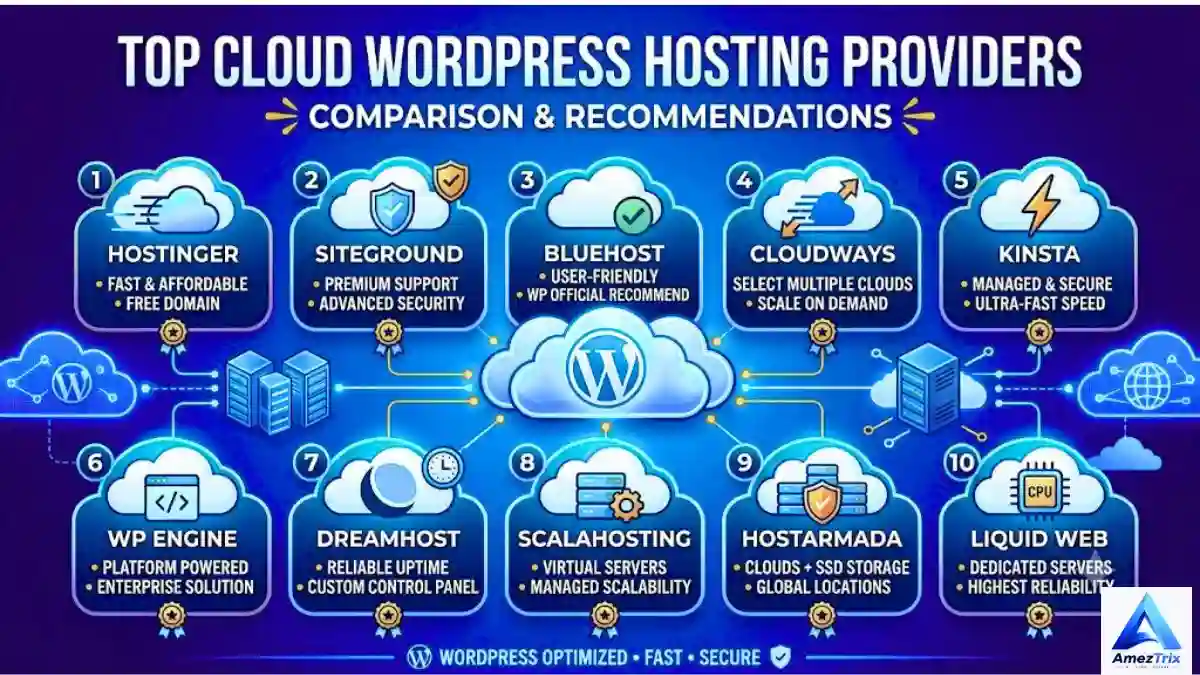
1. Hostinger Cloud Hosting
Best for: Beginners, bloggers, small businesses, and growing sites
Hostinger remains one of the more approachable entry points into Cloud WordPress hosting, without demanding heavy server-management skills from the user. Its cloud lineup includes WordPress-ready tools, NVMe storage, CDN access, backup options, and AI-assisted features depending on the tier. Its Cloud Startup plan is aimed at agencies and higher-traffic projects, offering around 100GB of NVMe storage along with both daily and on-demand backups. Hostinger is also listed among WordPress.org’s recommended hosting providers.
Why people choose it:
- Beginner-friendly dashboard
- True cloud infrastructure
- Native WordPress support
- Built-in CDN
- Backup options included
- AI-assisted tools
- Support for multiple websites on higher tiers
- Competitive intro pricing
If you want an affordable way into cloud hosting without babysitting a complicated server, Hostinger is worth a look.
2. Cloudways
Best for: Developers, agencies, and advanced WordPress users
Cloudways takes a different route entirely — instead of being a traditional host, it’s a managed layer sitting on top of infrastructure from providers like DigitalOcean, Vultr, Linode, AWS, and Google Cloud. That gives you far more control over which underlying resources power your site.
It also includes staging, cloning, caching tools, security features, and hands-off server administration.
Why people choose it:
- Choice of multiple cloud infrastructure providers
- Managed WordPress environment
- Flexible resource allocation
- Built-in staging
- Server-level caching
- Developer-oriented toolset
- Pay-as-you-go pricing on select plans
Cloudways shines once you’ve outgrown shared hosting but still don’t want to manually manage every server task. The trade-off is a steeper learning curve for total beginners.
3. SiteGround Cloud Hosting
Best for: Businesses, agencies, and resource-heavy websites
SiteGround runs its managed Cloud WordPress hosting on top of Google Cloud infrastructure. Its cloud plans start considerably higher than entry-level shared hosting — the Jump Start plan is listed around $100/month, with higher tiers available for sites that need more CPU, RAM, and storage.
That pricing makes SiteGround Cloud a better fit for established businesses that genuinely need dedicated cloud resources rather than beginners hunting for the cheapest possible plan.
Why people choose it:
- Google Cloud–powered infrastructure
- Dedicated resource allocation
- Fully managed environment
- Automatic scaling options
- Daily and on-demand backups
- Advanced security tooling
- Priority support access
4. Kinsta Managed WordPress Hosting
Best for: Premium WordPress sites and established businesses
Kinsta is a premium managed WordPress platform built around performance, security, and infrastructure that’s largely handled for you. It includes staging environments, daily backups, CDN delivery, and scalable plans — though it’s worth understanding its usage-based limits and overage policies before committing, since visitor counts, bandwidth, and storage all factor into pricing.
Kinsta’s CDN runs through Cloudflare and comes with an enterprise-grade firewall plus DDoS protection.
Why people choose it:
- Premium managed WordPress environment
- Cloud-based infrastructure
- Free CDN included
- Edge caching
- Daily backups
- Built-in staging
- Strong security stack
- Performance monitoring
- WordPress-focused support team
Kinsta tends to appeal most to businesses, agencies, WooCommerce stores, and publishers who value performance and managed support over chasing the lowest price tag.
What Does Cloud WordPress Hosting Actually Cost?
One of the most common mistakes buyers make is judging a plan purely by its advertised first-month price.
Cloud hosting pricing varies enormously. Budget plans might run just a few dollars a month on a promotional term, while premium managed platforms can climb into the tens or hundreds of dollars monthly. For instance, Hostinger’s promotional cloud pricing tends to sit well below its renewal rate, while SiteGround’s managed cloud tier starts around $100/month.
That gap matters. Never compare hosts using promotional pricing alone.
Before signing up, check:
- Introductory vs. renewal pricing
- Billing cycle length
- Setup fees
- Backup charges
- CDN costs
- Email hosting availability
- Storage and visitor limits
- Bandwidth caps
- Overage fees
- Migration costs
A cheap plan can quietly become expensive after renewal, while a pricier plan can still be excellent value if it saves you time and technical headaches.
Is Cloud Hosting for WordPress Actually Worth It?
For some sites, absolutely. For others, it’s simply overkill.
If you’re running a brand-new blog pulling in a few hundred visitors a month, premium Cloud WordPress hosting is probably more than you need right now — a solid managed WordPress plan will do the job just fine, with room to upgrade later.
Cloud hosting starts making real sense once:
- Your traffic is climbing steadily
- Your site generates real revenue
- You’re running an online store or WooCommerce
- You keep hitting resource ceilings
- Performance is becoming a bottleneck
- You expect traffic spikes
- You manage multiple websites
- You need staging and dev tools
- Downtime would actually cost you money
The takeaway: buy cloud hosting because your site genuinely needs it — not because the word “cloud” sounds impressive.
Best Cloud Hosting for Beginners
If you’re new to this, prioritize simplicity above everything else. A complicated cloud server can be genuinely frustrating if you’ve never managed hosting before.
Look for:
- One-click WordPress installs
- An intuitive control panel
- Free SSL
- Automated backups
- CDN included
- Malware protection
- Free site migration
- 24/7 support
- Simple scaling options
Unless you’re comfortable with Linux administration, server security, DNS, PHP-FPM, NGINX, and firewall configuration, a managed cloud platform will save you a lot of unnecessary stress.
Best Cloud Hosting for Small Businesses
Small businesses need balance — not the most expensive enterprise-grade server on the market, but consistent, dependable performance.
Focus on:
- Reliable, consistent performance
- Strong uptime history
- SSL included
- Regular backups
- Solid security
- CDN access
- Straightforward management
- Responsive customer support
- Room to scale
- Transparent renewal pricing
If your website is a real source of leads, bookings, or sales, spending a bit more on dependable infrastructure is usually money well spent.
Best Cloud Hosting for High-Traffic Sites
High-traffic sites need to look past storage numbers entirely. Instead, pay attention to:
- CPU allocation
- RAM
- PHP worker limits
- Database performance
- Object caching
- CDN capacity
- Server-level caching
- Network performance
- Backup architecture
- Scaling flexibility
- Traffic ceilings and overage fees
A site pulling 500,000 monthly page views has very different needs than one pulling 50,000 — and traffic type matters too. A mostly static blog is far easier to serve than a WooCommerce store where users are constantly triggering database-heavy actions.
Cloud Hosting for WooCommerce Stores
Online stores put a different kind of strain on hosting because customers are constantly interacting with the site — searching products, adding to cart, updating quantities, creating accounts, applying coupons, completing checkout, and checking order status. That level of activity generates far more database load than a typical blog.
For WooCommerce, prioritize:
- Fast database performance
- Object caching
- CDN coverage
- SSL
- Automated backups
- Malware protection
- Staging environments
- Scalable resources
- Strong uptime
- Payment security
For a serious e-commerce operation, price shouldn’t be the deciding factor — reliability should be.
Features Worth Actually Checking Before You Buy
SSD or NVMe Storage — NVMe can significantly outperform older storage tech, but storage speed alone won’t make your site fast; the entire stack matters.
CDN — Caches and delivers static content closer to your visitors, especially valuable for an international audience.
Automated Backups — Look for daily backups plus on-demand options. Don’t rely solely on your host’s backups — keeping an independent copy is still smart practice.
Staging — Lets you test plugin updates, theme changes, WooCommerce updates, and redesigns safely before pushing them live.
SSL — Non-negotiable for running your site securely over HTTPS.
Security Stack — Firewall, malware scanning, DDoS protection, login protection, vulnerability monitoring, and automatic security patching.
Customer Support — Great infrastructure doesn’t help much if you can’t reach anyone when something breaks. Check for live chat, ticketing, phone support, WordPress specialists, and 24/7 availability.
How to Choose the Right Cloud WordPress Host: A 5-Step Process
Step 1 — Estimate your actual traffic. Pull real numbers from Google Analytics and Search Console before assuming you need a premium plan.
Step 2 — Identify your site type. Blog, business site, news outlet, affiliate site, WooCommerce store, membership platform, or agency site — each has different resource needs.
Step 3 — Set a realistic budget. Factor in renewal pricing, not just the first invoice.
Step 4 — Compare resources properly. Don’t just look at storage — weigh CPU, RAM, bandwidth, PHP workers, CDN, backups, staging, and traffic allowances together.
Step 5 — Check the upgrade path. A good cloud host should let you scale up smoothly as your site grows — this is one of cloud hosting’s biggest advantages over shared hosting.
Pros and Cons of Cloud WordPress Hosting
Pros:
- Strong scalability
- Flexible resource allocation
- Well suited to growing sites
- Solid performance potential
- Advanced security options
- Handles traffic spikes well
- Managed options widely available
- Great for business and WooCommerce use cases
- Easier resource upgrades
Cons:
- Pricier than basic shared hosting
- Pricing structures can get confusing
- Premium managed plans add up fast
- Some providers charge overage fees
- Not every “cloud” plan is built the same
- More advanced platforms have a learning curve
Cloud hosting isn’t automatically the right call for every WordPress site — it’s a trade-off worth weighing honestly.
Cloud Hosting vs. VPS Hosting
Both get compared often because each offers more power than basic shared hosting. A VPS gives you a virtualized server with dedicated resource allocations, while cloud hosting typically taps into broader infrastructure with more built-in flexibility and scalability — though this depends heavily on how the provider designed their platform.
Managed Cloud WordPress hosting tends to be easier for beginners since the provider handles most server administration. An unmanaged VPS, on the other hand, gives developers far more granular control. Which one fits you comes down to how much technical responsibility you actually want to take on.
Does Cloud Hosting Help SEO?
Not directly — Cloud WordPress hosting itself isn’t a Google ranking factor. But it can influence SEO indirectly through faster page loads, stronger uptime, better user experience, improved Core Web Vitals potential, quicker server response times, and more graceful handling of traffic spikes.
Best web Hosting is just one ingredient, though. Content quality, search intent, internal linking, backlinks, technical SEO, mobile usability, and structured data all matter just as much — so don’t buy expensive hosting expecting it to single-handedly boost your rankings.
How Much Cloud Hosting Does Your WordPress Site Actually Need?
There’s no universal number, but here’s a rough starting point:
Small blog: 1–2 CPU cores, 2–4GB RAM, SSD/NVMe storage, CDN, automated backups
Growing business site: 2–4+ CPU cores, 4–8GB RAM, NVMe storage, advanced caching, CDN, staging, daily backups
High-traffic site: Higher CPU allocation, more RAM, advanced/object caching, CDN, database optimization, scalable infrastructure, premium support
Treat these as general guidelines, not fixed rules — your actual needs will depend on your specific site and traffic patterns.
Frequently Asked Questions
What is WordPress Cloud Hosting?
It’s a Cloud WordPress hosting environment built on cloud infrastructure, offering better scalability, flexibility, performance, and reliability than basic shared hosting — though this varies by provider.
Is cloud hosting better than regular WordPress hosting?
Not automatically. “WordPress hosting” refers to hosting optimized for WordPress specifically, while “cloud hosting” describes the underlying infrastructure. A service can be both at once — the right choice depends on your site’s actual requirements.
Is cloud WordPress hosting expensive?
It can be. Entry-level plans are fairly affordable, while premium managed cloud hosting can get pricey fast. Always compare promotional pricing against renewal rates and possible overage charges.
Is cloud hosting good for beginners?
Yes, as long as you go with a managed platform rather than an unmanaged cloud server that requires hands-on administration.
Can cloud hosting handle high traffic?
Generally, yes — but actual capacity still depends on CPU, RAM, database performance, caching, CDN setup, and the provider’s specific limits.
Is cloud hosting faster than shared hosting?
Often, but not automatically. Speed depends on infrastructure quality and how well your site itself is optimized.
Can I move my site from shared hosting to cloud hosting?
Yes — through a migration plugin, your new host’s migration service, or a manual transfer.
Is cloud hosting good for WooCommerce?
Yes. WooCommerce stores benefit from the extra resources, caching, and scalability as product catalogs and traffic grow.
Does cloud hosting improve Google rankings?
Not directly. It can support better technical performance and user experience, but rankings depend on far more than hosting alone.
Final Verdict: Should You Buy Cloud WordPress Hosting in 2026?
Cloud WordPress hosting makes the most sense for sites that have genuinely outgrown basic shared hosting. It brings together scalability, stronger performance potential, resource flexibility, tighter security, and managed WordPress conveniences that shared plans simply can’t match.
For beginners and smaller sites, an affordable cloud plan offers a comfortable upgrade path without requiring deep server knowledge. For businesses, WooCommerce stores, agencies, and high-traffic publishers, managed cloud hosting provides the infrastructure needed to grow with real confidence.
Just don’t pick a host based on the lowest advertised price alone. Look past the promotional offer and compare renewal pricing, CPU, RAM, storage, CDN, backups, security, caching, traffic limits, support quality, staging tools, scalability, and overage policies.
If you’re on a budget, Hostinger’s cloud plans are worth evaluating. If you want flexible, developer-friendly managed infrastructure, Cloudways is a strong contender. If your business needs dedicated managed cloud resources, SiteGround Cloud sits at the premium end. And if top-tier managed WordPress performance and support matter most to you, Kinsta is worth serious consideration.
At the end of the day, the best cloud WordPress hosting isn’t the most expensive plan on the market — it’s the one that gives your site enough resources, reliability, and room to grow, without making you pay for capacity you’ll never actually use.
If your traffic is climbing, your current host keeps hitting resource limits, or your site is starting to feel unpredictable, moving to a properly configured cloud WordPress environment could be exactly the next step you need.
About Author
Rajendra Parmar is the Founder and Editor of AmezTrix, where he covers Artificial Intelligence, Technology, WordPress, Web Hosting, Digital Marketing, Gadgets, and Software. His mission is to simplify complex technology through practical tutorials, honest reviews, and well-researched guides that help readers make smarter digital decisions.

Rajendra Parmar
Founder & Editor • AmezTrix
Rajendra Parmar is the Founder and Editor of AmezTrix, a platform covering Artificial Intelligence, Technology, WordPress, Web Hosting, Digital Marketing, Gadgets, Software Reviews, and emerging innovations. His mission is to simplify complex technology through practical tutorials, honest reviews, and well-researched guides that help readers make smarter digital decisions.