AI Hosting vs Traditional Hosting: Compare performance, cost, security & AI server benefits to choose the right hosting. | AmezTrix

AI Hosting vs Traditional Hosting: Which One Actually Fits Your Website?
If you’ve been comparing web hosting plans lately, you’ve probably noticed providers slapping labels like “AI-Ready,” “AI-Powered,” or “AI-Optimized” on everything. It raises a fair question: does your website actually need specialized AI infrastructure, or are you just paying extra for a trendy buzzword? That’s exactly what this AI Hosting vs Traditional Hosting comparison is here to settle.
Here’s the short version: these two aren’t competing for the same job. What you should choose really comes down to what you’re actually running. A typical WordPress blog, business site, portfolio, or content-driven website mostly needs solid CPU performance, fast SSD/NVMe storage, caching, security, and room to scale — not a pricey GPU server sitting there doing nothing.
AI applications are a different story. Machine-learning projects, large-scale inference, and genuinely compute-heavy workloads are where specialized AI server hosting starts to earn its higher price tag. Getting this distinction right in the AI hosting vs traditional hosting decision means you won’t overpay for horsepower your site will never use — while still picking infrastructure that actually delivers the performance and flexibility you need.
Table of Contents
- What Exactly Is AI Hosting?
- What Is Traditional Hosting, Really?
- The Core Differences at a Glance
- Why Businesses Choose AI Hosting
- Why Traditional Hosting Still Wins for Most People
- CPU vs GPU: What Your AI App Actually Needs
- Performance: Marketing Claims vs Reality
- Scalability and Growing Pains
- Security Considerations for Both
- Cost Breakdown
- Does WordPress Need AI Hosting?
- Who Should Pick What
- Does AI Hosting Help SEO? (Spoiler: No)
- Mistakes People Keep Making
- The Hybrid Approach Nobody Talks About Enough
- Where Hosting Is Headed
- FAQs
- Final Verdict
What Exactly AI Hosting benefits?
AI hosting is infrastructure built around the demands of machine learning, AI inference, and automation-heavy applications — not around serving a static blog page. Depending on who you buy from, that might mean GPU access, beefy CPUs, huge RAM pools, and software stacks pre-configured for AI frameworks.
Common use cases include:
- AI chatbots and virtual assistants
- Generative AI tools (image, text, audio)
- Computer vision applications
- Natural language processing pipelines
- Recommendation engines
- AI-powered SaaS products
- Model training and testing environments
Here’s the catch nobody tells you upfront: the word “AI” on a hosting plan doesn’t guarantee you’re getting a GPU or specialized hardware. Some providers just mean their servers are “optimized” in a vague, marketing-friendly sense. Always check the actual spec sheet — vCPU count, RAM, GPU model (if any), storage type — before you believe the label.
What Is Traditional Hosting, Really?
Traditional hosting is the hosting that’s been running the internet for two decades: shared hosting, VPS, cloud hosting, dedicated servers, and managed WordPress hosting. It’s built for conventional workloads — blogs, business sites, portfolios, small stores, forums, and documentation pages.
If you’re publishing articles, running WooCommerce, or managing a company website, this is almost certainly your lane. A blog doesn’t need a GPU any more than a bicycle needs a jet engine. Solid CPU, decent RAM, NVMe storage, caching, and a CDN will carry it just fine.
The Core Differences at a Glance
| Feature | AI Hosting | Traditional Hosting |
|---|---|---|
| Built for | AI/ML and compute-heavy apps | Websites and standard apps |
| GPU access | Often available (specialized plans) | Rarely offered on basic plans |
| RAM | Usually generous | Moderate |
| WordPress support | Possible, but overkill | Excellent |
| Machine learning | Well-suited | Not ideal |
| Scalability | Typically high | Varies by plan |
| Cost | Higher, sometimes much higher | Lower |
| Setup complexity | Can get technical fast | Beginner-friendly |
| Best for | AI apps, ML workloads | Blogs, business sites, stores |
The takeaway here isn’t “AI hosting is better.” It’s that AI hosting is specialized, and specialization only pays off when your workload actually needs it.
Top 10 AI Hosting & Traditional Hosting Providers — Specs, Features & Price – Quick Comparison Table
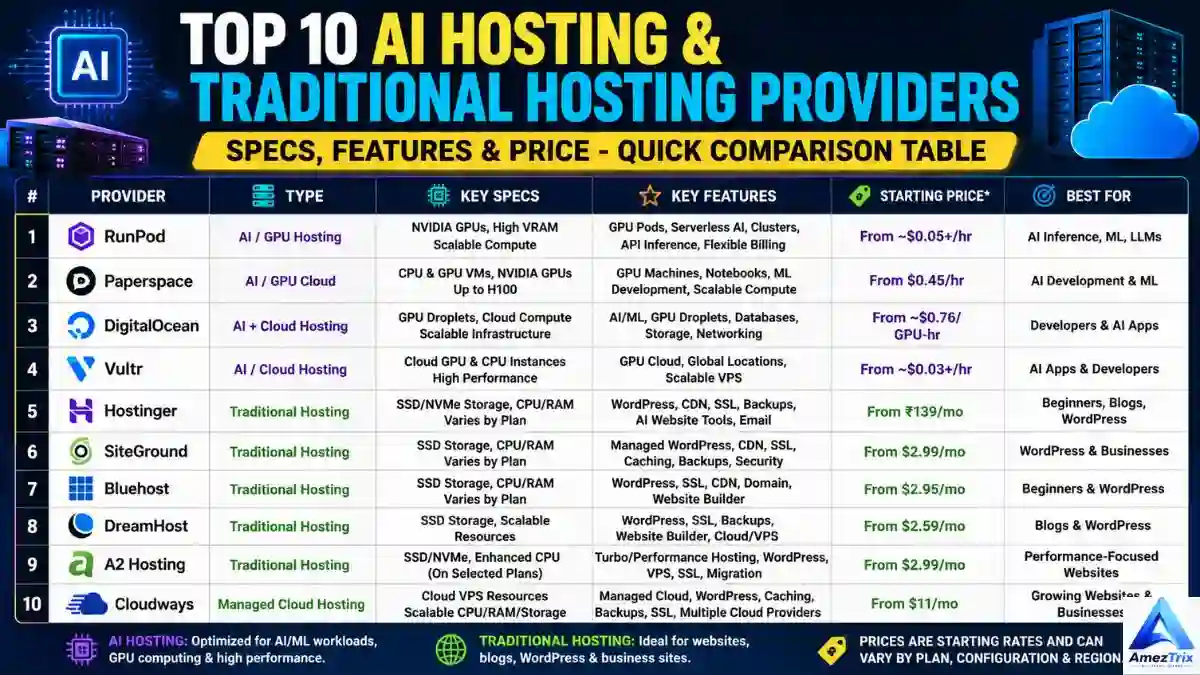
| # | Provider | Type | Key Specs | Key Features | Starting Price* | Best For |
|---|---|---|---|---|---|---|
| 1 | RunPod | AI / GPU Hosting | NVIDIA GPUs, high-VRAM options, scalable compute | GPU Pods, serverless AI, clusters, API-based inference, flexible billing | ~$0.05+/hr (GPU/workload dependent) | AI inference, ML, LLMs |
| 2 | Paperspace | AI / GPU Cloud | CPU & GPU VMs, NVIDIA GPUs up to H100 | GPU machines, notebooks, ML dev environments, scalable compute | From $0.45/hr (listed GPU machines) | AI development & ML |
| 3 | DigitalOcean | AI + Cloud Hosting | GPU Droplets, cloud compute, scalable infra | AI/ML support, GPU Droplets, databases, storage, networking | GPU from ~$0.76/GPU-hr on-demand | Developers & AI apps |
| 4 | Vultr | AI / Cloud Hosting | Cloud GPU & CPU instances | GPU cloud, high-performance compute, global data centers, scalable VPS | Varies by GPU/instance | AI apps & developers |
| 5 | Hostinger | Traditional / AI-assisted Web Hosting | SSD/NVMe storage, CPU & RAM vary by plan | WordPress tools, CDN, SSL, backups, AI website builder, email hosting | From ₹139/mo (advertised intro rate) | Beginners, blogs, WordPress |
| 6 | SiteGround | Traditional / Managed Hosting | SSD storage, CPU & RAM vary by plan | Managed WordPress, CDN, SSL, caching, automated backups, security tools | Plan-dependent | WordPress & business sites |
| 7 | Bluehost | Traditional Hosting | SSD storage, CPU & RAM vary by plan | WordPress hosting, free SSL, CDN, free domain, website builder | Plan-dependent | Beginners & WordPress |
| 8 | DreamHost | Traditional Hosting | SSD storage, scalable resources | WordPress hosting, SSL, backups, website builder, cloud/VPS upgrade path | Plan-dependent | Blogs & WordPress |
| 9 | A2 Hosting | Traditional / Performance Hosting | SSD/NVMe, enhanced CPU on select plans | Turbo performance hosting, WordPress, VPS, SSL, free migration | Plan-dependent | Speed-focused websites |
| 10 | Cloudways | Managed Cloud Hosting | Cloud VPS resources, scalable CPU/RAM/storage | Managed cloud stack, WordPress support, caching, backups, SSL, multi-cloud choice | Provider/server dependent | Growing websites & businesses |
*Pricing changes often and varies by region, billing cycle, and promotional offers — always confirm current rates directly on the provider’s site before committing.
The AI Server Hosting / GPU Hosting Providers

1. RunPod — Best for Pay-as-you-go AI Inference
RunPod has built a solid reputation among developers who don’t want to commit to a long-term GPU contract. You get access to NVIDIA GPUs across a range of VRAM tiers, plus serverless AI endpoints that only bill you while a job is actually running. If you’re deploying an LLM, running inference at scale, or just experimenting without wanting to babysit infrastructure, this flexible billing model is a genuine advantage.
2. Paperspace — Best for ML Development Environments
Paperspace leans heavily into the developer experience — think ready-to-go notebooks, GPU-backed virtual machines, and access to newer hardware like the H100 for teams that need serious training power. It’s a strong pick if your workflow involves iterating on models rather than just calling a pre-trained one.
3. DigitalOcean — Best for Developers Already in Their Ecosystem
DigitalOcean’s GPU Droplets bring AI compute into a platform a lot of developers already know for its simplicity. If you’re already running your app’s backend, database, or storage on DigitalOcean, adding GPU capacity without switching providers is a convenient way to keep everything under one roof.
4. Vultr — Best for Global GPU Availability
Vultr’s cloud GPU and CPU instances are spread across a wide network of global data centers, which matters if latency to specific regions is a priority for your AI application. It’s a solid middle ground between raw performance and provider flexibility.
The Traditional Hosting Providers
5. Hostinger — Best for Beginners on a Budget
Hostinger consistently wins on price-to-value, especially for first-time website owners. NVMe storage, one-click WordPress installs, and even some AI-assisted site-building tools come bundled in without pushing users toward unnecessary infrastructure.
6. SiteGround — Best for Managed WordPress Performance
SiteGround’s strength is in the details — proactive caching, tight security, and genuinely responsive support. It costs more than budget hosts, but for WordPress sites where uptime and speed actually matter to the business, that extra cost tends to pay for itself.
7. Bluehost — Best for WordPress Beginners
Officially recommended by WordPress.org for a reason, Bluehost keeps the onboarding process simple: free SSL, a free domain for the first year, and an included website builder make it a common first stop for new site owners.
8. DreamHost — Best for Long-Term Flexibility
DreamHost pairs affordable WordPress hosting with a clear upgrade path into VPS and cloud tiers, so you’re not forced to migrate providers the moment your traffic outgrows a shared plan.
9. A2 Hosting — Best for Speed-Focused Sites
A2’s “Turbo” tier is built specifically around faster page loads, with enhanced CPU allocation on select plans. If site speed is a direct priority — say, for an affiliate site competing on Core Web Vitals — this is worth a look.
10. Cloudways — Best for Scaling Without Server Management
Cloudways sits in an interesting spot: managed cloud infrastructure without the steep learning curve of configuring a raw VPS yourself. You pick your underlying cloud provider, and Cloudways handles the server management layer on top.
Not All “AI Hosting” Means the Same Thing
Here’s the part worth repeating: some of these providers hand you a dedicated GPU for training and running models yourself. Others just offer cloud infrastructure flexible enough to support an AI application without any dedicated GPU involved at all.
And on the flip side, a website built around AI content or AI features doesn’t automatically need either. If your app’s AI processing happens through an external API call, a traditional host can run the front-end just fine — the heavy computation is someone else’s server’s problem, not yours.
Why Businesses Choose AI Hosting
It handles heavier compute loads. AI inference and model processing chew through resources a normal website never touches. Specialized infrastructure is simply built to absorb that.
GPUs matter for parallel processing. A GPU can run thousands of small calculations simultaneously, which is exactly what deep learning and image-heavy AI tasks need. That said — and this trips people up constantly — not every AI feature needs a GPU. If your app just pings an external AI API, a regular VPS is often enough.
More horsepower, when you need it. High-core CPUs, large RAM, NVMe speed, and generous bandwidth all come standard on serious AI plans.
Scaling for unpredictable traffic. AI SaaS tools can go from 50 users to 5,000 overnight after a product launch or a viral post. Cloud-based AI infrastructure flexes with that kind of spike far better than a fixed shared-hosting plan.
Purpose-built for AI startups. Whether you’re building an AI writing assistant, an image generator, or an automation platform, the environment can be shaped around what your app is actually doing computationally.
Why Traditional Hosting Still Wins for Most People
It’s dramatically cheaper. This is the big one. Paying for a GPU server to run a WordPress blog that serves HTML and a few database queries is like renting a moving truck to pick up a pizza.
It’s easier to manage. One-click WordPress installs, control panels, automated backups, free SSL, email accounts — traditional hosts have spent 20 years polishing this experience for non-technical users.
WordPress basically runs on it. PHP, MySQL, a web server, some RAM, and caching — that’s the whole recipe. No GPU required, ever, for a standard content site.
It’s the natural home for content sites. Blogs, niche publications, affiliate sites, and small business pages don’t get any real benefit from AI-grade infrastructure. Your money is better spent on content quality and site speed.
CPU vs GPU: What Your AI App Actually Needs
This is where most beginners get it wrong. They assume “AI website” automatically means “GPU required.” It doesn’t.
| Workload | CPU | GPU |
|---|---|---|
| WordPress site | Excellent | Not needed |
| Blog | Excellent | Not needed |
| App calling an external AI API | Usually enough | Usually unnecessary |
| Small AI feature | Often sufficient | Optional |
| Large model inference | Limited | Often preferred |
| Deep learning training | Weak fit | Strong fit |
| Computer vision | Workable | Often preferred |
If your site just sends a request to OpenAI, Anthropic, or another provider’s API and gets a response back, the heavy lifting happens on their servers, not yours. You genuinely don’t need a GPU sitting idle on your own hosting bill.
Performance: Marketing Claims vs Reality
Don’t judge hosting by its label — judge it by fit. A well-tuned VPS will often outperform a badly configured “AI server” for a normal website. And a proper GPU instance will crush a CPU-only box on a genuine deep-learning task.
For regular websites, what actually moves the needle is CPU speed, RAM, storage type, database tuning, server location, CDN usage, and caching. For AI workloads, add GPU model, GPU memory, framework compatibility, and container support to that list.
The mistake is comparing hosting plans purely by “does it say AI” instead of by the specs that actually run your application.
Scalability and Growing Pains
Shared hosting is built around predictable traffic. VPS and cloud plans give you more room to breathe. AI infrastructure often needs to flex even further, because usage patterns for AI apps are frequently spiky and unpredictable.
A realistic growth path looks something like:
Small site → VPS → Cloud → Dedicated/GPU infrastructure
Moving up this ladder only when you actually need to — not preemptively — keeps you from overpaying for capacity that’s sitting there unused.
Security Considerations for Both
Hosting type alone doesn’t make you secure. SSL, firewalls, malware scanning, DDoS protection, backups, and access controls matter regardless of what you’re running.
AI applications, though, carry a few extra risks worth knowing about: API key exposure, unauthorized model access, prompt injection attempts, and the handling of sensitive training or user data. If your AI app touches customer information, factor security architecture into your hosting decision before you sign up, not after.
Cost Breakdown
| Hosting Type | Typical Use | Cost Level |
|---|---|---|
| Shared Hosting | Basic websites | $ |
| Managed WordPress | Content/business sites | $$ |
| VPS | Growing sites/apps | $$ |
| Cloud Hosting | Scalable applications | $$$ |
| Dedicated Server | High-resource apps | $$$$ |
| GPU/AI Server | AI and ML workloads | $$$$+ |
Pricing swings a lot between providers, regions, and hardware tiers — but the underlying rule doesn’t change: don’t pay for GPU capacity your application isn’t actually using.
Does WordPress Need AI Hosting?
Short answer: no, not usually.
You can run WordPress on an AI-grade server, but a standard install just needs solid PHP handling, database performance, caching, and reliable storage — none of which requires a GPU. Even a tech blog that publishes AI-related content every day doesn’t need AI hosting to do it; the “AI” in the topic doesn’t transfer to the infrastructure requirement.
GPU hosting only becomes relevant if the WordPress site itself is running computationally heavy AI models locally, which is rare outside of very specific plugin setups.
Who Should Pick What
Go with AI hosting if you’re: an AI developer, an ML engineer, running a computer vision project, building a generative AI tool, or scaling an AI SaaS product with real inference demands.
Stick with traditional hosting if you’re: a blogger, a small business owner, an affiliate marketer, a portfolio site owner, a news publisher, or running a WordPress-based store.
Consider a hybrid setup if you’re: running a content site or SaaS front-end that occasionally calls external AI APIs but doesn’t need dedicated compute of its own.
Does AI Hosting Help SEO? (Spoiler: No)
Google doesn’t rank you higher because your hosting plan has “AI” in the name. Rankings come down to content quality, search intent match, page experience, technical SEO, site structure, mobile usability, speed, and authority signals.
A fast, well-optimized traditional hosting setup will beat a sluggish, overpriced AI server every time. If you’re trying to improve rankings, that budget is far better spent on content research, technical fixes, internal linking, and earning legitimate backlinks — not on hardware your site doesn’t need.
Mistakes People Keep Making
- Buying GPU hosting “just in case.” If your app only talks to an external AI API, you don’t need your own GPU sitting there burning money.
- Choosing hosting on price alone. The cheapest plan often hides limits on RAM, databases, or concurrent processes. Read the full spec sheet.
- Ignoring server location. Latency to your actual audience matters more than raw specs.
- Not planning for growth. What works today might choke in six months if traffic scales up.
- Mixing up AI hosting with AI website builders. One builds your site using AI tools; the other just hosts it. They’re not the same thing, and conflating them leads to bad purchases.
The Hybrid Approach Nobody Talks About Enough
Here’s something a lot of guides skip: you don’t have to pick one or the other. A hybrid setup — traditional hosting for your front-end, WordPress, database, and user accounts, paired with an external AI API or a separate GPU instance for the actual AI processing — is often the smartest and cheapest architecture available.
Website → Traditional Web Server → AI API / GPU Infrastructure
Your everyday hosting handles pages, logins, billing, and content. The AI-heavy lifting happens somewhere purpose-built for it. For most businesses dabbling in AI features without running their own models, this split saves real money without sacrificing capability.
Where Hosting Is Headed
Expect more GPU-ready cloud plans, AI-assisted server management, serverless AI workloads, and energy-efficient computing as demand keeps climbing. But traditional hosting isn’t going anywhere — the internet still runs on millions of ordinary websites that will never touch a GPU, and that’s not changing anytime soon. The future isn’t “AI hosting replaces traditional hosting” — it’s both existing side by side, serving different jobs.
FAQs
Is AI hosting better than traditional hosting?
Not universally. It’s better for GPU-dependent or compute-heavy workloads. For blogs, business sites, and WordPress, traditional hosting is usually the smarter, cheaper pick.
Do AI-related websites need AI hosting?
No. If your site just calls an external AI API, regular hosting handles it fine.
Is GPU hosting necessary for ChatGPT-style apps?
Not if you’re using someone else’s API. The model runs on their servers — your site only needs to send and receive requests.
Is traditional hosting good enough for WordPress?
Yes, and for most sites, it’s actually the better fit.
Is AI hosting expensive?
It can be, especially with dedicated GPU resources. Pricing depends heavily on hardware and provider.
Which hosting is best for machine learning projects?
Specialized AI or GPU hosting, particularly for training or running compute-intensive models.
Does switching to AI hosting improve Google rankings?
No. Hosting affects speed and reliability, which are ranking factors, but the label “AI hosting” itself has zero direct SEO benefit.
Can I start small and upgrade later?
Absolutely — starting on traditional hosting and moving to VPS, cloud, or AI infrastructure as your needs grow is a completely reasonable strategy.
Final Verdict
Don’t choose hosting based on which option sounds more futuristic. Choose it based on what your application actually does.
If you’re running a blog, a business website, an online store, or a standard WordPress site, traditional hosting remains the practical, budget-friendly choice — and honestly, it’ll probably serve you well for years.
If you’re building machine learning tools, AI SaaS products, or anything doing serious inference work, AI server hosting earns its higher price tag.
And if you’re somewhere in between — running a content site with a few AI-powered features — a hybrid setup lets you get the best of both without overpaying for compute you’ll never fully use.
About Author
Rajendra Parmar is the Founder and Editor of AmezTrix, where he covers Artificial Intelligence, Technology, WordPress, Web Hosting, Digital Marketing, Gadgets, and Software. His mission is to simplify complex technology through practical tutorials, honest reviews, and well-researched guides that help readers make smarter digital decisions.

Rajendra Parmar
Founder & Editor • AmezTrix
Rajendra Parmar is the Founder and Editor of AmezTrix, a platform covering Artificial Intelligence, Technology, WordPress, Web Hosting, Digital Marketing, Gadgets, Software Reviews, and emerging innovations. His mission is to simplify complex technology through practical tutorials, honest reviews, and well-researched guides that help readers make smarter digital decisions.