GPT-6 Astra AI Agents: Computer Use, Coding, MCP and Automation Explained

Quick answer: GPT-6 Astra AI Agents is OpenAI’s flagship model for hard, multi-step work: reasoning, coding, computer use, research and document creation. On its own, it is a model, not an agent. Put it inside an app with tools such as web search, file search, computer use, function calling or MCP, and you get an AI agent that can plan, act, check the result and keep going. The API lists a 1.05 million-token context window, a 128,000-token output limit and standard pricing of $10 per million input tokens and $50 per million output tokens.
Not long ago, most people used AI to draft emails, summarize documents or answer questions. The more interesting question now is a different one: can the AI actually do the work?
That is where GPT-6 Astra AI Agents come in. And honestly, it’s less simple than the headlines make it sound.
Once an AI can operate a browser, call outside tools and change real information, it stops being a writing assistant. It becomes part of your workflow. This guide covers what Astra can do, how its computer use, browser, coding and MCP features work, what it costs, and where I’d be careful.
Table of Contents
- What is GPT-6 Astra?
- What are GPT-6 Astra AI agents?
- Computer use
- Browser use and web search
- Tool use
- MCP
- Coding agent and Codex
- 1M context and 128K output
- Automation and professional work
- What it costs
- Safety and human control
- Limitations
- FAQ
What Is GPT-6 Astra?
GPT-6 Astra AI Agents is OpenAI’s most capable model for demanding work. OpenAI’s model page says to use it for complex reasoning, coding, computer use, research and document creation. The API model ID is gpt-6-astra, and OpenAI released it in early September 2026.
It accepts text and image input, returns text, and offers five reasoning effort levels: low, medium, high, xhigh and max. The idea is practical. Easy jobs don’t need deep thinking, so you save the heavy setting for hard ones.
| Specification | GPT-6 Astra |
|---|---|
| API model ID | gpt-6-astra |
| Context window | 1,050,000 tokens |
| Maximum output | 128,000 tokens |
| Knowledge cutoff | April 30, 2026 |
| Input/output | Text and image in, text out |
| Reasoning effort | Low, medium, high, xhigh, max |
| Standard input price | $10 per 1M tokens |
| Cached input price | $1 per 1M tokens |
| Standard output price | $50 per 1M tokens |
| Supported tools | Web search, file search, computer use, function calling, MCP |
The numbers matter less than the combination. Big context, strong reasoning and tool use together are what make Astra interesting for agents.
What Are GPT-6 Astra AI Agents?
A model and an agent aren’t the same thing. GPT-6 Astra AI Agents is the model. An AI agent is a system that uses a model to chase a goal through several actions.
A chatbot works like this: question → AI → answer.
An agent works more like this: goal → reason → pick a tool → act → look at the result → reason again → continue → deliver.
Try this request: “Find five competitors, compare their pricing, build a spreadsheet and summarize the differences.” A plain chatbot explains how you could do it. An agent can search, collect the data, organize it, create the sheet and write the summary.
There’s a catch, though. Developers decide which tools an agent gets and what it may do with them. A powerful model can’t magically reach every service on its own.
| Piece | Role in a GPT-6 Astra agent |
|---|---|
| GPT-6 Astra | The reasoning engine that makes decisions |
| Tools | Web search, file search, computer use, functions, MCP servers |
| Instructions | The goal, rules and boundaries |
| Permissions | What the agent is allowed to read or change |
| Approvals and monitoring | Human checkpoints for risky actions |
So when someone says “GPT-6 Astra AI agent,” they usually mean a whole system with Astra as the brain.
GPT-6 Astra Computer Use
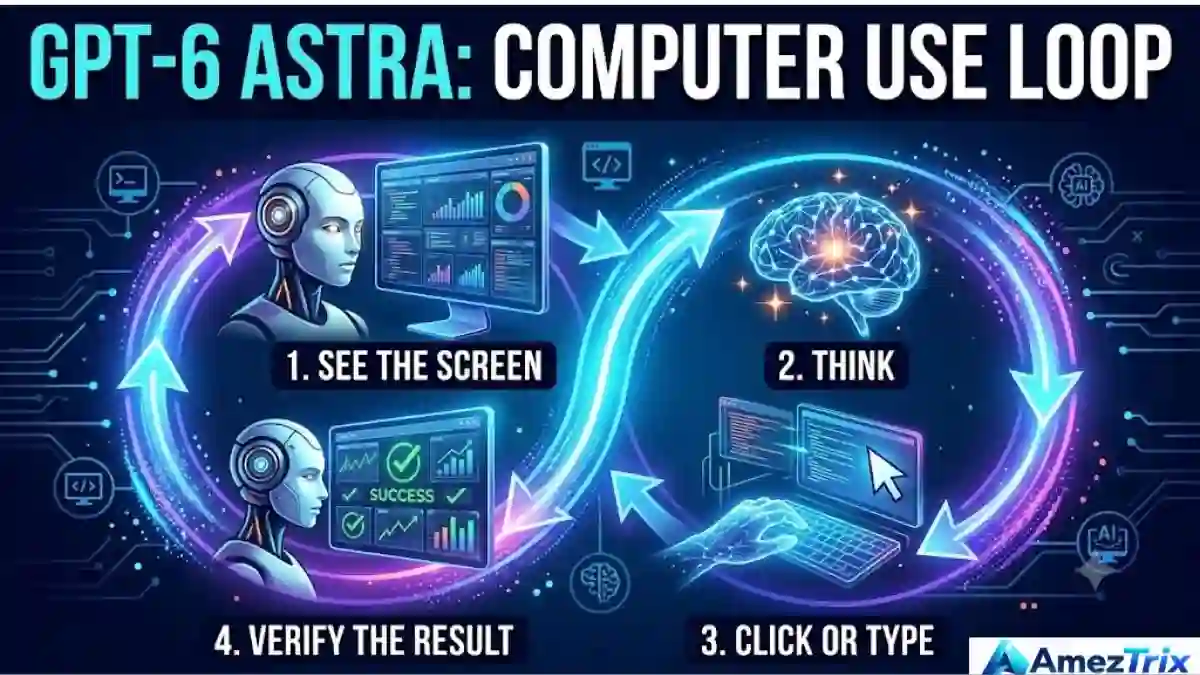
Computer use is the headline feature for agents. It lets a model operate browser or desktop interfaces: filling forms, testing user interfaces, finishing tasks inside applications.
The loop is surprisingly human. The model gets information about what’s on screen, decides the next action, the application carries it out, and the model sees the new result. See → think → click → see → think → type → verify.
Typical jobs include filling online forms, navigating websites, updating CRM records, front-end QA, organizing information, researching sites, preparing documents and troubleshooting software. OpenAI has shown Astra handling research, CRM updates, calendar organization, software testing and website creation.
Early coverage of the launch also reports that Astra scored 72.6% on the OSWorld 2.0 computer-use benchmark, against 65.7% for GPT-5.6 Sol, and finished its tasks faster. Treat those as OpenAI-reported figures and check OpenAI’s own materials before quoting them in anything important.
GPT-6 Astra Browser Use and Web Search
Browser automation isn’t new. Old-school scripts follow fixed rules: open page, click button, enter value, submit. That works until the site changes. Buttons move, a login screen shows up, a form throws an odd error, and the script dies.
A reasoning agent can look at the current page and decide what to do next. Ask it to “gather the latest information from three official company websites and prepare a comparison,” and it can search, open pages, read them and organize the results.
Web search deserves its own mention because models don’t know anything past their training date. Astra’s knowledge cutoff is April 30, 2026. OpenAI’s web search tool lets an agent pull current information while it works. Good uses:
- Current news and market research
- Product and pricing checks
- Technical documentation lookups
- Competitor research and fact-checking
- Travel and real-time business information
Reasoning without fresh data and reasoning with web search are different workflows. If recency matters, give the agent a source.
GPT-6 Astra AI Agents Tool Use
Tools turn a language model into a working system. Think of Astra as the decision-maker and the tools as its hands.
| Tool | What it gives the agent |
|---|---|
| Web search | Current information from the internet |
| File search | Access to relevant documents |
| Computer use | The ability to operate software interfaces |
| Function calling | Connections to your own application’s operations |
| Remote MCP | Links to external tool servers |
| Shell and code execution | A place to run code and commands |
The real power shows up when several of these work together on one task.
GPT-6 Astra and MCP
MCP stands for Model Context Protocol. It’s a standard way for AI systems to connect with outside tools and services. An MCP server publishes tool definitions; an agent finds them and calls them when needed. OpenAI’s API supports remote MCP servers.
Picture a company with an internal MCP server exposing approved functions for customer data, project management, documentation, analytics or inventory. Instead of building a custom connection for every system, developers publish the capabilities once.
Say an agent has to search internal docs, check a project’s status, update a task and write a report. With no tool connections, it can only tell a human what to do. With the right MCP tools, it can do the work.
Permissions still decide everything. Developers can require approval before tool calls or limit which tools the agent sees, and that matters most when a server can change real data. For a deeper look at agent building blocks, read our guide on how to build AI agents.
GPT-6 Astra Coding Agent and Codex
Coding is a major Astra use case. OpenAI positions it for complex software engineering, and it’s available in Codex, OpenAI’s environment for development and technical work.
A coding agent can read a repository, understand its structure, find bugs, edit several files, write tests, run commands, inspect failures, refactor and explain what it did. That shifts the request from “write this function” to something like: “Investigate why this test suite fails, find the root cause, fix it, run the tests and explain the changes.”
The second request needs planning, iteration and a real development environment. That’s the difference between code generation and a coding agent.
A typical flow: issue → repository analysis → plan → code changes → tests → debugging → review.
Real engineering work also includes reading docs, tracing dependencies, checking edge cases and updating documentation. Long context and tool support help with all of that. OpenAI’s own coding guidance adds an interesting note: as models improve, developers should rethink old prompting habits instead of stacking more instructions. In my view, a clear goal, good context and the right tools beat a giant prompt almost every time.
If you’re comparing options, our breakdown of the best AI coding agents covers Codex, Copilot, Claude Code, Cursor and Windsurf side by side.
1 Million Token Context and 128K Output
OpenAI lists Astra’s context window at 1,050,000 tokens, so “1 million token context” is a fair shorthand. That’s enough room for a large codebase, a pile of legal documents, or a research folder full of papers and notes.
Bigger isn’t automatically smarter, though. Irrelevant material adds noise, messy instructions confuse the workflow, and key facts still need verification. The useful question isn’t “how big is the window?” It’s “what can I do with that much context?” Good answers include analyzing large codebases, long technical documents, research collections, project histories and multi-document comparisons. It can also cut down on repeated summarizing, although careful context management still pays off.
The 128,000-token output limit is also huge. Most requests never need it, but it helps with large code changes, long technical reports, detailed documentation and multi-file generation. Remember it’s a ceiling, not a target. Shorter outputs are easier to review.
GPT-6 Astra Automation and Professional Work
Picture a small business. An employee reads customer details in an email, enters them into a CRM, creates a task, updates a spreadsheet and sends a confirmation. A few minutes each. Now multiply by hundreds of customers.
That’s the kind of work agents can take over. The best candidates share three traits: they’re repetitive, they follow a recognizable process, and the systems involved can be connected safely. Astra then handles the reasoning-heavy parts that rule-based automation struggles with.
OpenAI also positions Astra for engineering, research, marketing, sales, data analysis, design, operations, technical support and document creation. It describes workflows where Astra works across applications and builds documents, spreadsheets and presentations from organizational templates. That matters because nobody works in one app. A sales rep juggles email, a CRM and spreadsheets; an engineer jumps between Git, a terminal, an issue tracker and a browser.
| Traditional automation | GPT-6 Astra agent |
|---|---|
| Rule-based | Reasoning-based |
| Fixed sequence of steps | Chooses the next step |
| Works best with predictable workflows | Can handle changing situations |
| Mostly API-focused | Can also work through a user interface |
| Breaks when conditions change | Can sometimes adapt |
| Needs predefined logic | Can follow broader instructions |
Traditional automation isn’t obsolete. If one API call solves a problem reliably, it’s usually cheaper and more predictable. Agents earn their keep when a task involves ambiguity, changing information or several different tools.
Example: building a small business website
A normal AI workflow hands you HTML, CSS, JavaScript and instructions, and you assemble everything. With an agentic workflow, you can give a broader goal: “Build a responsive five-page business website, test the navigation, check mobile layouts and prepare the final project.” The agent can plan the structure, create files, write code, run the site, open it in a browser, test links, spot visual problems, fix them and test again. It’s participating in development, not just typing code.
Example: SEO and content research
Publishers can combine web search, files and documents for topic research, search-intent analysis, content briefs, FAQ discovery, competitor research, internal-link planning, technical audits and content updates. One rule I’d never drop: AI research should support editorial judgment, not replace it. Check sources, verify claims, and keep real experience in the writing. Our posts on LLMO in SEO and GEO ranking factors explain why that matters for AI search visibility.
How Much Does GPT-6 Astra Cost?
| Token type | Standard price per 1M tokens |
|---|---|
| Input | $10.00 |
| Cached input | $1.00 |
| Cache writes | $12.50 |
| Output | $50.00 |
One thing many people miss: OpenAI’s documentation says prompts with more than 272,000 input tokens are priced at 2x the input and cache rates and 1.5x the output rate for the full request. So the 1.05M window is real, but the cheap part ends at 272K.
A quick example at standard rates: a request with 100,000 input tokens and 5,000 output tokens costs roughly $1.00 for input plus $0.25 for output, so about $1.25. Sending a 300,000-token prompt with 10,000 tokens of output and the long-context rates apply, which works out to about $6.75.
Tool calls such as search or computer use can add their own fees, and prompt caching can cut repeated-context costs. Astra sits at the top of OpenAI’s price range, so for simple chatbots or high-volume, cost-sensitive jobs, one of OpenAI’s cheaper models is often the smarter pick. Always confirm current rates on OpenAI’s pricing page.
Safety and Human Control
More capable agents mean more useful automation, and bigger consequences when something goes wrong. An agent that reads a CRM is handy. One that can also delete customer records needs a proper permission model.
| Action | Sensible control |
|---|---|
| Reading data | Limit to what the task needs |
| Drafting an email | Fine to automate |
| Sending an email | Human approval |
| Researching products | Fine to automate |
| Making a purchase | Human approval |
| Deleting files or records | Human approval, or block entirely |
| Publishing content | Human review |
| Running commands | Sandbox and log everything |
OpenAI describes safeguards around computer use, including confirmation policies and extra controls for organizations. Follow the principle of least privilege: give the agent only the access it actually needs. The most useful agent isn’t the one that never asks. It’s the one that knows when to act and when to check with you.
GPT-6 Astra Limitations
- Mistakes happen. A strong model can still misread a requirement or pick the wrong action.
- Tool access adds risk. The more systems an agent touches, the more carefully you should design permissions.
- Cost adds up. Premium pricing plus long prompts and tool fees can surprise you.
- Large context isn’t magic. A 1.05M window doesn’t guarantee every detail gets used correctly.
- Human review still matters for business, financial, legal and security decisions.
- Workflow design is the hard part. Wiring ten tools to a smart model doesn’t make a reliable agent. It needs clear goals, error handling and testing.
Who Should Use GPT-6 Astra AI Agents?
| Who | Why it fits |
|---|---|
| Developers | Building advanced software and coding agents |
| Businesses | Automating multi-step digital workflows |
| Researchers | Handling large information sets |
| Content and SEO teams | Combining research with production |
| Enterprise teams | Working across several applications |
For a basic chatbot or simple text generation, a smaller model may be plenty. The most capable model isn’t automatically the right one. If you’re still exploring, see our main GPT-6 Astra guide, plus OpenAI Agent Builder and OpenAI Dots for related agent products.
Frequently Asked Questions About GPT-6 Astra AI Agents
What is GPT-6 Astra?
GPT-6 Astra is OpenAI’s flagship model for demanding reasoning, coding, computer use, research and professional work. It supports tools and multi-step workflows.
Can GPT-6 Astra AI Agents use a computer?
Yes. OpenAI’s computer-use capability lets supported models operate browser and desktop interfaces through an appropriate execution environment.
What is a GPT-6 Astra computer agent?
It’s an agent system that uses GPT-6 Astra as the reasoning model and gives it computer-use abilities.
Can GPT-6 Astra browse the web?
Yes. OpenAI’s web search tool lets agents retrieve current information from the internet while they work.
What is GPT-6 Astra MCP?
It refers to using the Model Context Protocol to connect Astra-powered apps with external tools and services.
Can GPT-6 Astra write code?
Yes. Software engineering is a core use case, covering repository analysis, code changes, debugging and testing. It’s also available in Codex.
What is GPT-6 Astra’s context window and output limit?
OpenAI lists a 1.05 million-token context window and a maximum output of 128,000 tokens.
How much does GPT-6 Astra cost?
Standard API pricing is $10 per million input tokens, $1 per million cached input tokens and $50 per million output tokens. Prompts above 272,000 input tokens cost more.
Is GPT-6 Astra AI Agents an autonomous agent?
Astra is a model. You can build autonomous or semi-autonomous agents with it by adding tools, instructions, permissions and an execution environment.
Is GPT-6 Astra right for everyone?
No. The right model depends on task complexity, cost, speed and reliability needs. OpenAI offers cheaper models for simpler or high-volume workloads.
Final Takeaway
GPT-6 Astra AI Agents changes the question we ask about AI. The old one was “what can AI tell me?” The newer one is “what can AI do for me?”
It reasons, searches the web, works with code, operates computer interfaces and handles huge amounts of context. For developers, that opens the door to more capable agents. For businesses, it means new automation. For researchers and content teams, it can trim repetitive digital work.
But it works best when people stay in charge of goals, permissions and the decisions that carry real consequences. That, more than any benchmark, is why GPT-6 Astra is worth watching.
GPT-6 Astra at a Glance
| Topic | GPT-6 Astra |
|---|---|
| Primary role | Complex reasoning and professional work |
| Computer use and browser workflows | Supported |
| Web search and file search | Supported |
| Coding and Codex | Supported |
| MCP | Supported |
| Context window | 1.05M tokens |
| Maximum output | 128K tokens |
| Reasoning levels | Low to max |
| API model ID | gpt-6-astra |
| Standard API price | $10 input / $50 output per 1M tokens |
Sources: OpenAI’s GPT-6 Astra model documentation, plus OpenAI documentation on computer use, MCP and web search. Prices and limits change, so confirm them on OpenAI’s official pages.
About the Author
Rajendra Parmar is the Founder and Editor of AmezTrix, where he covers Artificial Intelligence, Technology, WordPress, Web Hosting, Digital Marketing, Gadgets and Software. His mission is to simplify complex technology through practical tutorials, honest reviews and well-researched guides that help readers make smarter digital decisions.