Top 5 AI Coding Agents: Best Tools, Free Options and How to Choose (2026 Guide)
Quick answer: Top 5 AI Coding Agents are tools that take a software task, break it into steps, and carry those steps out inside your project: editing files, running commands and tests, and fixing errors. Assistants suggest code; agents do the work and hand it back for review. Popular options in 2026 include OpenAI Codex, GitHub Copilot, Claude Code, Cursor and Windsurf. Free access exists, but always with limits.
A few years ago, a Google AI tool finished your line and stopped there. Now an agent can read the whole repository, plan the job, change ten files, run your tests, read the failures and try again. That is a very different kind of helper.
The catch? Pricing, models and limits change almost monthly. Treat the details below as a snapshot, and confirm them on each vendor’s official page before you pay.
Table of Contents
- What are AI coding agents?
- Agent vs assistant
- How coding agents work
- Best AI coding agents in 2026
- Free AI coding agents
- Which agent for which job
- What developers use them for
- Using agents safely
- How to write a good prompt
- How to get started
- FAQ
What Are AI Coding Agents?
An AI coding agent is software that accepts a goal, plans the steps and executes them inside your codebase. It doesn’t just hand you a snippet to paste.
Ask an assistant for a login function and you get a login function. Ask an agent for this instead:
Add user authentication, update the database schema, create the API endpoints, write tests, run them and fix whatever breaks.
and it inspects the project, decides which files matter, makes the changes and reacts to the results. GitHub describes its Copilot agent mode this way: it works out which files to change, edits them, runs commands and iterates until the task is finished. OpenAI describes Codex similarly, as an agent for work that ranges from routine pull requests to migrations and refactors.
A simple formula: agent = AI model + project context + tools + ability to act + a human in charge. That last part matters more than most people admit.
AI Coding Agent vs AI Coding Assistant
The two terms get mixed up constantly. Here is the practical difference.
| Capability | AI Coding Assistant | AI Coding Agent |
|---|---|---|
| Autocomplete and snippets | Yes | Yes |
| Explains code | Yes | Yes |
| Understands the whole project | Limited to decent | Usually much deeper |
| Edits several files | Sometimes | Yes |
| Runs terminal commands | Rarely | Common |
| Runs tests, fixes failures | Limited | Common |
| Plans multi-step tasks | Limited | Core feature |
| Opens pull requests | Usually no | Some do |
| Works in the background | Rare | Increasingly common |
In short, an assistant answers and waits. An agent keeps going until the goal is met or it gets stuck.
How Do AI Coding Agents Work?
Most are built from the same four parts.
The language model understands code, documentation and plain-English instructions. Some models are tuned specifically for programming.
The context comes next. A decent agent looks around before touching anything: source files, config, dependencies, tests, Git history, folder structure. Skip this step and it treats every file as an island, then breaks something on the far shore.
Then the tools: file search, file editing, a terminal, Git, package managers, test runners, and sometimes web search or MCP servers. Cursor’s documentation lists searching, editing, running commands and MCP interaction as core agent abilities.
Finally, the agent plans, acts and checks itself. Say you want dark mode on a website. A good agent finds the global CSS, looks for existing theme state, builds a toggle, moves colours into CSS variables, updates components, runs tests and fixes what failed.
Plan → Code → Test → Diagnose → Fix → Test again.
One warning from experience: green tests don’t prove the code is right. I’ve seen agents get every test passing by quietly editing the test. Always read the diff.
Best AI Coding Agents in 2026
No single tool wins for everyone. A solo WordPress developer, a backend team and a student learning Python need different things. So here is what each major option does well.
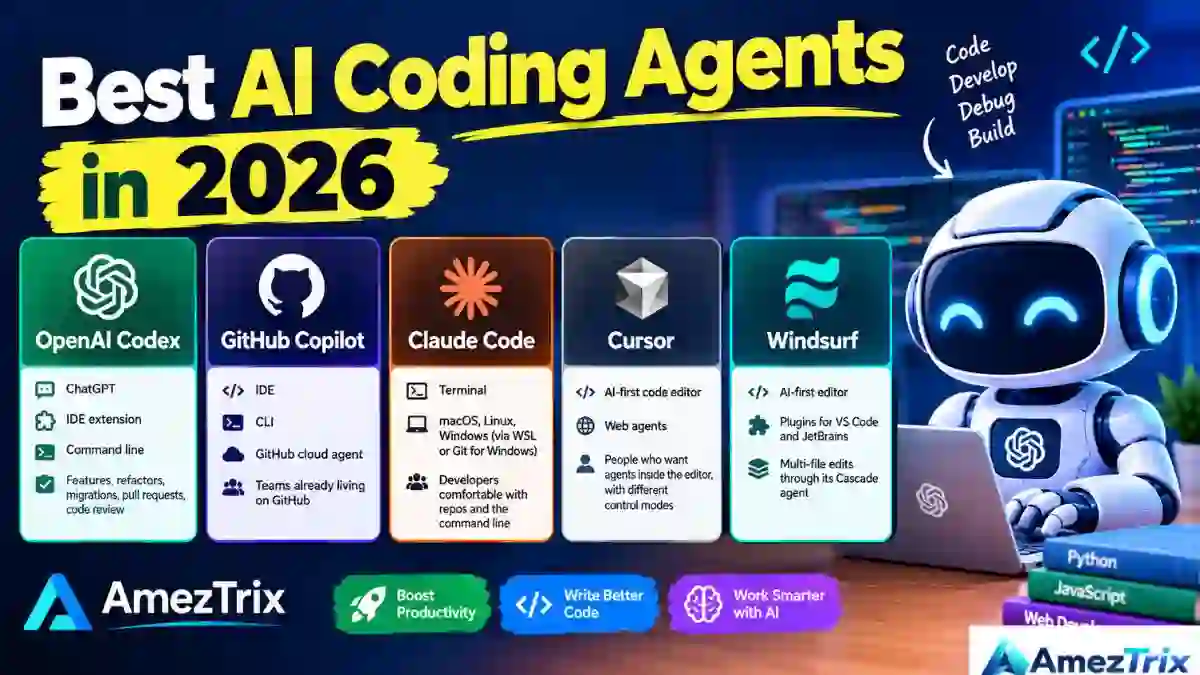
| Tool | Where you use it | Best for |
|---|---|---|
| OpenAI Codex | ChatGPT, IDE extension, command line | Features, refactors, migrations, pull requests, code review |
| GitHub Copilot | IDE, CLI, GitHub cloud agent | Teams already living on GitHub |
| Claude Code | Terminal (macOS, Linux, Windows via WSL or Git for Windows) | Developers comfortable with repos and the command line |
| Cursor | AI-first code editor, plus web agents | People who want agents inside the editor, with different control modes |
| Windsurf | AI-first editor, plugins for VS Code and JetBrains | Multi-file edits through its Cascade agent |
1. OpenAI Codex
Codex handles features, refactors, migrations, pull requests, testing and code review. You can reach it through ChatGPT, an IDE extension or the command line, which makes it a good match for developers who want an agent working across a project instead of one file.
On access, OpenAI says Codex is available across ChatGPT plans, Free and Go included, with limits that vary by plan. Codex Cloud is the exception and isn’t included with Free or Go. The OpenAI help page has the current details.
2. GitHub Copilot
GitHub Copilot began as autocomplete and has grown into a wider platform: chat, agent mode, a CLI, a cloud agent, code review, custom agents and MCP support. Agent mode can explore a project, edit files, run commands and iterate.
Eligible paid plans can also run third-party agents, including Claude and Codex. The Free plan includes 2,000 code completions a month and a limited allowance of AI credits for chat and agent features; check the plans page for current numbers.
3. Claude Code
Claude Code is Anthropic’s coding agent, and it lives mostly in the terminal. It works with your files, commands, Git workflows and MCP integrations. The flow is simple: open your project, start the agent, describe the task, and review while it inspects, edits and runs commands.
It suits people who are happy in a terminal. If you’d rather stay in a visual editor, the next two may feel more natural.
4. Cursor
Cursor is a code editor with AI built in. Its Agent mode explores the codebase, edits several files, runs commands and works through errors. I like that it lets you choose how much control to hand over:
- Agent: complex, autonomous tasks
- Ask: questions and read-only exploration
- Manual: targeted edits
- Custom: your own workflows
Those modes are documented here. Cursor also offers web-based agents you can start from a browser and connect to GitHub repositories.
5. Windsurf
Windsurf is another AI-first environment. Its coding agent is called Cascade, and the company ships plugins for VS Code and JetBrains IDEs. It covers generation, refactoring, debugging and multi-file changes, so it competes directly with Cursor.
What happened to Gemini CLI?
Plenty of older articles still call Gemini CLI a free consumer option. That’s outdated. Google’s documentation says consumer access to the Gemini Code Assist IDE extensions and Gemini CLI was shut down after June 18, 2026, with affected users directed to its Antigravity products. Enterprise and Standard editions of Gemini Code Assist weren’t part of that change.
The lesson applies to every tool review, this one included: if an article is a year old, re-check the plan details.
Free AI Coding Agents: What Do You Really Get?
Free options exist, but they come with strings: daily or monthly limits, fewer models, restricted cloud features, smaller context, no team tools.
| Option | What the free access looks like (as of October 2026) |
|---|---|
| GitHub Copilot Free | 2,000 code completions per month and a limited allowance of AI credits for chat and agent features |
| OpenAI Codex | Included across ChatGPT plans; Free and Go include it, with usage limits; Codex Cloud is not part of Free or Go |
| Gemini CLI (consumer) | Consumer access ended after June 18, 2026 |
| Cursor, Windsurf, Claude Code | Check each vendor’s current pricing page, since plans change often |
Don’t choose a tool just because it costs nothing. A generous free tier on a tool that struggles with your language or repository size will waste more hours than a paid plan costs. Weigh free usage against model quality, context size, repository access, security and how well it fits your workflow.
Which Top 5 AI Coding Agents for Job?
| What you need | What to look for |
|---|---|
| Quick completions while typing | An AI coding assistant |
| A feature touching many files | Agent mode in an IDE |
| Hunting down a bug | An agent with terminal access |
| Refactoring a whole repository | A repository-aware agent |
| Staying in the terminal | A CLI coding agent |
| Turning a GitHub issue into a pull request | A cloud coding agent |
| Learning to program | Ask or chat mode |
| Automated code review | A review-focused agent |
| Tasks that run while you do something else | A cloud or background agent |
| Team-wide rollout | A managed agent platform |
Starting from your problem beats scrolling through yet another “top 10” list.
Assistant or agent? If you’re learning, an assistant is plenty: “explain this Python function” doesn’t need an agent. But if you want to “find the authentication bug, fix it, write a regression test, run the suite and explain the changes,” that’s several steps across several files. An agent handles it far more naturally.
What Developers Use Coding Agents For
New features. Describe the feature, such as “add a profile page with editable name, email and photo,” and the agent studies your existing components first. Good ones copy your conventions instead of inventing new ones.
Debugging. Hand over the error message and let it reproduce, inspect, find the cause, fix and test. Agents are often at their best here because the finish line is clear.
Refactoring old code. JavaScript to TypeScript, deprecated APIs, a monster function split into modules, bumped dependencies. Review legacy migrations slowly, because automated changes can hide compatibility problems that surface weeks later.
Writing tests. Unit, integration and regression tests, fixtures, mock data. Check that the tests prove something real instead of just lifting a coverage number.
Fixing GitHub issues. GitHub documents workflows where agents work asynchronously on an assigned task and then open a pull request. The path runs: issue, agent, code, tests, pull request, human review, merge. A human sits at the end by design.
Web developers and WordPress users
On WordPress, agents can draft plugins, PHP functions, CSS, JavaScript, REST API integrations, Gutenberg blocks, theme tweaks and schema markup. For front-end work, they build landing pages, repair responsive layouts and improve accessibility; on the back end, they handle Python, PHP, Java, Go, SQL and REST APIs. Testing, security and deployment remain your job.
Using AI Coding Agents Safely
An agent that edits files and runs commands has real power over your machine. Treat it like a new teammate on day one, not like a search box.
Before you let one loose, know which files it can touch, which commands it can run, which credentials it can see, which repositories it can reach, whether commands need your approval, and whether you can undo the changes. GitHub’s agent documentation covers command approval and organization-level controls, and OpenAI has written about boundaries, permissions, approvals and telemetry when deploying coding agents.
| Habit | Why it matters |
|---|---|
| Commit before big tasks | Gives you a restore point if the agent wanders off |
| Keep secrets out of reach | API keys, database passwords, SSH keys, WordPress admin logins and cloud credentials should never be handed over casually; use environment variables |
| Limit permissions | More connected tools means a larger attack surface |
| Review every important diff | Agents produce logic errors, security holes, wrong assumptions and thin tests |
A quick restore point looks like this:
git status
git add .
git commit -m "Before AI agent changes"
Now if something goes wrong, you can walk back.
A note on MCP. Model Context Protocol lets agents talk to databases, APIs, documentation, GitHub and project trackers. GitHub documents MCP support in Copilot, and Cursor does the same. It makes agents far more capable, and it also means more things that can go wrong, so give each connection only the access it truly needs.
How to Write a Good Coding-Agent Prompt
Compare these two requests:
“Fix my website.”
“Inspect this WordPress plugin and find out why the REST API endpoint returns a 403. Don’t touch production files. Explain the likely cause first, then propose a fix and test it locally.”
The second one gives the agent a scope, a goal, an environment and a safety boundary. The first permits it to guess.
A reliable prompt covers six things: goal, context, constraints, requirements, how to test, and what to report. Here’s one I’d actually use:
Goal:
Fix the broken contact form validation.

Context:
This is a WordPress plugin written in PHP and JavaScript.

Requirements:
1. Find the validation logic.
2. Identify the root cause.
3. Make the smallest safe change.
4. Add or update tests.
5. Run the tests.

Constraints:
Do not modify database credentials.
Do not change production configuration.
Do not delete files.

Final response:
Explain the root cause, files changed, tests run,
and any remaining risks.
That last line, asking for remaining risks, is a small habit that pays off. It makes the agent admit what it isn’t sure about.
Want more prompt patterns? Our guide on how to build AI agents goes deeper, and OpenAI Dots shows where agent products are heading.
Strengths and Limits
| Where agents shine | Where they struggle |
|---|---|
| Repetitive tasks done fast | Confidently wrong answers |
| Searching many files at once | Fuzzy requirements lead to solving the wrong problem |
| Looping on errors without getting bored | Loose prompts cause sprawling changes |
| Explaining unfamiliar code to beginners | Thin tests that pass without proving much |
| Freeing experienced developers for design work | Higher credit or token use than autocomplete |
Will Coding Agents Replace Developers?
My honest view: not the way headlines suggest. They behave more like power tools. The healthiest workflow is still this: you define the problem, the AI investigates and implements, tests run, and you review and approve.
You keep architecture, business requirements, security, testing strategy and deployment. What shifts is where your time goes. Writing a precise spec and spotting a subtle flaw in a diff become worth more than typing speed. Skills that gain value include Git, testing, security, code review, agent permissions, MCP and CI/CD.
Research points the same way. A 2026 exploratory study of agentic coding tools found that repository-level configuration, such as context files, skills and subagents, is becoming a core part of agent workflows, and it identified AGENTS.md as an emerging convention shared across several ecosystems.
How to Get Started (Without Regret)
- Ask for explanations first. Point the agent at a project and have it describe what it sees.
- Ask for a plan before edits. Try: “Analyze the project and create an implementation plan. Do not change files.”
- Make one small, low-risk change.
- Have it run the tests.
- Read the whole diff, at least at first.
- Raise the difficulty slowly, from small fixes to multi-file features.
- Add automation last, once you trust how the agent behaves.
If you’re a student or just starting, pair this with our list of AI tools for students. To understand why content like this gets cited by AI search, read what LLMO means in SEO and how to rank in ChatGPT.
Frequently Asked Questions About Top 5 AI Coding Agents
What are AI coding agents?
They are AI systems that understand a software project and carry out multi-step development tasks: editing files, running commands, testing code, debugging and preparing changes for review.
What’s the difference between a coding agent and a coding assistant?
An assistant mostly suggests, explains and generates code. An agent takes a bigger goal and uses tools to work through several steps to reach it.
Are there AI coding agents free?
Yes, with limits. GitHub Copilot has a Free plan with limited completions and AI credits, and OpenAI says Codex is included across ChatGPT plans, Free and Go included, subject to usage limits.
What is the best AI coding agent?
There isn’t one best tool. The right pick depends on your editor, repository, language, how much autonomy you want, your budget and your security needs.
Can an AI coding agent build a whole application?
It can handle large chunks and sometimes build a project from a high-level brief. Production apps still need human review, testing, security checks and deployment oversight.
Can Top 5 AI Coding Agents fix bugs?
Yes. Many can read the code, analyze or reproduce an error, change files, run tests and iterate on a fix.
Are coding agents good for beginners?
They are, as long as you don’t skip the fundamentals. Use them to explain code, produce examples and troubleshoot, but keep learning the concepts yourself.
Can coding agents run from the terminal or work with GitHub?
Yes to both. Claude Code, the OpenAI Codex CLI and GitHub Copilot CLI offer terminal workflows, and GitHub supports agentic workflows in Copilot plus third-party agents on eligible plans.
Should an agent deploy straight to production?
For most teams, no. Keep safeguards and human review in place, and give agents only the permissions they need.
Final Thoughts
Top 5 AI Coding Agents are a real step forward. Assistants are great for completions and quick explanations, while agents take on larger jobs: exploring a project, editing many files, running commands, testing and debugging.
If you’re searching for free AI coding agents, GitHub Copilot’s Free plan and Codex access through eligible ChatGPT plans are sensible places to experiment before you spend anything. Limits change, so read the official pricing pages first.
For professional use, skip the question of which tool has the longest feature list. Ask which one fits your codebase, environment, security rules, budget and the level of autonomy you’re comfortable with. The best results I’ve seen come from a simple partnership: define, plan, delegate, test, review, deploy. The AI handles more of the typing. You still decide what’s worth building, and whether it’s safe to ship.
Explore more: AI Tools · AI automation tools · GEO ranking factors · free AI image generators.
About the author: Rajendra Parmar is the Founder and Editor of AmezTrix, where he writes about AI, technology, WordPress, web hosting, digital marketing, gadgets and software. His goal is to turn complex tech into practical tutorials, honest reviews and well-researched guides.