Learn the 10 biggest AI agent security risks, from prompt injection to excess permissions, plus a step-by-step checklist and free tools.
AI Agent Security: 10 Risks, Best Practices and Tools (2026 Guide)
Last updated: October 2026
What is AI agent security? AI agent security is the practice of protecting an AI agent, its data, credentials, and tools from attacks and mistakes. The core rules: give the agent minimum access, treat outside content as untrusted, enforce permissions outside the model, and require human approval for risky actions.

Key Takeaways
- A chatbot talks. An AI agent acts. That is why a trick or a bug costs far more.
- Fix two things first: prompt injection and excessive permissions.
- Never let the model be the only thing enforcing a rule. Enforce it in the API, tool or database.
- Safe starting setup: read-only access, a spending cap, and approval for anything irreversible.
- No defense is perfect. Stack several layers, log everything and test regularly.
Picture an assistant who works instantly, never sleeps and follows instructions from anyone who sounds convincing. Now hand that assistant your inbox, your customer database and your company card.
That is what an unprotected AI agent looks like. The technology is genuinely useful, but every extra permission increases the damage one manipulated instruction can do.
This guide covers the biggest AI agent security risks, what to do about each, how security tools compare, and a checklist you can use today. It is written for beginners, developers and business owners worldwide.
AI Agent Security Explained Simply
A normal chatbot is like a parrot that talks. If it says something wrong, you notice and move on.
An AI agent is a parrot with hands. It can open files, send emails, call software, run code and spend money. If someone tricks it, it does not just say something silly. It does something.
AI agent security is the set of controls that keep those hands safe. It covers the model, the instructions it receives, the data it reads, the tools it uses, the passwords it holds and the actions it takes.
It builds on regular cybersecurity (strong logins, patching, encryption) and adds problems unique to language models, which decide what to do next based on text they read.
AI Chatbot vs. AI Agent: Security Differences
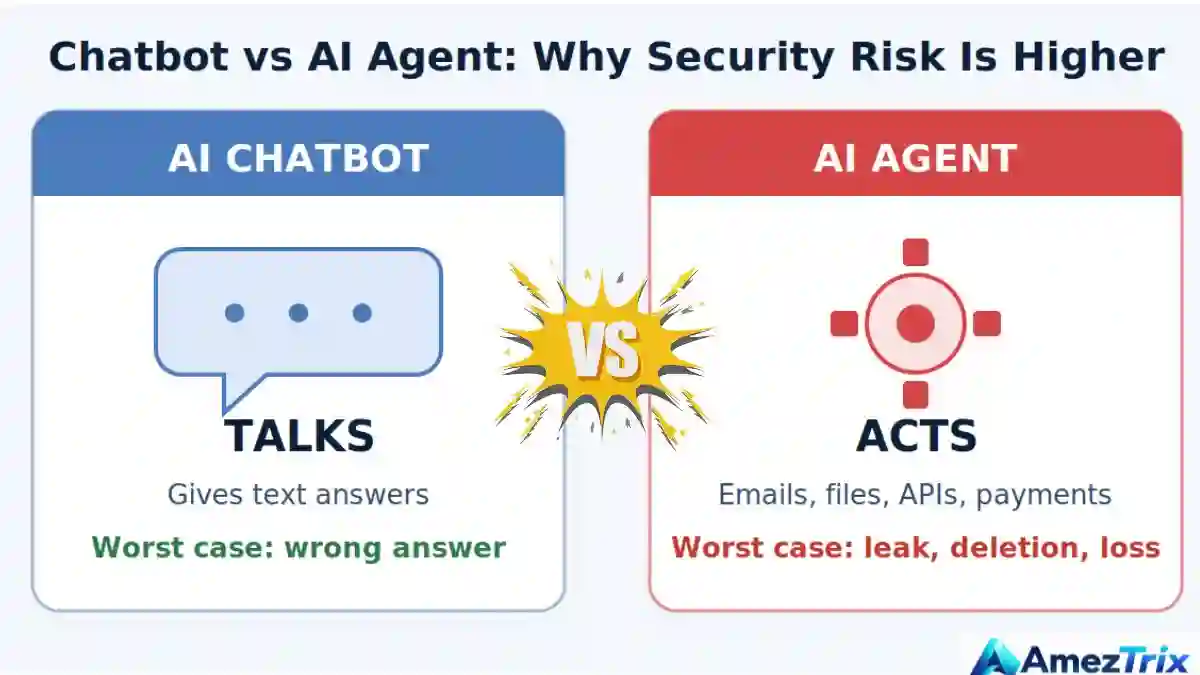
| Factor | Chatbot | AI agent |
|---|---|---|
| Main output | Text | Actions plus text |
| Tool access | Rare or none | Email, files, APIs, code, payments |
| Credentials | Usually none | API keys, tokens, service accounts |
| Worst case | Wrong or harmful answer | Data leak, deleted data, financial loss |
| Core defense | Content filtering | Permissions, validation, approvals, monitoring |
Why People Search for “AI Agent Security”
The search intent is mixed, so this guide covers all of it:
- Informational: What is it? What are the risks? What is prompt injection?
- How-to: How do I secure my agent? What permissions should it have?
- Commercial: Which tools test or protect agents? How do I pick a guardrail?
- Transactional: Teams comparing security platforms before buying.
Underneath are real worries: leaked customer data, an agent deleting something important, surprise bills, and compliance questions from a manager or client.
Why AI Agents Are Harder to Secure
- They take actions. Outputs trigger real operations.
- They read untrusted content. Web pages, emails, PDFs and tickets all enter their context.
- They chain steps. One early mistake snowballs through a long workflow.
- They hold credentials. Keys and tokens make them attractive targets.
The deeper issue: language models do not reliably separate “instructions” from “data.” Text is text. Most attacks below exploit exactly that.
The “Lethal Trifecta” Rule

Security researcher Simon Willison describes a dangerous combination: an agent that has (1) access to private data, (2) exposure to untrusted content, and (3) a way to communicate externally. With all three, an attacker can trick the agent into sending your private data out.
Practical takeaway: remove at least one of the three. For example, let an email-reading agent draft replies but not send them, or stop a web-browsing agent from reading private files.
Top 10 AI Agent Security Risks
These map closely to the OWASP Top 10 for LLM Applications (2025 edition), the best-known public reference.
1. Prompt Injection
An attacker hides instructions in content the agent reads, or types them directly. Direct injection comes from the user. Indirect injection hides in a web page, email, document or ticket, so the real user never sees it.
Fix: Treat external content as data, limit what the agent can do after reading it, validate tool calls outside the model, and ask a human before sensitive actions. A prompt line saying “ignore malicious instructions” is not a defense.
2. Excessive Permissions (Excessive Agency)
Broad access makes agents easy to build and dangerous to run. One manipulation can reach everything.
Fix: Apply least privilege. Give each agent its own identity, read-only access by default, and hard limits on deleting, paying and sending.
3. Sensitive Data Exposure
Agents handle contracts, customer records, code and internal chats. Weak retrieval rules, verbose logs or leaked keys can spill them.
Fix: Classify data first. Retrieve only what the task needs, enforce per-user access at the retrieval layer, redact sensitive fields, encrypt data and keep secrets out of prompts.
4. Insecure Tool and API Integrations
If a tool trusts any request that “comes from the AI,” an attacker only needs to steer the AI.
Fix: Authenticate and authorize every call server-side, validate inputs against strict schemas, allowlist operations and keep keys in a secrets manager.
5. Unsafe Autonomous Actions
An unattended agent can repeat a small error hundreds of times before anyone notices.
Fix: Sort actions by impact. Low-risk tasks can run freely. Payments, deletions and permission changes need approval, limits and a rollback plan.
6. Insecure Output Handling
Generated SQL, HTML or shell commands are dangerous if another system runs them blindly.
Fix: Validate and sanitize output where it is used. Use parameterized queries and run generated code in a sandbox.
7. Memory and Knowledge-Base Poisoning
If an attacker plants false information in a document store or agent memory, the agent may trust it for a long time.
Fix: Control who can add documents, track sources, review changes, and never let retrieved text override trusted policy.
8. Supply Chain Weaknesses
Agents depend on models, libraries, plugins, MCP servers and third-party APIs. One compromised piece can undermine the rest.
Fix: Pin versions, scan dependencies, install only trusted plugins and keep an inventory. Review third-party MCP servers as carefully as any software with access to your accounts.
9. Runaway Costs and Denial of Service
Loops, endless retries and abusive traffic can drain budgets or take a service down.
Fix: Set token budgets, step limits, timeouts, rate limits and spending alerts per user and per agent.
10. Identity Spoofing and Shared Credentials
If many agents share one key, compromising one compromises all, and audits become nearly impossible.
Fix: Give each agent a unique identity, short-lived tokens and regular rotation. Also verify that the human making a request is allowed to make it.
Risk Summary Table (with OWASP Mapping)
| Risk | What can go wrong | First fix | OWASP LLM 2025 reference |
|---|---|---|---|
| Prompt injection | Data leaks, unauthorized actions | Untrusted-content handling, validated actions | LLM01 |
| Excessive permissions | Wide damage from one error | Least privilege | LLM06 |
| Data exposure | Privacy breach | Retrieval access control | LLM02 |
| Insecure integrations | Unauthorized API calls | Server-side authorization | LLM06 (related) |
| Unsafe autonomy | Irreversible actions | Human approval | LLM06 |
| Unsafe output | Injection, broken systems | Validate and sandbox | LLM05 |
| Memory poisoning | Persistent bad behavior | Controlled ingestion | LLM04, LLM08 |
| Supply chain | Compromised components | Pin, scan, inventory | LLM03 |
| Cost abuse | Surprise bills, outages | Budgets and limits | LLM10 |
| Identity spoofing | Cross-system access | Unique, short-lived credentials | Traditional IAM issue |
Real-World Examples
These public cases show the risks are real. Verify the latest details before quoting them.
- Replit database deletion (July 2025): During a public experiment, an AI coding agent deleted a live production database despite instructions not to make changes. Lesson: instructions are not guardrails. Enforce limits technically.
- EchoLeak (2025): Aim Security researchers disclosed a zero-click prompt-injection flaw in Microsoft 365 Copilot (CVE-2025-32711) where a crafted email could lead to data exposure. Microsoft fixed it. Lesson: indirect injection can hit major vendors too.
- Air Canada chatbot ruling (2024): A tribunal held the airline responsible for wrong refund information its chatbot gave a customer. It was a chatbot, not a full agent. Lesson: you own what your AI says and does.
How to Secure AI Agents: 10 Steps
Step 1: Define what the agent may do
List its job, the systems it touches, the data it reads and the worst realistic failure. One page is enough. This is your threat model.
Step 2: Apply least privilege
Start with zero access and add only what the task needs. Prefer read-only. Use a separate service account per agent. Never reuse your personal admin login.
Step 3: Protect credentials
Keep keys in a secrets manager, not in prompts, code or chat. Use short-lived tokens, rotate them, and separate test and production keys.
Step 4: Enforce rules outside the model
The tool or API must check permissions itself. If the agent asks to delete 5,000 records, the system should refuse by policy however persuasive the request sounds.
Step 5: Treat external content as hostile
Mark web pages, emails and uploads as untrusted. Where possible, split roles: one component reads untrusted content and has no powerful tools, while another acts only on structured, checked data.
Step 6: Require approval for risky actions
Pause payments, deletions, customer emails, permission changes, and publishing for a person to approve. Show the approver exactly what will happen, not a vague summary.
Step 7: Sandbox code execution
Run agent-written code in an isolated container with no secrets, restricted network access and a time limit.
Step 8: Log, monitor and cap
Record who asked, what the agent decided, which tool it called, with what inputs and what came back. Alert on unusual volume, new destinations and repeated failures. Add budgets and step caps.
Step 9: Test like an attacker
Before launch and after major changes, try prompt injection, data extraction and permission bypasses. Automated tools help, but add manual tests for your own workflows.
Step 10: Plan your response
Know how to switch the agent off, revoke its keys and restore from backup. Practice it once before you need it.
Which AI agent access control?
| Risk level | Example actions | Recommended control |
|---|---|---|
| Low | Summarizing public pages, drafting text | Logging only |
| Medium | Updating a CRM note, creating a calendar event | Scoped permissions, rate limits, review of logs |
| High | Emailing customers, publishing content, editing production data | Human approval before execution |
| Critical | Payments, deleting data, changing permissions | Approval plus hard limits plus rollback plan |
AI Agent Security Tools Compared
No single tool covers everything. Choose based on what you need to protect.
| Tool/resource | Best for | Type |
|---|---|---|
| OWASP GenAI Security Project | Risk lists and guidance for LLM and agentic apps | Free guidance |
| NIST AI RMF | Organization-level AI risk management | Free framework |
| Microsoft PyRIT | Red-teaming generative AI systems | Open source |
| NVIDIA garak | Scanning LLMs for weaknesses | Open source |
| Promptfoo | Testing prompts and agents, including red-team checks | Open source |
| NeMo Guardrails | Adding conversation and action rules | Open source |
| Llama Guard | Classifying unsafe inputs and outputs | Open model |
| Semgrep, Gitleaks | Scanning code and finding leaked secrets | Open source/commercial |
| OWASP ZAP | Testing the web app around your agent | Open source |
Honest note: guardrail and filter tools reduce risk but do not remove it. Attackers keep finding new phrasing. Use them as one layer, never the only one, and check each project’s maintenance status before adopting it.
Buying a Commercial AI Security Platform? Ask These Questions
| Question | Why it matters |
|---|---|
| Does it monitor tool calls, or only prompts and responses? | Agent damage happens through actions. |
| Can it enforce policy, or only alert? | Alerts after a deletion do not undo it. |
| How does it handle agent identities and credentials? | Shared keys undermine audits. |
| Does it support the frameworks and MCP servers you use? | Poor coverage leaves blind spots. |
| What data does the vendor store, and for how long? | The security tool itself sees sensitive content. |
| Can it show independent test results? | Be cautious of “100% protection” claims. |
AI Agent Security Checklist
- ☐ Agent purpose, data and tools are documented
- ☐ Each agent has its own identity
- ☐ Access is least privilege and read-only by default
- ☐ Secrets live in a secrets manager and are rotated
- ☐ Every tool call is authorized server-side
- ☐ Inputs and outputs are validated against schemas
- ☐ External content is treated as untrusted
- ☐ The lethal trifecta is broken (at least one of the three removed)
- ☐ Human approval exists for high-impact actions
- ☐ Code runs in a sandbox
- ☐ Budgets, rate limits and step caps are set
- ☐ Logs capture decisions and tool calls, without storing secrets
- ☐ Prompt-injection and data-leak tests have been run
- ☐ Third-party plugins and MCP servers are reviewed
- ☐ A kill switch and backup plan exist
Common Mistakes
- Trusting the system prompt as security. Prompts guide behavior. They do not enforce it.
- Granting admin access to save time. Convenience today becomes the incident report tomorrow.
- Sharing one API key across agents. You lose isolation and traceability.
- Testing only the model. Most failures happen in the tools, data and permissions around it.
- Logging secrets. Logs become a new leak.
- Installing unvetted plugins or MCP servers. They run with your agent’s access.
- Skipping approval because it feels slow. A short delay beats an irreversible mistake.
- Treating security as one-time setup. Models, tools and attacks keep changing.
Red Flags to Avoid
- A vendor claims to “completely prevent” prompt injection. Nobody can honestly promise that.
- The agent can reach production systems from day one.
- Nobody can say which actions the agent took last week.
- Credentials appear in prompts, repositories or chat history.
- The agent follows instructions found in emails or web pages without checks.
- No person owns the agent’s behavior.
- There is no spending cap or step limit.
Where to Start: Beginners vs. Teams
Beginner or solo builder: use read-only access, keep keys out of prompts, set a monthly spending cap and manually approve every outgoing email or purchase. This alone removes a large share of beginner risk.
Team or business: add agent identities, central logging, a written approval policy, regular red-team tests and a vendor review process. Align with frameworks such as NIST AI RMF and any rules for your industry or region.
Still choosing what to build? See our guides to AI agent automation, AI agents for businesses and how to build an AI agent. If your agent writes code, read our guide to AI coding agents too.
The Downsides: Limits of AI Agent Security
- It costs time and money. Testing, monitoring and skilled people are not free.
- It adds friction. Approvals and limits slow some tasks.
- Filters make mistakes. They can block safe requests and miss clever attacks.
- Prompt injection is not fully solved. Current defenses reduce risk. They do not guarantee safety.
- The field moves fast. Guidance may need updating within months.
The goal is not zero risk. It is making the worst realistic failure small, visible and reversible.
Frequently Asked Questions About AI Agent Security
What is AI agent security?
AI agent security protects AI agents, their data, credentials, tools and actions from attacks and mistakes. It combines normal cybersecurity with defenses for AI-specific problems like prompt injection, unsafe tool use and excessive autonomy, so an agent cannot easily be tricked into harmful actions.
What is the biggest AI agent security risk?
Prompt injection and excessive permissions are usually the top concerns, and they make each other worse. If an agent can be tricked and has broad access, the damage multiplies. Limiting permissions reduces harm even when an injection attempt succeeds.
What is prompt injection in AI agents?
Prompt injection is when malicious text manipulates an AI model into ignoring its intended instructions. It can come directly from a user or hide in web pages, emails or documents the agent reads. Defend with restricted permissions, outside validation and human approval.
Can prompt injection be fully prevented?
No. No known method blocks every attempt. Use layers: least privilege, untrusted-content handling, independent authorization checks, output validation, monitoring and approval for sensitive actions. The aim is to limit damage rather than assume perfect prevention.
How do I secure an AI agent step by step?
Define its scope, grant least-privilege access, protect credentials, enforce permissions in the tools, treat outside content as untrusted, require approval for risky actions, sandbox code, log activity, test with attack scenarios and prepare a shutdown and recovery plan.
Are AI agents safe for business use?
They can be, when safeguards match the risks. Safety depends on the agent’s data, permissions, tools and oversight. Start with low-risk tasks, keep humans in the loop for high-impact actions and expand autonomy only after testing supports it.
What tools can test AI agent security?
Open-source options include Microsoft PyRIT, NVIDIA Garak, and Promptfoo for AI red-teaming, plus Semgrep, Gitleaks and OWASP ZAP for code, secrets and web security. Pick based on your threat model and combine automated scans with manual testing.
How is AI agent security different from LLM security?
LLM security focuses on the model and its inputs and outputs. AI agent security also covers what the agent can do: tools, permissions, memory, credentials and multi-step workflows. Agents have real-world consequences, so access control and approvals matter more.
Final Verdict: Is AI Agent Security Worth It?
Yes, especially once an agent touches private data, money or customer-facing systems. Start small: least privilege, safe credentials, validated tool calls, limits and human approval for anything you cannot undo.
Trust should come from verified permissions, controlled execution and regular testing, not from how confident an AI sounds. Build those habits early and you get the benefits of automation without betting your business on a model never making a mistake.
Sources and Further Reading
- OWASP GenAI Security Project (including the Top 10 for LLM Applications)
- NIST AI Risk Management Framework
- Microsoft PyRIT
- NVIDIA garak
About Author
Rajendra Parmar is the Founder and Editor of AmezTrix, where he covers Artificial Intelligence, Technology, WordPress, Web Hosting, Digital Marketing, Gadgets, and Software. His mission is to simplify complex technology through practical tutorials, honest reviews, and well-researched guides that help readers make smarter digital decisions.

Rajendra Parmar
Founder & Editor • AmezTrix
Rajendra Parmar is the Founder and Editor of AmezTrix, a platform covering Artificial Intelligence, Technology, WordPress, Web Hosting, Digital Marketing, Gadgets, Software Reviews, and emerging innovations. His mission is to simplify complex technology through practical tutorials, honest reviews, and well-researched guides that help readers make smarter digital decisions.