Compare Hostinger vs SiteGround in 2026 with AmezTrix. Explore pricing, speed, security, uptime, and WordPress features to choose the best host.
Hostinger vs SiteGround 2026: Which Web Hosting Actually Deserves Your Money?
Picking a hosting provider feels a lot like picking a landlord — you don’t really find out if you made the right call until something breaks at 2 AM. And in 2026, with dozens of hosts screaming “fastest servers ever” at you, two names keep rising to the top of every serious comparison: Hostinger and SiteGround.
Both Hostinger vs SiteGround are genuinely good. That’s actually what makes this decision hard — you’re not choosing between “good” and “bad,” you’re choosing between two different philosophies of hosting. Hostinger is built around giving you enterprise-level tech at a price a student or solo blogger can afford. SiteGround is built around giving agencies, developers, and growing businesses a hosting environment they can lean on without babysitting it.
This guide breaks down exactly where each one wins, where each one falls short, and — more importantly — which one fits your specific situation. No fluff, no fence-sitting.
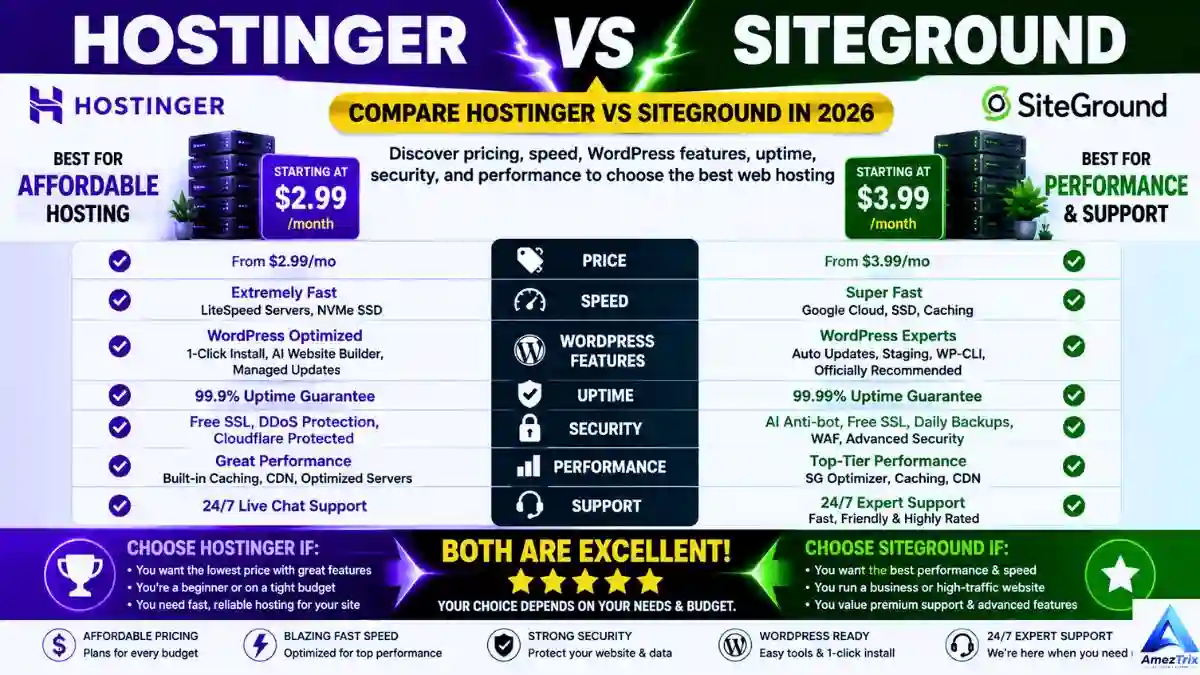
Hostinger vs SiteGround comparision

| Category | Hostinger | SiteGround |
|---|---|---|
| Starting price | Budget-friendly | Premium |
| Core tech | LiteSpeed servers, NVMe SSD | Google Cloud Platform |
| Free domain | Yes, on select annual plans | No |
| Free SSL | Yes | Yes |
| Daily backups | On premium tiers | On every plan |
| Built-in CDN | Yes | Yes |
| AI website builder | Yes, fairly robust | Limited native AI |
| Support | 24/7 live chat | 24/7 live chat + phone (varies by region) |
| Uptime | 99.9% | 99.9% |
| Ideal user | Beginners, bloggers, small businesses | Agencies, developers, WooCommerce stores |
Short version: if you’re watching your budget and just need a fast, reliable site up and running, Hostinger is genuinely hard to beat. If you’re managing client sites, running a growing WooCommerce store, or need staging environments and Git support baked in, SiteGround earns its higher price tag.
Hostinger review
Hostinger‘s whole reputation is built on one idea: you shouldn’t have to pay premium prices to get premium tech. And to its credit, the company backs that up. Under the hood you get LiteSpeed Web Servers, NVMe SSD storage, HTTP/3, a built-in CDN, object caching, and automated malware scanning — the kind of stack that used to be reserved for pricier hosts.
The dashboard, hPanel, is where Hostinger really shows its beginner-first thinking. It’s not cPanel dressed up in a new skin — it’s a genuinely rebuilt interface that makes installing WordPress, managing domains, and setting up email feel almost effortless. If you’ve never touched a hosting control panel before, this is the one that won’t make you want to close the laptop and give up.
Where Hostinger shines:
- Genuinely affordable, even on renewal (a rarity in this industry)
- LiteSpeed + NVMe combo makes WordPress sites feel snappy
- hPanel is refreshingly intuitive
- AI website builder, logo generator, and content tools included
- Free domain bundled with many annual plans
Where it comes up short:
- No phone support — you’re stuck with chat and tickets
- Entry-level plans can feel tight on resources once traffic grows
- Some advanced features are locked behind higher tiers
SiteGround review
SiteGround built its name the old-fashioned way: by being consistently excellent at support and performance, year after year, long enough that developers and agencies started recommending it by word of mouth. It runs on Google Cloud Platform, which gives it a scalability edge when traffic spikes unexpectedly — think a blog post going viral or a store getting hit with holiday traffic.
Instead of cPanel, you get Site Tools — SiteGround’s own dashboard, built with developers and serious WordPress users in mind. It’s not as beginner-soft as hPanel, but it gives you things Hostinger doesn’t: proper staging environments, Git integration, and granular PHP version control.
Where SiteGround shines:
- Daily backups included on every single plan, not just the expensive ones
- Support that consistently gets praised for actually solving problems, not just reading scripts
- Google Cloud infrastructure handles traffic spikes gracefully
- Staging + Git make it a natural fit for agencies and dev teams
- AI-driven anti-bot protection blocks a serious volume of malicious login attempts
Where it comes up short:
- Noticeably pricier, especially at renewal
- No free domain — you’ll register that separately
- Entry-level storage can feel limiting for bigger sites
Top 10 Web Hosting Providers Compared (2026 Edition)
Trying to shortlist a hosting provider by opening ten different pricing pages is a special kind of exhausting — every host claims to be “the fastest” and “the most reliable,” and somehow none of them agree on what that actually means in numbers.
So instead of another vague roundup, here’s a side-by-side breakdown of the ten hosts that consistently show up in real user recommendations for 2026, with the specs that actually matter laid out plainly.
Note: pricing changes often with promotions and renewal cycles, so treat the numbers below as a starting-point reference rather than gospel — always confirm on the provider’s site before checking out.
Quick Comparison Table
| Hosting Provider | Starting Price* | Free Domain | Free SSL | Storage | Website Limit | Bandwidth | Data Centers | Control Panel | CDN | Daily Backup | WordPress Optimized | AI Tools | Uptime Guarantee | Best For |
|---|---|---|---|---|---|---|---|---|---|---|---|---|---|---|
| Hostinger | ~$2.99/mo | ✅ | ✅ | 100 GB NVMe SSD | Up to 100 | Unlimited | 10+ | hPanel | ✅ | ✅* | ✅ | ✅ | 99.9% | Best Overall Value |
| SiteGround | ~$3.99/mo | ❌ | ✅ | 10–40 GB SSD | Unlimited | Unmetered | Google Cloud | Site Tools | ✅ | ✅ | ✅ | Limited | 99.9% | Premium WordPress |
| Bluehost | ~$2.95/mo | ✅ | ✅ | 10–100 GB SSD | 10–100 | Unmetered | Global | cPanel | ✅ | ✅* | ✅ | Limited | 99.9% | Beginners |
| DreamHost | ~$2.59/mo | ✅ | ✅ | SSD Storage | Unlimited | Unlimited | US | Custom Panel | ✅ | ✅* | ✅ | ❌ | 100%* | Bloggers |
| A2 Hosting | ~$2.99/mo | ❌ | ✅ | NVMe SSD | 1–Unlimited | Unlimited | Global | cPanel | ✅ | ✅ | ✅ | ❌ | 99.9% | Speed |
| ChemiCloud | ~$2.95/mo | ✅ | ✅ | 20–40 GB SSD | Unlimited | Unlimited | 10+ | cPanel | ✅ | ✅ | ✅ | ❌ | 99.99% | Customer Support |
| Cloudways | ~$11/mo | ❌ | ✅ | Cloud SSD | Flexible | Pay-as-you-go | 65+ | Custom Panel | ✅ | ✅ | ✅ | Limited | 99.99% | Cloud Hosting |
| GreenGeeks | ~$2.95/mo | ✅ | ✅ | 50 GB SSD | 1–Unlimited | Unmetered | Global | cPanel | ✅ | ✅ | ✅ | ❌ | 99.9% | Eco-Friendly |
| ScalaHosting | ~$2.95/mo | ❌ | ✅ | SSD/NVMe | Unlimited | Unmetered | Global | SPanel/cPanel | ✅ | ✅ | ✅ | ❌ | 99.9% | VPS Hosting |
| HostArmada | ~$2.49/mo | ✅ | ✅ | SSD Cloud Storage | 1–Unlimited | Unlim |
What Actually Stands Out in This List
Hostinger remains the value leader here — 100 GB of NVMe SSD storage at the lowest price point on this list, paired with AI tools most competitors haven’t matched yet, is a hard combination to beat for anyone starting out.
SiteGround trades storage headroom for infrastructure quality, running on Google Cloud rather than standard SSD arrays — a smart trade if your site’s traffic tends to spike unpredictably.
Bluehost and DreamHost both lean into the beginner-friendly lane, with DreamHost’s 100% uptime guarantee being a genuinely rare commitment in this industry rather than the usual 99.9% hedge.
A2 Hosting keeps its identity simple: it’s built for people who care about raw speed above almost everything else, right down to its NVMe-only storage approach.
ChemiCloud quietly has one of the best uptime numbers on this entire table (99.99%) and consistently ranks near the top for support response times, even though it doesn’t get talked about as much as the bigger names.
Cloudways is the outlier — pay-as-you-go pricing and 65+ data center locations make it a genuinely different product built for scalable cloud hosting rather than flat-rate shared plans, which is also why it starts noticeably higher on price.
GreenGeeks wins on sustainability credentials without giving up modern hosting essentials, making it a solid pick for anyone who wants their hosting choice to align with eco-conscious values.
ScalaHosting is really built for people who eventually want to grow into VPS territory — its SPanel option gives more control than a typical shared-hosting dashboard.
HostArmada rounds things out as a genuinely underrated budget option, undercutting almost everyone on this list on starting price while still bundling a free domain and cloud SSD storage.
Which One Should You Actually Pick?
- Tightest budget, first website: Hostinger or HostArmada
- Serious WordPress project, need reliability over price: SiteGround
- Simple beginner setup with a known brand: Bluehost
- Blogging, long-term uptime peace of mind: DreamHost
- Need raw server speed: A2 Hosting
- Want support that actually picks up fast: ChemiCloud
- Scaling cloud infrastructure, flexible pricing: Cloudways
- Eco-conscious hosting without a performance trade-off: GreenGeeks
- Planning to eventually move to VPS: ScalaHosting
There’s no single “best” host on this list — just the one whose trade-offs match what you’re actually building. If price and storage matter most, Hostinger leads the pack. If long-term managed reliability is worth paying extra for, SiteGround, Cloudways, or ChemiCloud are the stronger long-game picks.
Performance & Speed: The Real Numbers That Matter
Speed isn’t just a bragging-rights metric — Google factors it into rankings, and users bounce off slow sites within seconds. So how do these two actually compare?
Hostinger leans on its LiteSpeed stack paired with LiteSpeed Cache, which is particularly effective for WordPress sites. Combined with NVMe storage and HTTP/3, you get low Time to First Byte numbers that hold up well even on budget plans.
SiteGround takes a different route, relying on Google Cloud’s infrastructure along with its own SuperCacher technology and Ultrafast PHP. The result isn’t necessarily faster in raw numbers, but it’s remarkably consistent — the kind of performance that doesn’t dip when your traffic suddenly triples.
Bottom line: for a typical blog or small business site, Hostinger’s speed is more than sufficient and often edges ahead on price-adjusted performance. For sites that need to gracefully absorb traffic surges, SiteGround’s cloud backbone is the safer long-term bet.
Pricing: Hostinger vs SiteGround
This is genuinely the category where the two Hostinger vs SiteGround providers split hardest. Hostinger’s entire pricing strategy revolves around undercutting the competition while still including features rivals charge extra for — free SSL, a free domain on annual plans, managed WordPress, and daily or weekly backups depending on the tier.
SiteGround doesn’t try to compete on price at all. It leans fully into the “you get what you pay for” argument, and for many business owners, that argument holds up — daily backups across every plan, premium managed WordPress updates, and priority support on higher tiers are hard to find at Hostinger’s price point.
A quick heads-up: hosting prices shift constantly with seasonal promotions, so always double-check current rates before you commit.
Ease of Use: hPanel vs Site Tools
If you’re brand new to websites, hPanel is going to feel like a breath of fresh air. It strips away the clutter that made old-school cPanel intimidating and replaces it with a clean, guided experience — install WordPress, connect a domain, and set up email in a handful of clicks.
Site Tools isn’t unfriendly by any means, but it’s clearly built with a more technical user in mind. You get deeper controls — staging, Git, PHP version switching — that a total beginner might never touch, but that a developer will genuinely appreciate having on day one.
WordPress Hosting Face-Off
With WordPress powering a huge chunk of the internet, this comparison matters more than almost any other category.
Hostinger’s WordPress setup includes one-click installs, LiteSpeed Cache, automatic updates, WP-CLI support, and its AI website builder for anyone who wants to skip the design phase entirely. It’s an excellent on-ramp for first-time WordPress users and small content sites.
SiteGround goes deeper into managed territory — its SG Optimizer plugin, dynamic caching, and built-in staging environment make it easier to test changes safely before pushing them live, which matters a lot once a site has real traffic and real revenue riding on it.
Security Comparison of Hostinger vs SiteGround
Neither host is weak on security, but they approach it differently. Hostinger bundles free SSL, DDoS protection, Cloudflare integration, a malware scanner, and two-factor authentication into its plans — solid, well-rounded protection for most personal and small business sites.
SiteGround pushes further with an AI-driven anti-bot system that reportedly blocks millions of malicious login attempts daily, on top of daily backups and continuous server monitoring. For sites handling sensitive customer data or processing payments, that extra layer can be worth the premium.
Backups, Uptime & Support
Uptime is essentially a tie — both Hostinger vs SiteGround providers promise and generally deliver 99.9%. Backups are where SiteGround pulls ahead outright, offering daily backups on every plan compared to Hostinger’s weekly-to-daily split depending on tier.
Support is close, but leans SiteGround for complex, technical problems — their team has a strong reputation for actually resolving server-level issues rather than just pointing you to an FAQ. That said, Hostinger’s 24/7 live chat is fast and more than capable of handling the everyday questions most beginners actually run into.
Who Should Choose Which? SiteGround vs Hostinger
| If you are a… | Go with | Why |
|---|---|---|
| First-time website owner | Hostinger | Simple setup, low cost, AI tools do the heavy lifting |
| Blogger | Hostinger | Great WordPress performance without the price tag |
| Small business owner | Hostinger | Best balance of price and features |
| Freelancer/student | Hostinger | Budget-friendly, easy to manage solo |
| WooCommerce store owner | SiteGround | Better scalability as orders grow |
| Web development agency | SiteGround | Staging, Git, and multi-client tools built in |
| High-traffic publisher | SiteGround | Google Cloud handles spikes smoothly |
Other Hosts Worth a Glance
If neither of these feels like a perfect match, a few other names are worth researching: Bluehost for WordPress beginners, DreamHost for bloggers, Cloudways for managed cloud hosting, A2 Hosting for pure performance chasers, and ScalaHosting if VPS is more your speed.
Frequently Asked Questions
Is Hostinger better than SiteGround?
For beginners and small budgets, yes — Hostinger typically wins on value. SiteGround pulls ahead for businesses that need advanced managed features.
Which host is actually faster?
Hostinger vs SiteGround – Both are fast in practice. Hostinger’s LiteSpeed setup excels on WordPress specifically, while SiteGround’s Google Cloud backbone stays consistent under heavier loads.
Does Hostinger really include a free domain?
Yes, on most annual plans, for the first year.
Does SiteGround offer a free domain too?
No — you’ll need to register your domain separately.
Which is better for WooCommerce stores?
SiteGround generally handles larger stores better, though Hostinger works fine for smaller shops just getting started.
Is the SiteGround price premium actually worth it?
If you need managed WordPress, daily backups by default, and dependable support for a business-critical site, yes — it’s a reasonable trade-off.
Which should a total beginner pick?
Hostinger, almost every time — the combination of low cost and an easy dashboard makes the learning curve much gentler.
Final Verdict: Who Actually Wins?
If you’re weighing pure value against price, Hostinger takes the win for most people heading into 2026. It gives beginners, bloggers, and small businesses a hosting stack that used to require a much bigger budget — fast servers, solid security, and AI tools that genuinely save time.
That said, SiteGround hasn’t lost its edge. If your business depends on uptime, your site handles serious transactional volume, or you’re managing hosting for multiple clients, the higher price buys you real peace of mind — daily backups everywhere, cloud-grade scalability, and a support team that treats complex issues like their own problem to solve.
There’s no universally “correct” answer here — only the one that fits how you actually use your website.
About Author
Rajendra Parmar is the Founder and Editor of AmezTrix, where he covers Artificial Intelligence, Technology, WordPress, Web Hosting, Digital Marketing, Gadgets, and Software. His mission is to simplify complex technology through practical tutorials, honest reviews, and well-researched guides that help readers make smarter digital decisions.