Discover the best AI video generators and tools for creating stunning videos faster. Compare features, uses, and top AI video apps with AmezTrix.
Best AI Video Generators in 2026: 10 Tools Worth Your Time (And a Few Worth Skipping)
Remember when making a decent video meant hiring a camera crew, booking a studio, and praying your budget didn’t blow up? Yeah, those days are basically gone.
Now you type a sentence, wait a few minutes, and get a finished clip. No lights. No actors. No editor breathing down your neck about deadlines. That’s the promise of the best AI Video Generators — and honestly, most of them deliver on it, at least partly.
I’ve spent a good chunk of time testing these tools, reading through their docs, and comparing what they actually do versus what their marketing pages claim. So here’s an honest rundown of the ten platforms worth knowing about in 2026, whether you’re a YouTuber, a small business owner, a teacher building course content, or someone who just wants to make cool stuff for Instagram.
The short version? Runway and Kling AI are still the best AI Video Generators pick if you care about cinematic quality. Need a talking-head presenter without actually filming yourself? Go with HeyGen or Synthesia. Google’s Flow, built on its Veo models, does something few others manage well — realistic video paired with audio that actually matches. And if you’re already living inside Adobe’s tools, Firefly slots right in.
Top 10 AI Video Generators – Quick Glance
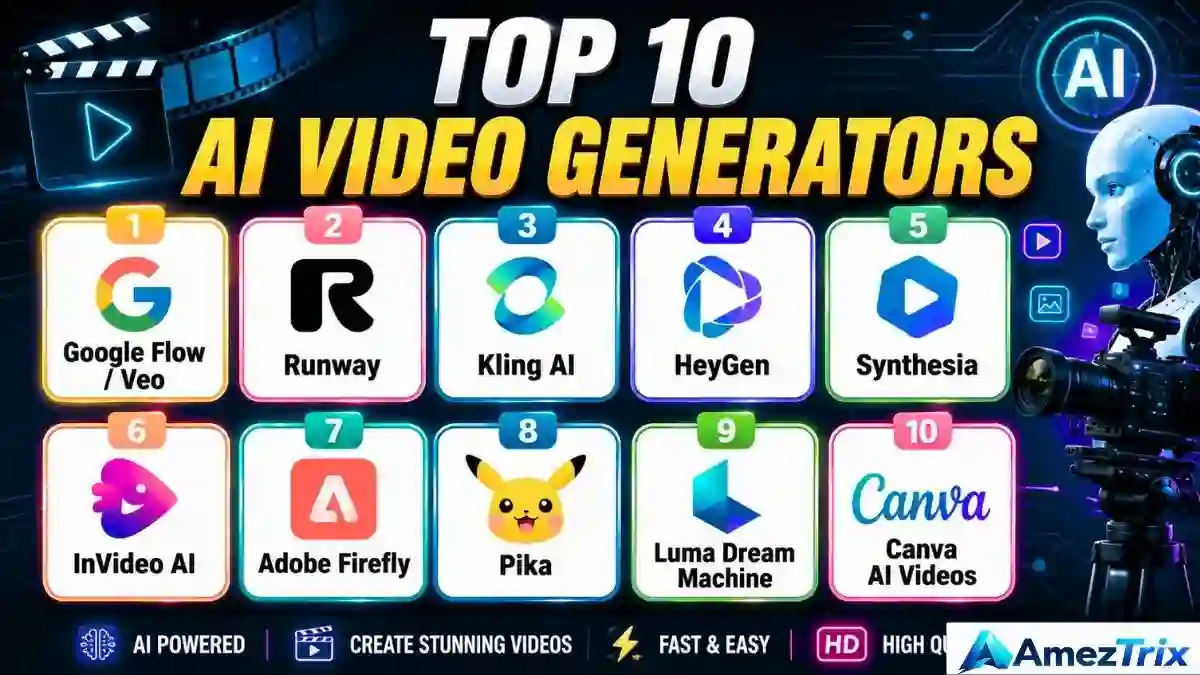
| Rank | Tool | Best For | What It Does Well |
|---|---|---|---|
| 1 | Google Flow / Veo | Cinematic videos | Realistic visuals with matching audio |
| 2 | Runway | Pro creators | Serious editing control |
| 3 | Kling AI | Believable motion | Multi-shot, cinematic scenes |
| 4 | HeyGen | AI avatars | Presenters, marketing, translation |
| 5 | Synthesia | Corporate/training | Polished AI presenters |
| 6 | InVideo AI | Content creators | Turns scripts into finished videos |
| 7 | Adobe Firefly | Creative pros | Generative video inside Adobe’s suite |
| 8 | Pika | Social media | Fun effects, short clips |
| 9 | Luma Dream Machine | Experimentation | Text/image-to-video |
| 10 | Canva AI Video | Beginners | Simple, template-driven |
So What Even Is an AI Video Generator App?
At its core, it’s software that builds video from a text prompt, an image, a script, or footage you already have. You describe the scene. The AI fills in the rest.
Try something like:
A futuristic electric car driving through a neon-lit city at night, cinematic camera movement, realistic lighting.
Feed that into most of today’s tools, and within a minute or two, you’ll have a short clip that roughly matches what you asked for. Not perfect, mind you — but often surprisingly close.
Beyond the basic prompt-to-video stuff, most platforms also throw in:
- Image-to-video animation
- AI avatars and voiceovers
- Auto-subtitles and translation
- Background swaps and object removal
- Clip extension and upscaling
- Script generation
What’s changed over the past year or so isn’t just image quality. It’s the boring-but-important stuff — motion that stays consistent, physics that don’t look broken, audio that actually syncs. That’s where the real progress has been.
How These Best AI Video Generators Apps Actually Work
It’s less complicated than it sounds.
You start by giving the AI something to work with — a prompt, an image, maybe an existing clip. The model reads that input and figures out the pieces: who’s in the scene, where it’s set, how the camera should move, what the lighting should look like.
Then it generates the video, frame by frame, trying its best to keep everything consistent so your character doesn’t suddenly grow a third arm halfway through (it still happens sometimes, let’s be real).
After that, you get to tinker. Regenerate a rough scene. Tweak the prompt. Extend the clip a few seconds. Add music.
Once you’re happy, export it and post it wherever it needs to go — YouTube, Instagram, a client’s inbox, whatever.
1. Google Flow / Veo — Cinematic Video Done Right
Google’s Veo-powered system might be the single biggest jump forward in generative video right now. It handles motion in a way that actually looks intentional, not just AI-generated for the sake of it. And the audio? It’s built in, not bolted on afterward.
Flow itself is designed around full scenes rather than isolated ten-second clips, which makes it better suited to actual storytelling.
Good for: filmmakers, YouTubers, anyone trying to build a narrative, not just a clip.
The catch: the more advanced features can hit usage limits fast, and — like with every tool on this list — your results are only as good as your prompt.
2. Runway — The Professional’s Choice
Runway isn’t just a generator. It’s closer to a full production environment. You can start with a prompt, an image, or footage you already shot, then refine, extend, and upscale it, all without leaving the platform.
I’d call this the tool for people who take video seriously — agencies, editors, studios that need more than “type a sentence, get a clip.”
Strong points: deep creative control, professional-grade output.
Downside: there’s a real learning curve here. Don’t expect to master it in an afternoon.
3. Kling AI — When Motion Needs to Look Real
Kling has built a name for itself around one thing in particular: movement that actually looks like movement. Walking, driving, action scenes — the stuff that trips up a lot of other models tends to hold together here.
Adobe actually added Kling 3.0 to Firefly’s model lineup, specifically citing its multi-shot ability and dialogue sync. That’s not nothing.
Where it shines: product demos, action sequences, anything involving people or vehicles in motion.
Where it stumbles: complex prompts often take a few tries to get right, and credits can burn through quicker than you’d expect.
4. HeyGen — Avatars That Actually Work for Business
HeyGen skips the cinematic stuff entirely and focuses on something more practical: presenter-led video. Write a script, and it generates someone delivering it — no camera, no filming yourself at 11pm because that’s the only free slot you had.
It supports over 175 languages for presenter content, which matters a lot if you’re running marketing or training across different markets.
Best for: businesses, sales teams, course creators — anyone who needs a lot of video, fast, without hiring a presenter every time.
5. Synthesia — The Corporate Training Go-To
If you’ve ever sat through a bland compliance training video, there’s a decent chance it was made with something like Synthesia. That’s not a knock — it’s genuinely good at exactly that job.
Where it’s used most: onboarding, compliance training, internal comms, online courses.
Strengths: clean script-to-video workflow, solid multilingual support.
Weakness: don’t expect cinematic magic here. That’s not what it’s built for.
6. InVideo AI — For When You Need Speed
InVideo leans hard into automation. Type something like “make a 5-minute video on the benefits of electric vehicles,” and it structures the scenes, writes narration, pulls visuals, and adds captions — mostly on its own.
Good for: creators who publish often and don’t have time to hand-build every video.
Trade-off: less precision than the specialist tools above. You’re trading control for speed.
7. Adobe Firefly — Built for the Adobe Crowd
Firefly’s real advantage isn’t one specific feature — it’s context. It plugs generative video straight into the Adobe ecosystem, and it even lets you pick between different underlying models, including Kling and Veo, depending on the job.
Makes sense for: designers, editors, agencies already knee-deep in Adobe’s other tools.
Less exciting if: you’re not already using Premiere or Photoshop regularly — the value drops without that context.
8. Pika — Playful, Fast, Social-First
Pika doesn’t take itself too seriously, and that’s kind of the point. It’s great for turning a static photo into something that moves, or throwing together a quick, eye-catching clip for Reels or TikTok.
Use it for: short-form content, experimental ads, memes, quick concept tests.
Don’t expect: a full editing suite. This is more of a creative sandbox than a production pipeline.
9. Luma Dream Machine — Good for Testing Ideas
Luma sits in an interesting spot — early-concept visualization. Before a filmmaker commits real budget to a scene, they can rough it out here first and see if the idea even works visually.
Solid for: concept development, image-to-video experiments.
Heads up: results can be inconsistent, and complicated stories often need several regeneration attempts before they click.
10. Canva AI Video — The Easiest On-Ramp
If you already use Canva for graphics, its AI video features feel like a natural extension. You get AI-generated clips mixed with templates, brand kits, and social formats — all in one place.
Perfect for: beginners, marketers, anyone who wants results without learning dedicated video software.
Not ideal for: complex cinematic work — that’s simply not what Canva is trying to be.
Best AI video generator –Full Feature Comparison
| Tool | Text-to-Video | AI Avatars | Editing | Cinematic Quality | Best For |
|---|---|---|---|---|---|
| Google Flow/Veo | Yes | Limited | Yes | Excellent | Filmmaking |
| Runway | Yes | Limited | Excellent | Excellent | Professional creators |
| Kling AI | Yes | Limited | Yes | Excellent | Realistic motion |
| HeyGen | Yes | Excellent | Yes | Moderate | Business videos |
| Synthesia | Yes | Excellent | Yes | Moderate | Training |
| InVideo AI | Yes | Yes | Excellent | Moderate | YouTube |
| Adobe Firefly | Yes | Limited | Excellent | Excellent | Creative professionals |
| Pika | Yes | Limited | Good | Good | Social media |
| Luma | Yes | Limited | Good | Excellent | Creative experiments |
| Canva | Yes | Limited | Excellent | Moderate | Beginners |
Which One Should You Actually Pick in AI Video Generator Tools?
Depends what you’re making, honestly.
Want something cinematic? Go with Flow, Runway, or Kling. Making YouTube content on a schedule? InVideo, Runway, or Canva, depending on how hands-on you want to be. Need a presenter without hiring one? HeyGen or Synthesia, no question. Just getting started and don’t want a steep learning curve? Canva or InVideo will treat you gently.
Running an agency and need every option available? Runway or Firefly give you the most room to work.
AI Video vs. Doing It the Old Way
| Factor | Traditional Video | AI Video |
|---|---|---|
| Camera | Usually required | Often skipped |
| Actors | Often required | Optional |
| Studio | Often required | Not required |
| Editing | Manual | AI-assisted |
| Voiceover | Human recording | AI or human |
| Production time | High | Much lower |
| Cost | Can be steep | Usually cheaper |
| Creative control | Very high | Improving fast |
None of this means AI has replaced real filmmaking, though. Good direction, a clear story, and someone checking the output still matter — a lot, actually.
How to Actually Choose One
A few things worth checking before you commit to a subscription:
- Video quality — does the motion look natural, or slightly off?
- Clip length — some tools are built for 5-second bursts, others for longer sequences.
- Audio — does it come built in, or are you adding sound separately?
- Avatar realism — matters a lot if you’re doing training or business content.
- Editing tools — built-in editing saves you from juggling five different apps.
- Commercial rights — read the licensing terms. Seriously, actually read them.
- Credits and pricing — watch for watermarks, resolution caps, and export limits.
- Learning curve — beginners want simplicity; pros want depth.
Are Any of These Actually Free?
Sort of. Most offer a free tier, but it usually comes with strings attached — watermarks, limited credits, lower resolution, no commercial use. Fine for testing the waters. Not great if you’re producing content regularly. And since pricing on these platforms changes often (sometimes without much warning), it’s worth checking a platform’s current terms before you build a whole workflow around it.
Making Your First AI Video — Step by Step
Step 1: Pick your tool. Cinematic → Runway, Kling, or Veo. Avatar-led → HeyGen or Synthesia.
Step 2: Write a proper prompt. Don’t just type “a car driving.” Try something more like:
A futuristic electric SUV driving through a modern Indian city at sunset, cinematic tracking shot, realistic reflections, dramatic lighting, detailed environment, natural motion.
Step 3: Generate a few versions. The first attempt is rarely the best one. Generate three or four, then pick the strongest.
Step 4: Edit it properly. Add music, captions, your logo, maybe a call-to-action at the end.
Step 5: Match the format to the platform. YouTube wants 16:9. Shorts, Reels, and TikTok all want 9:16. LinkedIn is more flexible — 1:1 or 16:9 both work.
Writing Prompts That Best AI Tools – Video Generators Actually Work
There’s a rough formula that tends to work well: Subject + Action + Location + Camera + Lighting + Style + Motion.
For example:
“A professional electric vehicle driving on a futuristic highway at night, glowing city skyline in the background, cinematic tracking camera, realistic reflections, soft atmospheric lighting, smooth motion, photorealistic commercial style.”
The more specific you get, the more control you have. Vague prompts get vague, generic results — that’s just how it goes. Think about camera angle, lighting, mood, weather, even lens style if you know the terminology.
Why Bother With AI Video At All?
A few reasons, based on what I’ve seen creators and businesses actually gain from these tools:
- Speed. Projects that used to take days can wrap up in an afternoon.
- Cost. No studio, no crew, no equipment rental fees eating into your budget.
- Scale. Need ten variations of the same ad? Generate them, don’t reshoot them.
- Language reach. AI avatars make localizing content far less painful.
- Low barrier to entry. You don’t need editing experience to get a usable result.
Where It Still Falls Short
Not everything’s perfect, and it’s worth being upfront about that.
Characters sometimes drift slightly between scenes — a shirt color changes, a face looks subtly different. Hands and complex object interactions can still look a bit off. Most models are still best at short clips rather than long, continuous scenes. And a weak prompt will always give you a weak result, no matter how good the underlying model is.
Licensing is another thing people overlook. Before you publish anything commercially, actually check what rights you have — don’t assume.
Does AI Video Work for YouTube?
Yes, but it’s not magic. A well-made AI video still needs a good idea behind it, solid narration, a decent thumbnail, and a reason for people to keep watching. Treat AI as your production assistant — handling B-roll, transitions, background footage — while you stay in charge of the actual story. That balance is what separates channels that grow from ones that don’t.
What Businesses Are Actually Doing With This
Product demos, ad creative, employee training, sales decks turned into video, recruitment content — companies are using AI video across pretty much every department at this point. Avatars in particular are useful when the same message needs to go out in five different languages without reshooting five times.
Where Is This Heading?
Longer, more coherent videos. Better character consistency. Real-time generation, eventually. More believable physics. Tighter audio sync. A few labs are even experimenting with interactive video, where the story shifts based on viewer input.
One thing researchers keep pointing out — no single model wins at everything. That probably means the future isn’t about finding “the one best tool.” It’s about knowing which specialist tool to reach for, depending on the job.
Best AI Video Generators: Quick Questions People Ask
What’s the best AI video generator overall?
Depends on the goal. Runway and Kling for cinematic work, HeyGen and Synthesia for avatars and business content.
Is there a genuinely good free option?
A few platforms offer free tiers, but expect limits on credits and exports. Good enough for testing, not for regular production.
Can AI actually generate video from just text?
Yes — that’s the core feature on nearly every platform listed here.
Can I use AI to make YouTube videos?
You can, for scripts, visuals, and editing — but the original idea and quality control still need to come from you.
Does the video look realistic?
Often, yes. Better than most people expect. Though small glitches — a flickering object, an odd hand movement — still show up occasionally.
Do these tools generate sound too?
Some do, natively. Others focus purely on visuals, and you’ll need to add audio separately.
What’s the best option for a business?
HeyGen or Synthesia, especially if you’re doing presentations or training content regularly.
Which one’s best for filmmakers specifically?
Runway, Flow/Veo, or Kling — all three lean cinematic.
Can I actually sell or monetize AI-generated video?
Depends entirely on the platform’s licensing terms and your subscription tier. Always check before publishing commercially — this one’s worth double-checking every time.
Final Verdict
There isn’t one single best AI video generator tool here — that’s the truth. It really comes down to what you’re trying to make.
Filmmakers will probably end up with Runway or Veo. Training managers get more value from Synthesia. Social creators lean toward Pika or Canva. Test the free tiers before committing to anything. Compare actual output, not just marketing screenshots. Understand how the credit system works before you’re three videos deep and suddenly out of generations.
AI video isn’t replacing traditional production — not yet, maybe not ever completely. But the line between the two keeps getting blurrier every year. Creators who figure out how to blend AI speed with actual storytelling instinct are the ones who’ll come out ahead.
About Author
Rajendra Parmar is the Founder and Editor of AmezTrix, where he covers Artificial Intelligence, Technology, WordPress, Web Hosting, Digital Marketing, Gadgets, and Software. His mission is to simplify complex technology through practical tutorials, honest reviews, and well-researched guides that help readers make smarter digital decisions.